
TL;DR:
We tested Databricks Genie Ontology in public preview on our own operations data, and wrote a quick overview of the most important features:
- Genie Ontology lets users ask vague questions and still get a grounded answer
- What users see, what your team builds vs. what Genie infers automatically
- How Genie Ontology fits with Genie One, Genie Agents and Unity Catalog
- Can a descriptive ontology drive action-linked agents? (It can)
- In practice: how to start using Genie Ontology
- Databricks’ four-phase rollout plan
Back in the summer, we wrote up how to prepare for Genie Ontology when it was announced. Since then, it moved into public preview, which you join through your Databricks account team. We've tested it on our own data, and Databricks has published its own guides to operationalizing it and rolling it out.
What we found testing Genie Ontology
Mate Kover, our very own Head of Data Analytics ran the trials on our own operations data: timesheets from Excel, workforce utilization, resource allocation and capacity data exported from BigQuery, plus the Power BI reports built on top. He labeled the assets first so the ontology could be generated efficiently, which you can either do by hand or with a coding agent (he did the latter).
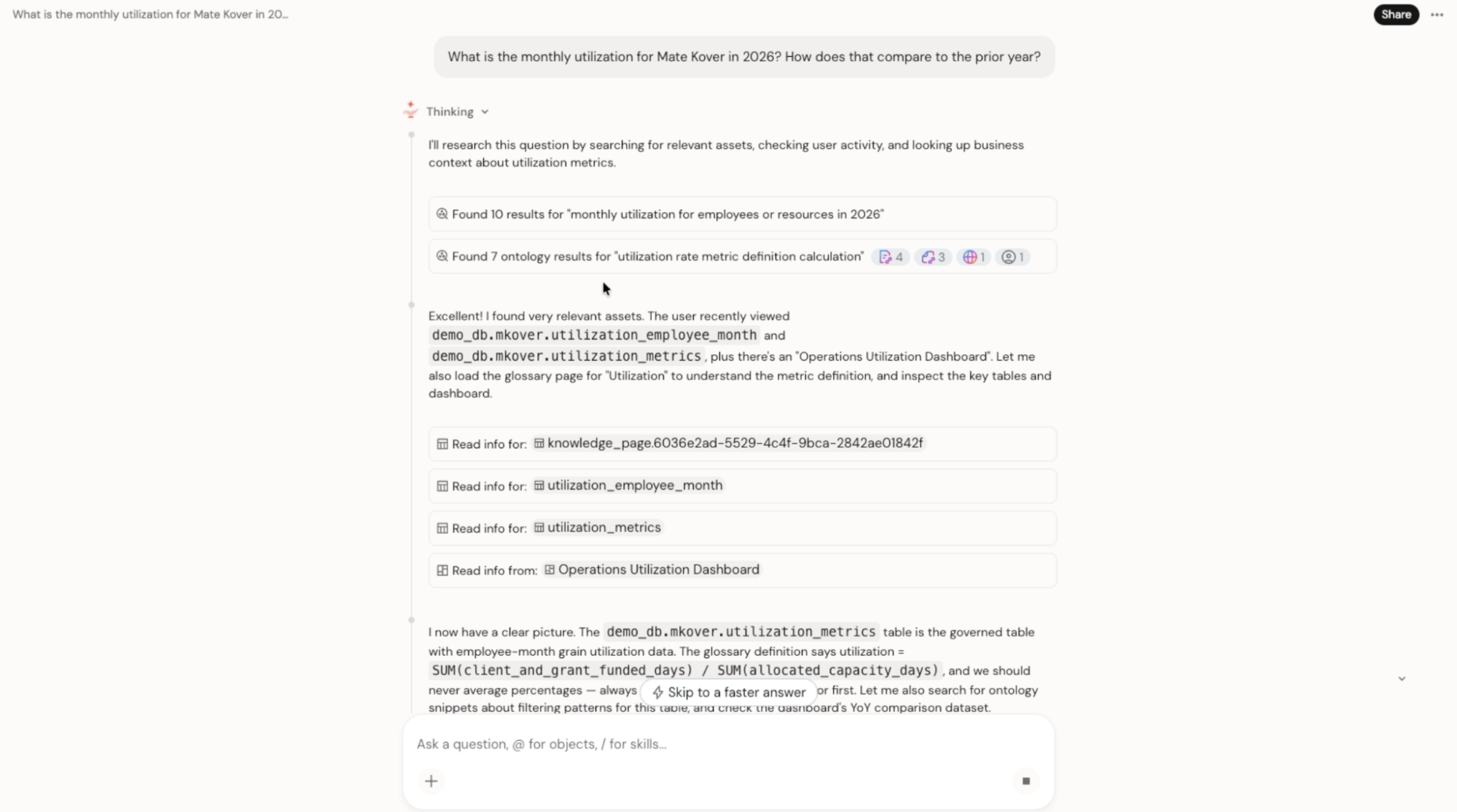
Then he asked Genie One the way a busy manager would: his monthly utilization this year, and how it compared to last year.

The business user sees none of the underlying ontology. They get an accurate answer, even with vague wording or internal jargon and their synonyms, and nobody has to write a careful prompt.
“On the surface, business users see nothing of Genie Ontology, other than the fact that they are getting correct answers.” – Mate Kover
Genie already has the terminology and the processes (if they are present in your Databricks ecosystem).
Then, opening the reasoning, the sources are all auditable. For our question, Genie searched the ontology for the utilization metric, loaded the Utilization Page, read the governed tables and the Operations Utilization Dashboard, and picked up a rule: that we never average percentages.
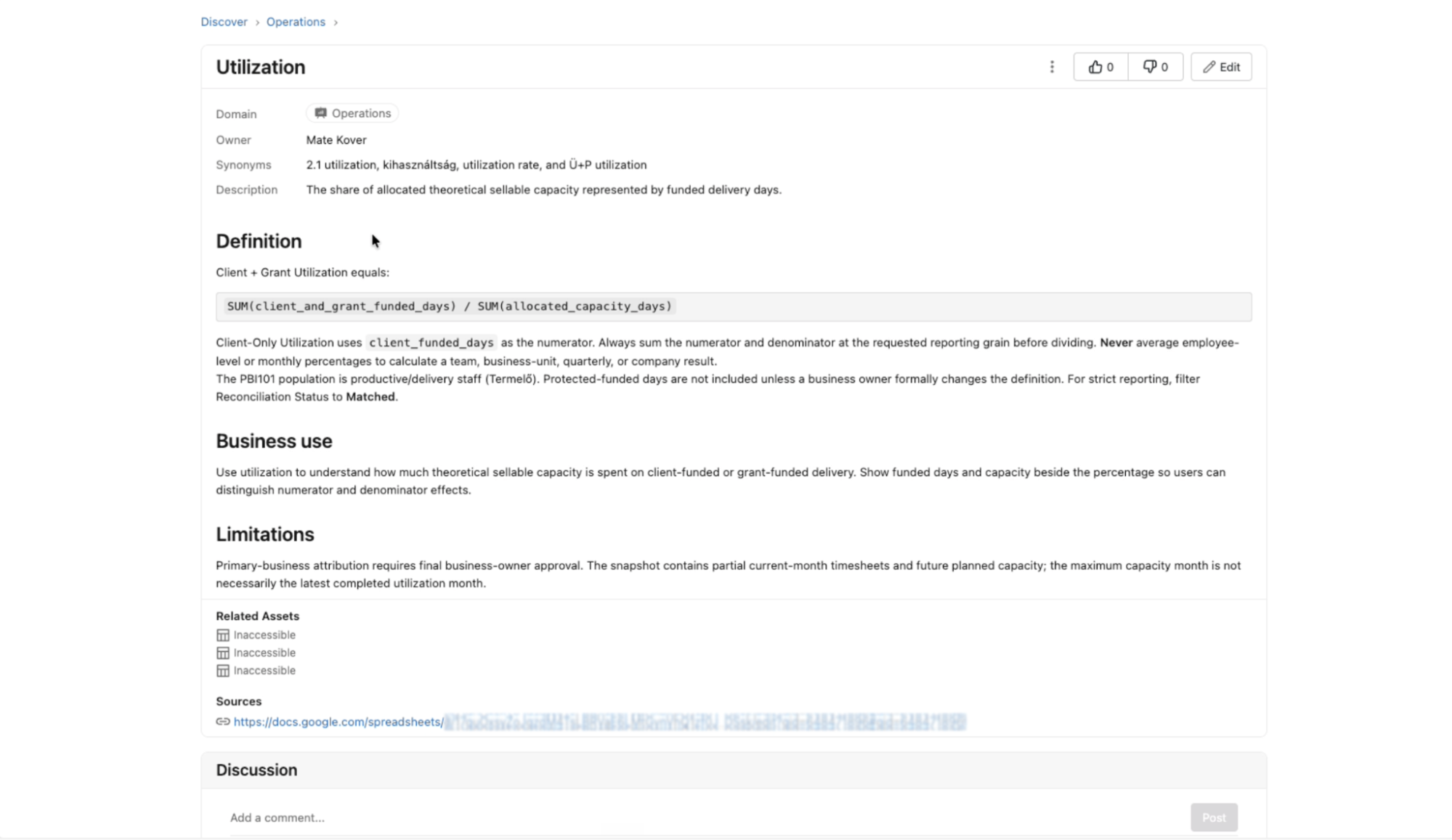
Pages are where you should tinker with Genie Ontology most (almost everything else gets built or inferred by Genie and OntoRank, under the hood).
So for example our Utilization Page holds an owner, synonyms (including local language variants for international operations), the formula, business use, limitations and source links, and colleagues can comment and follow the discussion. Much as they would on Wikipedia. Structuring Domains and Pages well is the bread and butter of this product.
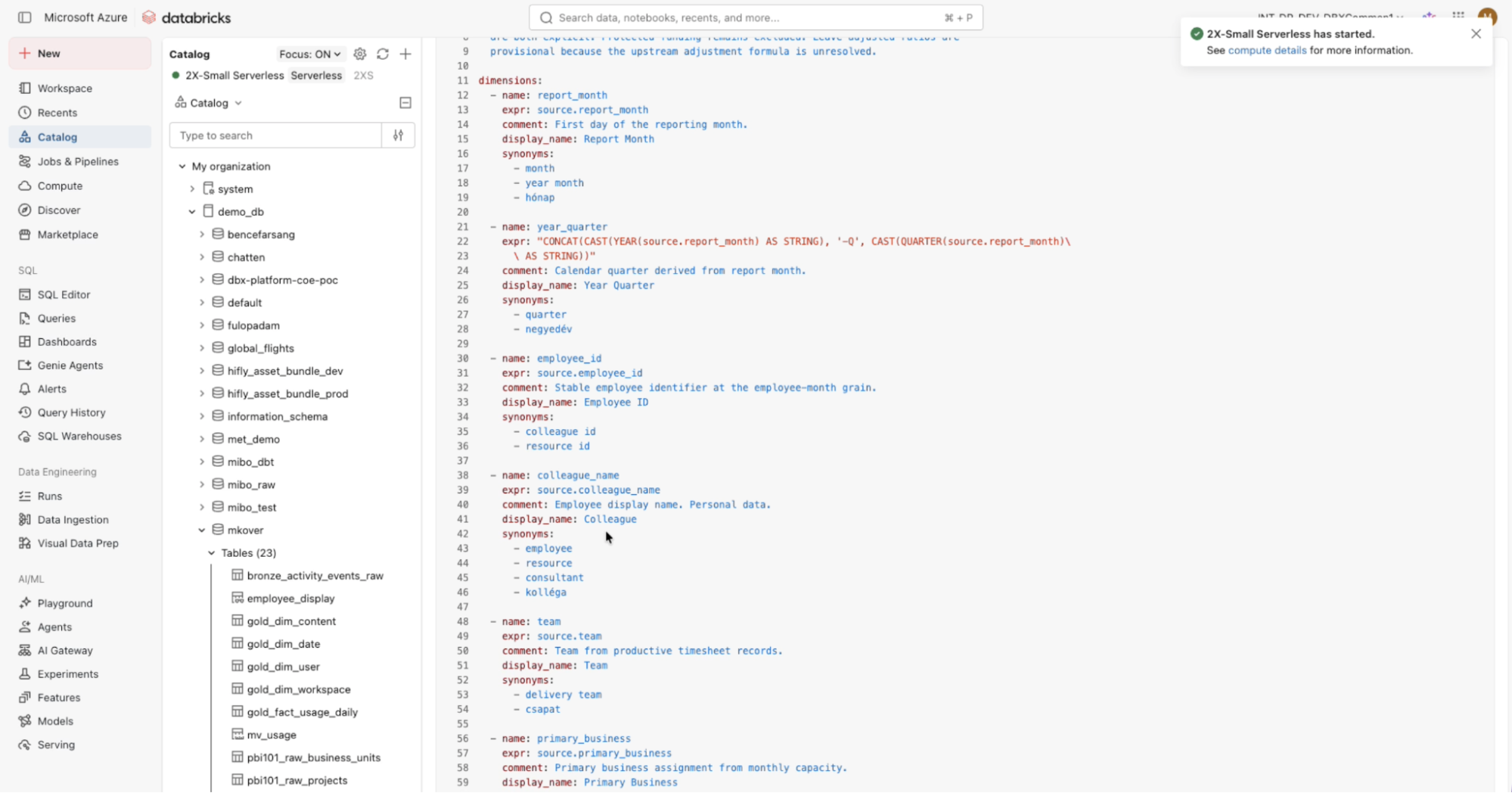
Next, Metric views are the most straightforward piece. You're creating a semantic model for a given View, with comments and tags that explain what a KPI is, how it's built and who uses it. They're stored as YAML, very close to semantic model definitions in dbt.
Genie Ontology also has a great chunk of the knowledge inferred automatically. It generates its own knowledge snippets from usage patterns and feedback (such as thumbs up or down), then ranks synonyms and contradictions against each other with OntoRank.
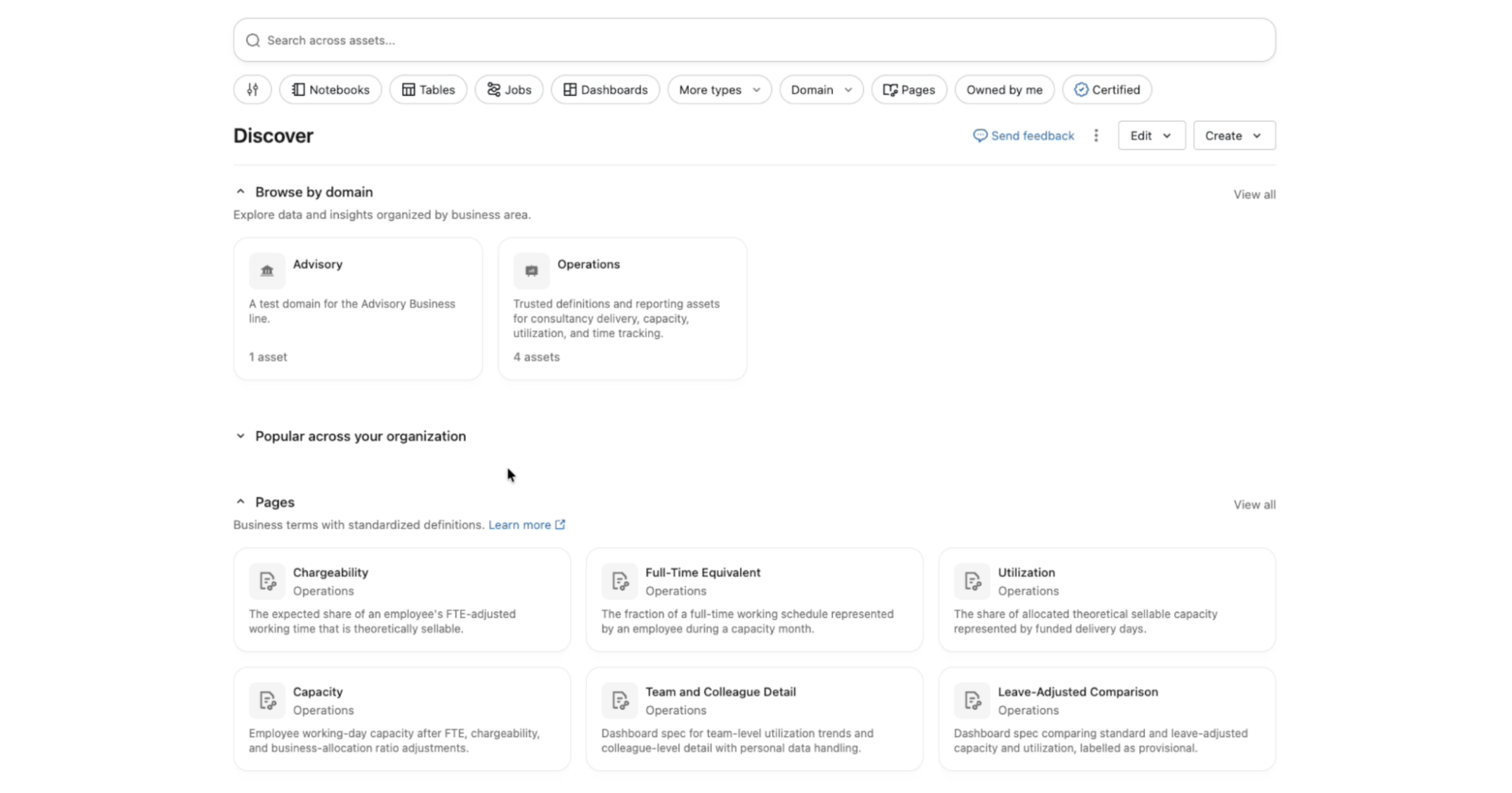
The Discover tab gives business users one place to see every Domain and Page, plus which business units are responsible for which notebooks, tables, jobs, dashboards and apps.
One really cool feature we found:
Through the Genie One MCP, people with the right access can bring that context into their preferred LLM or coding agent and skip the Genie interface entirely.
Next on our list: how third-party semantic layers and enterprise context tools like Glean plug into Genie.
How does Genie Ontology work with other Genie services and Unity Catalog
So think of it as a suite:
- Unity Catalog for governing every other piece of the stack centrally
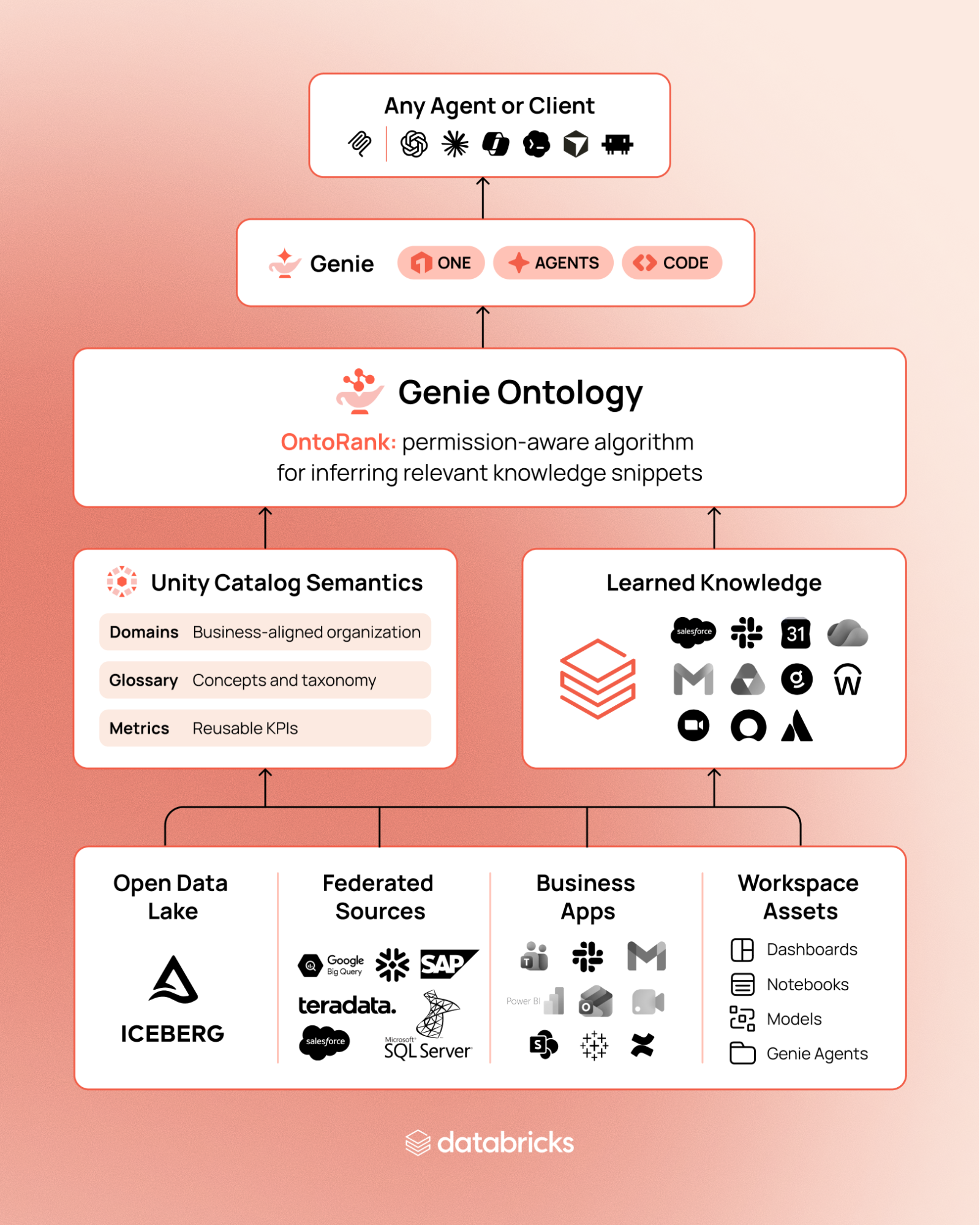
- Genie Ontology turns that governed data, plus how your teams use it, into shared business context
- Genie One, Genie Agents and Genie Code work from that context, so whatever you build on top starts from data you already trust.
- Agents outside Databricks can get the same context through the Genie One MCP (generally available since September)
Two things feed the ontology:
- Unity Catalog Semantics is the part you get to build: metric views, Domains, Pages (the business glossary) and certification. Your team defines them, govern them, so you need owners for them.
- Inferred context is the part Genie builds. It extracts knowledge snippets such as metric definitions, authoritative sources and business rules from metric views, dashboards, SQL queries and Genie Agents. That includes SQL from tools like dbt that runs on Databricks.
Databricks' advice is to "model the 'head' and let Genie Ontology infer the 'tail'." Define what has to be right, and let Genie cover the corners nobody will ever finish documenting.
But how does Genie Ontology improve AI outputs and accuracy, quantitatively? In Databricks' internal 28-question benchmark, Genie answered 84.5% of questions correctly on the first attempt, against 52.4% for the strongest general-purpose coding agent, and it was twice as fast. This matches the standards we see for other properly set up ontologies.
Are descriptive ontologies a good match for action-linked AI agents? And which kind is Genie Ontology?
AI ontologies come in two broad styles. A descriptive ontology records the business, from concepts to metrics, relationships, rules and owners.
A prescriptive ontology puts the actions first, and builds the model backwards from there, so each object carries the operations allowed on it.
Genie Ontology is descriptive, and linking actions to it is straightforward. Genie Agents use the same tools as Genie One, including MCP connections, scheduled tasks and writes to external systems. Databricks' own example has an agent pull usage signals grounded in Genie Ontology, then pass them to an outreach agent that sends targeted emails through the CRM.
Governing this setup is easier, since meaning and action each have their own controls. Definitions live in Unity Catalog, with owners, certification and permissions enforced at query time. Actions (and queries) run through tools that Unity Gateway controls: you grant access server by server, limit which tools an agent may call, and apply policies to traffic in both directions. You can change a definition without touching a workflow, and tighten a tool without re-modeling the business.
How to start using Genie Ontology
Our July homework list still holds: the business agrees on definitions, and engineering enforces them in the model. Databricks' guide now breaks the engineering side into six layers, from the physical data up to evaluation. So these are the additional points we'd look out for:
- Start below the semantics. A wide table with mixed grains invites agents to guess, and three IDs for one customer can cause double-counting. Build a gold layer around business processes, resolve entities into golden records, and point agents at a metric view or a purpose-built view instead of raw tables.
- Glossary entries are now Pages, and Domains come first. Every Page belongs to exactly one Domain, so set those up before you write definitions.
- Give metric views agent metadata. Add synonyms, display names and example queries, and declare primary and foreign keys so agents join correctly. Start with the 10 to 20 numbers people argue about.
- Let tools draft, and people approve. The dbxmetagen accelerator drafts descriptions and tags. Genie Code drafts metric views, imports Tableau or Power BI models with /importBI, and bulk-imports Pages from documents. Nothing should go live without review.
- Certify on purpose. Certified assets and reviewed Pages outrank inferred context in a conflict. Deprecate what's dead, so stale dashboards stop steering answers.
- Test with real personas. Genie only uses content the asker can see, so the same question can return different answers for different people.
- Plan who sees external definitions. Business definitions you add from external BI tools are available to all users in the account, unlike other snippets.
- Use the evaluation tooling. Write 25 to 50 real questions with expected answers and authoritative sources. (If you want to do evals within Databricks ecosystem as well, you can run them with Genie Agent Benchmarks, watch live answers in Genie Agent Monitor, and rerun after any substantive changes.)
When something comes back wrong in an AI answer or automation, fix it where it belongs: definitions and synonyms in Pages, calculations in metric views, source problems in Unity Catalog metadata or certification, and agent-specific issues in that agent's instructions.
How to roll out Genie Ontology, and how long it takes, going one team at a time
Databricks' rollout playbook is a phased plan with an evaluation gate at each step:
| Phase | What happens | Databricks' timeline |
| 0: Foundations | One team, one question set. Domains, metric views, Pages, owners, 25 to 50 test questions | 1 to 2 weeks |
| 1: First-team pilot | 5 to 10 users, weekly evaluation, exit criteria set in advance | 4 to 6 weeks |
| 2: Adjacent teams | 2 to 3 more domains, shared definitions promoted, drift monitored | The following quarter |
| 3: Organization-wide | Account-level access, federated ownership, tool governance | The 1 to 2 quarters after that |
Those timelines assume the groundwork is done. Aligning departments usually takes longer than the build, so Finance vs. Sales is what will stretch Phase 0.
Score Genie against your question set before the pilot and after every semantic change. Each miss points to the next thing worth governing.
By Phase 3, ownership should be federated: the platform team keeps the shared standards and guardrails, while each domain looks after its own agents and definitions.
Lighter options if you don't need the full thing
| Approach | Best for | Trade-off |
| UC-native ontology | Definite answers and governed actions | Each object type modeled by hand |
| OntoBricks (Databricks Labs) | Stored graph with reasoning and quality rules | Must be refreshed as data changes |
| Ontos (Databricks Labs) | Data contracts, products and glossary links | Catalogs meaning, doesn't infer |
| Ontop (open source) | Standard graph queries over live tables | Read-only, with query-time cost |
(Disclaimer: Labs projects are open source and not formally supported by Databricks.)
Where to start
Pick one team with a recurring, painful set of questions. Create one Domain, define the metrics people argue about, write the Pages behind them, and collect your test questions. Run source consolidation in parallel, on its own track.