
Sound familiar? It's Friday afternoon and you need to release, but the certificate has expired, the only person who knows where the key lives is on vacation, and the build can only be compiled on their machine anyway. On top of crossing the obvious “don’t ship on Friday” rule, these are signs of a missing pipeline.
Working != optimal
When creating a CI/CD pipeline for mobile, rushing or skipping it entirely saves some effort at first, but you pay for it quickly: with more development time, more manual work, and slower delivery.
| "We have a pipeline" | Well-optimized pipeline | |
| Time-consuming Long run times, slow feedback, late-surfacing failures, reruns | Fast Fast checks, early failure signals | |
| Wastes money Unnecessary build minutes, expensive macOS runs, repeated debugging | Lean Caching, targeted runs, fewer wasted work hours | |
| Frequent manual work Manual build, signing, and upload; disruptions from expiring certificates | (Mostly) automated Automated build, release, and managed signing | |
| Frustrating Interruptions, flaky tests, CI maintenance instead of product development | Smooth developer experience Reliable feedback, longer focus time | |
| High-risk Person-dependent process, misconfigurations, hard to cover for someone | Low-risk Traceable steps, consistent checks |
The most complicated pipeline is rarely the one that fits your project. A good pipeline is fast, surfaces failures early (fail fast), and runs cost-effectively. It takes automatable tasks off developers' plates, so less time goes to manual work and more is left for building the product.
Pick and choose with a capability map
A mobile CI/CD pipeline can automate a lot of steps, from checking the code all the way to a testable or production release. You don't need to roll everything out at once: pick based on your project's size, platforms, release cadence, and risks. Let’s look at everything you can squeeze out of your pipeline if you max it out.
Build and artifacts
The first thing to tackle is build time. Caching cuts it by reusing previously downloaded dependencies and finished build outputs, so the pipeline doesn’t repeat work it has already done. Incremental builds take the same idea further: they only rebuild the parts affected by your changes and keep the earlier results for everything else.
Closely related is a targeted build matrix, which allows you to skip building every flavor and build type on every push, because the pipeline can pick the variants to build based on the trigger event (details later).
Once the build itself is fast and focused, the pipeline can turn its output into something shippable. It produces the AAB or IPA package and signs it automatically, with the certificates, private keys, and passwords needed for signing kept in a protected secure file store. The pipeline also checks expiring certificates automatically and warns you in time when a renewal is needed; for example, through a Slack notification and opening a ticket.
After a signed package exists, the next step is distribution and publishing. With Firebase App Distribution or TestFlight, builds can reach testers automatically, and the Google Play Developer API and the App Store Connect API let you automate uploads as well. Production publishing can still stay behind a manual approval, so automation speeds up delivery without taking away your final say.
Finally, every artifact you produce should be easy to trace and debug later. Each build should carry a version and commit identifier so you always know exactly what code it came from. When distributing, don’t forget to keep the Android mapping files and iOS dSYMs alongside it, since they make debugging crash reports much easier down the line.
Here’s what it looks like in practice:
- uses: gradle/actions/setup-gradle@v4
 with:
   cache-read-only: ${{ github.ref != 'refs/heads/main' }}

- name: Build
 run: ./gradlew assembleDebug --build-cache
In the example above: at the end of the job, setup-gradle saves the build to the GitHub Actions cache storage, and at the start of the task it restores the earlier cache onto the new runner. The --build-cache flag lets Gradle use and extend the task output cache.
Illustrative Android CI example:
| Step | Without cache | With cache |
| Downloading dependencies | 2 min | 30 sec |
| Compilation and other build tasks | 8 min | 3 min |
| Cache restore and save | - | 1 min |
| Total | 10 min | 4 min 30 sec |
In this example, we save 5.5 minutes per run. On the first run, which starts with an empty cache, you won't see this speedup yet.
Every now and then it's worth running a clean build too, before a release or even periodically, to catch it if the project can no longer build on its own for some reason.
Testing
Testing is where a pipeline either earns trust or quietly loses it. The most important thing is to get the test pyramid right to begin with, and then stick to it. It doesn’t matter how optimized your pipeline is if you flip the pyramid and the slower tests outnumber the fast ones. The pipeline should respect the same shape: it starts at the bottom of the pyramid, running unit tests first, then integration tests, and finally UI tests.
Even a well-shaped pyramid can erode if failing tests are handled badly. When a test turns flaky, the tempting move is to skip it or switch it off, but a test that is disabled for good generates tech debt and a false sense of security. The better approach is to flag the flaky test, assign an owner and a deadline for fixing it, rather than rerunning it endlessly or toggling it on and off.
You also want to make sure new code arrives with tests of its own. That is where a coverage threshold comes in. It’s worth setting a minimum, specifically for the lines modified in the PR (diff coverage), not just for the whole codebase. On a big project, total coverage barely moves from a single PR, so it can hide the fact that new code landed without tests, while diff coverage flags it right away. In Azure DevOps, you can set this up with an azurepipelines-coverage.yml file, and the result also shows up as a comment in the PR.
coverage:
   status:
       comments: on
       diff:
           target: 80%
Static analysis and quality gates
Static code analysis should be a core part of any reliable pipeline. Detekt and SwiftLint are fast and lightweight, while Android Lint needs compilation, so it can run for minutes on a larger project. It's worth running the latter as a separate job, in parallel with the other checks within the validation stage, so it doesn't hold up the faster ones.
These tools complement each other rather than overlap, so here is what each one brings to the pipeline:
- Lint, Detekt, and SwiftLint: automated code analysis tools that surface style deviations, potential bugs, and maintainability issues.
- Konsist: uses automated tests to enforce architectural rules, such as dependencies between modules, package structure, and naming conventions.
- Sonar: aggregates static analysis results in a central dashboard. With quality gates, you can define which conditions must be met before new code can land on the target branch.
Pipeline analytics and developer experience
Your pipeline is only as useful as the feedback it gives. The practices below are about making that feedback timely, visible, and easy to act on, from the notifications that reach the team to the logs developers read when something breaks.
A notification sent to Slack or Teams should report the run’s result, including success status, run time, and a link to the run. What gets reported should be tailored to your team size, though: for a small team, every run might be interesting, but for a large one, green feature branch runs turn into noise and cause exactly the kind of interruption the pipeline was supposed to save you from. If everyone has already muted the CI channel, the notification might as well not exist. Failed runs and finished release builds should always trigger a notification, however.
Pull request is where most of the work and discussion actually happens, so it makes sense to surface results there as well. The CI status can report the build result, and required checks can be set as merge conditions. A custom PR comment can go further by showing the build result, run time, a test summary, and links to the produced artifacts.
Looking beyond individual runs, you also want to see how the pipeline behaves over time. Some platforms, like Azure DevOps, have built-in analytics and dashboard features that give you an overview of pipeline runs, their durations, and results. These can show which jobs are slow or fail often, making it easier to improve the process in a targeted way.
Finally, all of this visibility matters most at the moment something goes wrong. No one wants to find the “BUILD FAILED” needle in a haystack of a four-thousand-line log. When a run fails, it should be clear where and why it happened: descriptive, easy-to-read logs should show the relevant command, error, and context, and direct links to logs and test reports help you reproduce the issue quickly.
Platform-specific challenges
A mobile pipeline is more than generic CI tasks: Android and iOS need different build tools, signing, and runtime environments. It's worth handling these separately when designing the pipeline, because a poorly handled piece can cause a slow build, a hard-to-reproduce failure, or a release blocker.
Android
- Device fragmentation and test stability: compared to iOS, you have to deal with far more manufacturers, screen sizes, hardware configurations, and OS versions. Putting together the right test matrix and managing emulators is therefore a more complex job. Differing environments and resource requirements can also affect test stability, and uncovering manufacturer-specific bugs may require physical devices.
- Handling AAB and APK: Google Play typically gets an AAB, while direct installation requires an APK. The pipeline has to make sure the right package is produced for each distribution target, with proper signing and a traceable version. Reusing the shared build steps avoids two complete, independent builds.
- Build matrix: the combinations of flavors and build types multiply fast. Three flavors and two build types is already six variants, and if you produce both AAB and APK, that doubles. If you build everything on every change, run time and cost scale up accordingly, which is why conditional execution is especially valuable on Android.
iOS
- Hardware lock-in and infrastructure cost: building iOS apps requires macOS and Xcode, which limits your runner options and typically means higher costs. You can use a hosted macOS runner, a mobile CI provider like Bitrise or Codemagic, or your own Macs. With your own infrastructure, capacity planning, updates, and hardware maintenance are also on the team.
- Code signing complexity: managing certificates, private keys, and provisioning profiles in sync is a common source of failures. An expired certificate or a wrong profile can block a release; with ad hoc distribution, adding a new test device may require a profile refresh too. Fastlane Match can automate managing and syncing signing assets, but you still have to take care of permissions, secure storage, and expiration monitoring.
- Xcode version updates: App Store requirements occasionally make a newer Xcode and SDK version mandatory. An update can affect the compiler, dependencies, simulators, and build scripts. So it's worth pinning the version used in CI and testing the switch ahead of time, rather than doing it right before a release.
Maxing it out
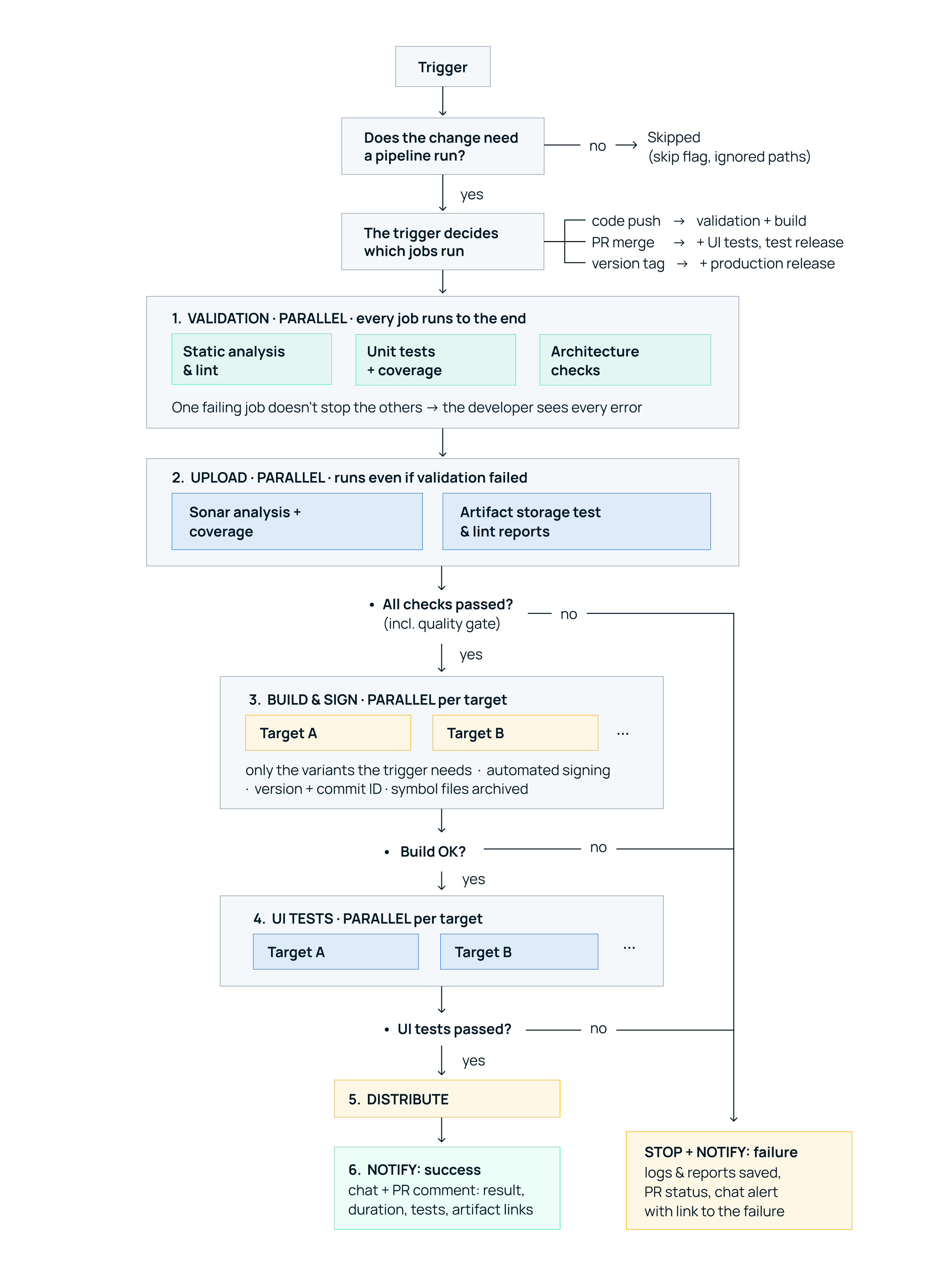
Having a long list of pipeline capabilities is one thing, but running them efficiently is another. Their order of execution matters, just like how much of the work can happen at once, and which jobs are actually worth triggering for a given change.
Ordering and parallelization
The simplest way to speed up feedback is to start with the cheap checks. There is no point waiting for a full build just to catch an easily detectable failure, so the order should be tailored to your project’s needs. Without UI tests, for example, Lint and unit tests (in parallel) followed by the build might be a good fit, while with UI tests, Lint and unit tests (in parallel) followed by a testable build and then the UI tests could work better. The compilation needed for the tests is, of course, already part of the test steps.
That example already hints at the next idea: independent tasks should run in parallel. Lint and unit tests can run at the same time, so a 5-minute lint and an 8-minute test run give you results in 8 minutes in the ideal case instead of 13. It’s worth being clear about what this buys you, though. Parallelization cuts waiting, not cost: on a hosted runner, the two jobs add up to the same total, and because of startup overhead they’ll actually burn slightly more billed minutes. It’s still worth it, because the developer gets feedback sooner.
Running things in parallel also raises the question of what should happen when something breaks. If a required check fails, the steps that depend on it shouldn’t run, so don’t spend time on signing or distribution after failing tests. You should still save the logs and reports you need for debugging, though.
Within the validation stage, however, this rule has an exception. Lint, Detekt, and unit tests should all run to completion even if one of them fails. These are fast, cheap checks, and it’s better for the developer to see all the failures at once than to fix a failing unit test only to find out that lint flagged something too. That way the reports are complete, and if we upload them to Sonar, it shows the real picture there too.
Conditional execution
Once the order and parallelism are sorted out, the next question is whether every job needs to run every time. It doesn’t, and the most natural way to decide is by the event that started the pipeline. On a push to a feature branch, lint, unit tests, and a debug build can run. On a PR merge, a more complete set of checks and the build matrix make sense, and on a version tag push, the pipeline can produce a signed release build and upload it to the store.
Events cover the common cases, but sometimes a developer needs more control than that. For debugging or targeted testing, parameterized manual triggers fill the gap: the CI UI can offer toggles and dropdowns to specify whether you want validation, which tests to run, which variants to build, and whether a release or internal distribution is needed.
At the other end of the spectrum are changes that don’t need a pipeline run at all. A README fix shouldn’t kick off a twenty-minute, six-variant build, so with the [skip ci] marker in the commit message, changes that only touch documentation can skip the pipeline entirely.
Determining ROI and worthy investments
With all that said, not every automation pays off the same way. Replacing a manual task that repeats every day is often worth more than shaving a few minutes off a rarely used build. The question is how much recurring work and risk we eliminate, and at what upfront and maintenance cost.
Hosted vs. self-hosted runners
| Aspect | Hosted runner | Self-hosted runner |
| Setup | Quick to set up, ready-made environment | Requires expertise and prep work |
| What are we paying for? | Run minutes, capacity, or a subscription | The machine and the ops expert's time |
| Maintenance | The provider manages the infrastructure | Updates and fixes are on us |
| When can it be cheaper? | With few or variable numbers of runs | With heavy, steady load and good utilization |
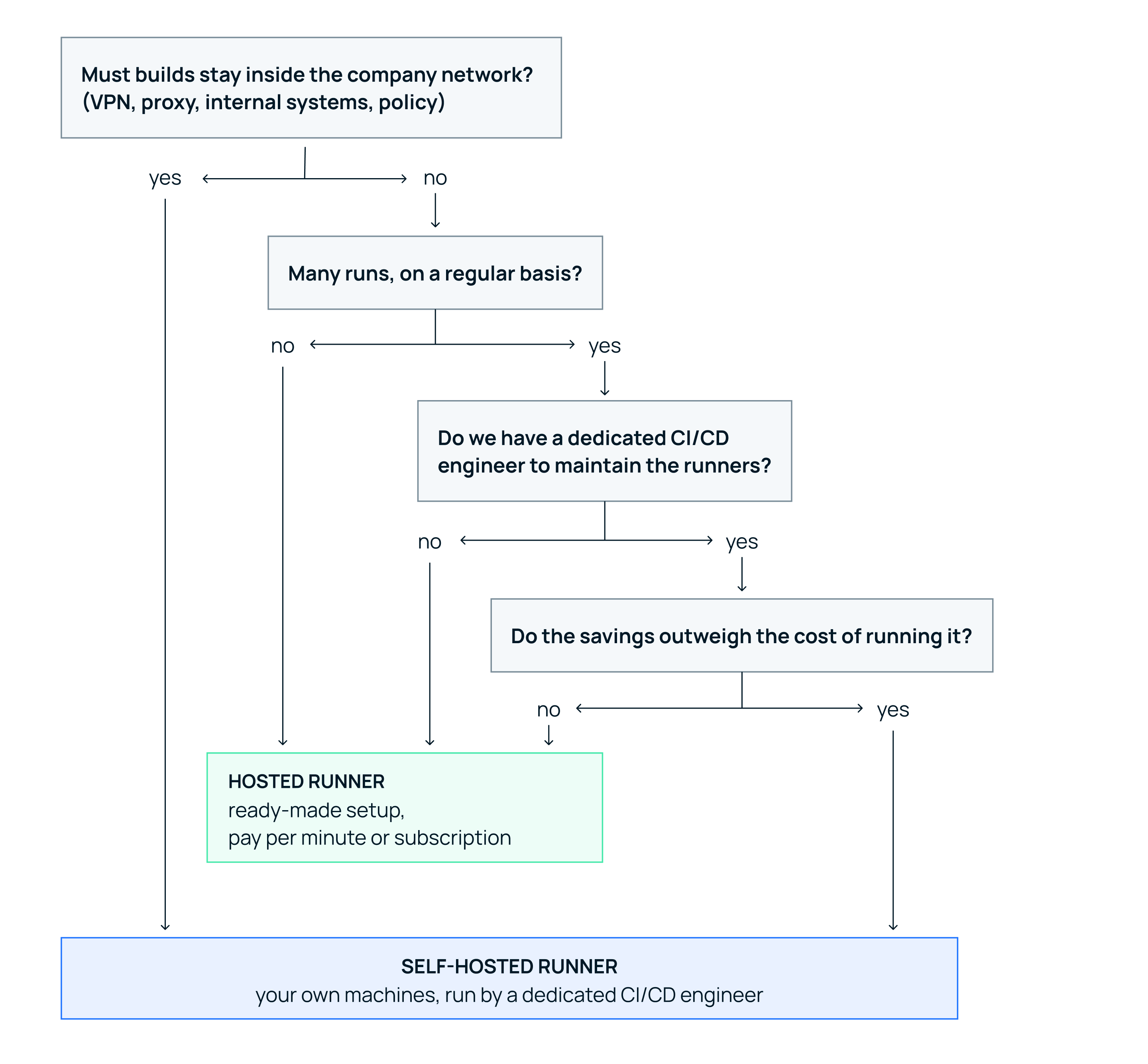
With hosted, you pay for the ready-made service; with self-hosted, you pay for your own infrastructure and the time of someone who knows what they're doing. The latter can lower the cost of running jobs, but it's only cheaper overall if the ops effort doesn't eat up the savings.
Investment targets
Not every improvement to a CI/CD pipeline is worth the same effort, and doing things in the wrong order can mean optimizing a process you can’t yet trust. When choosing where your next investment should go, it’s worth keeping a few things in mind.
The first priority is a reliable foundation. A successful run should really mean the code passed the required checks, and when something fails, you should be able to figure out why. Get rid of the recurring disruptions and the failures that need manual intervention before anything else, and only then think about speeding the process up.
Once the pipeline can be trusted, the next step is to automate repetitive tasks and take work off people’s plates. Building, signing, uploading, and distributing test builds shouldn’t need regular developer involvement. Start with the most frequent or most error-prone ones, since that is where the payoff is greatest.
With the right things automated, you can turn your attention to how fast they run. Caching, conditional execution, and parallelization all help cut waiting and wasted machine time. Rather than guessing, base your choices on measurements and go after the steps that cause the biggest time loss.
Only after all of that should you consider expanding capacity, and only if it is still needed. A more powerful or self-hosted runner, or a device farm, is worth the investment only when the optimized process is actually being limited by the infrastructure.
For each area, mark where you are: manual or missing → partially automated → automated → measured and optimized.
| Area | What to look at |
| Build | Does it build without manual prep? How long is the wait and the run time? Do we have a build matrix strategy? |
| Checks | Do the required tests and code analysis run automatically? Do failures block the merge? |
| Signing | Is it automated and secure? Do we get notified (in time) about certificate expirations? |
| Release and distribution | How many manual steps does it take to get a build to testers or up to the store? Can we identify the released versions? |
| Debugging | Are the logs readable and searchable? Do they help you quickly find the cause of a failure? Are the reports and other files for the build available? |
| Feedback | Does the developer find out about the run result? How detailed is the feedback in the PR: can you see test results, failures, artifacts, and related links? |
| Operations and cost | Is there a dedicated CI/CD owner? How much time do we spend on maintenance and fixes? What's the monthly cost of running it? |
The goal isn't a max score in every area. From the assessment, pick a few concrete improvements, and next to each one write down the frequency, expected savings, implementation effort, maintenance needs, and owner.
How to calculate CI/CD investment ROI
When calculating ROI, treat freed-up developer time and saved runner capacity separately.
You shouldn't have to build every variant one after another and run every test on your own machine, CI does that while you work on something else. That way, a failure in a rarely used variant can surface without a separate manual check. And producing and distributing a test build takes a single trigger instead of manual building, signing, and uploading.
Example: we replace 15 minutes of actual hands-on developer work, five times a day. Over twenty working days, that's 25 work hours a month. If the rollout takes 40 hours and maintenance is two hours a month, then at the same hourly cost, the investment pays for itself in roughly two months. The runner cost of five runs a day pushes this out a bit: on a hosted runner, put the billed minutes on the other side of the ledger; on self-hosted, put the purchase and operation of the machine there.
But note that a shorter build time doesn't automatically mean the same amount of freed-up developer time. The developer can work on something else in the meantime, but slow feedback does have a cost. Finding out that lint failed after having already started something else, switching context , and the time PRs spend waiting allcome out of the team's time. This is harder to quantify than the manual tasks we replaced, but it’s definitely more than zero.
On the machine side, though, the benefit is easy to measure: on a hosted runner, fewer billed run minutes means lower costs, and on self-hosted, capacity frees up sooner for the next job. For example, if the Android and iOS jobs wait on the same Mac runner that only serves one job at a time, a shorter Android run also cuts the iOS queue time.
So before and after the rollout, measure the manual tasks, run time, queue time, and total cost separately: automating developer work pays off differently than speeding up machine runs.