TL;DR
- Three axes: Git branch, DAB target, and Lakebase branch control everything. Each is independent, and all travel together through one bundle.
- Lakebase branching gives every developer or feature branch its own isolated database copy. Teams can develop and test against real data without sharing environments.
- Environment promotion rule: Lakebase branches for short-lived isolation (developers + PRs), separate workspaces for real environments.
- Lakebase binding belongs in the bundle. Databricks injects connection details and provisions the right Postgres role automatically, so nothing gets hardcoded.
- The same immutable SHA runs in dev, staging, and prod. Promote the commit, not the branch.
- Authentication is a three-layer problem: CI talking to Databricks, the App runtime talking to Lakebase and UC, and humans talking to the App. Design all three upfront, or you'll debug them in production.
If you're building Databricks applications at scale, this unified CI/CD setup will help you ensure every deployment in the ecosystem follows the same standardized, automated path from development to production.
3 axes of a unified CI/CD for Databricks Apps
Often, CI/CD setups on Databricks solve for one axis at a time: either branching strategy, or deployment config, with database state handled separately (or not at all). The result is coordination overhead, environment drift, and a shared staging database. The setup described here solves all three axes with one bundle.
Three orthogonal axes let a single bundle support personal sandboxes, per-PR previews, and protected dev/stg/prod workspaces:
- Git branch (code)
- DAB target (deployment)
- Lakebase branch (data)
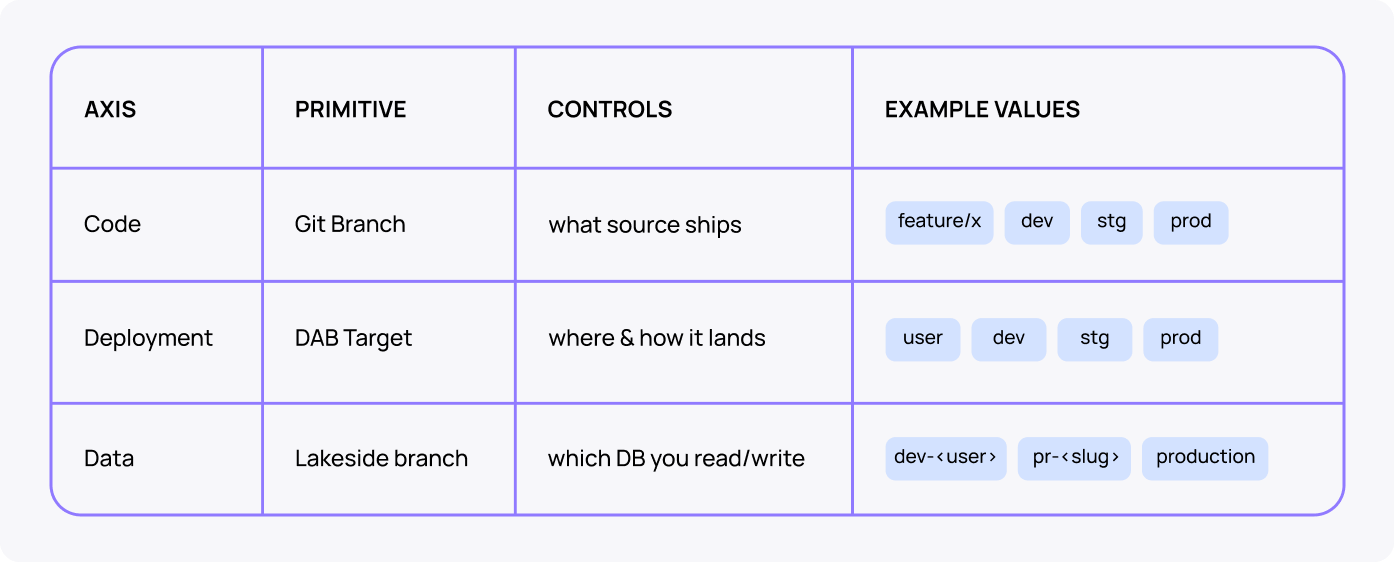
Each axis is independently controlled, but they travel together through the bundle. That's what makes this composable: a feature branch gets its own app name, workspace path, and Lakebase branch. All three are torn down together when the branch is deleted.
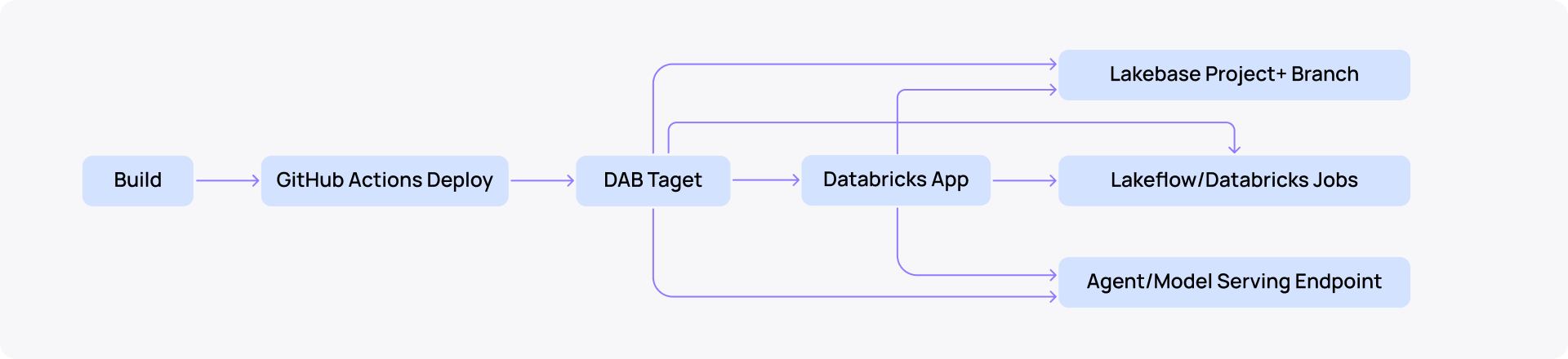
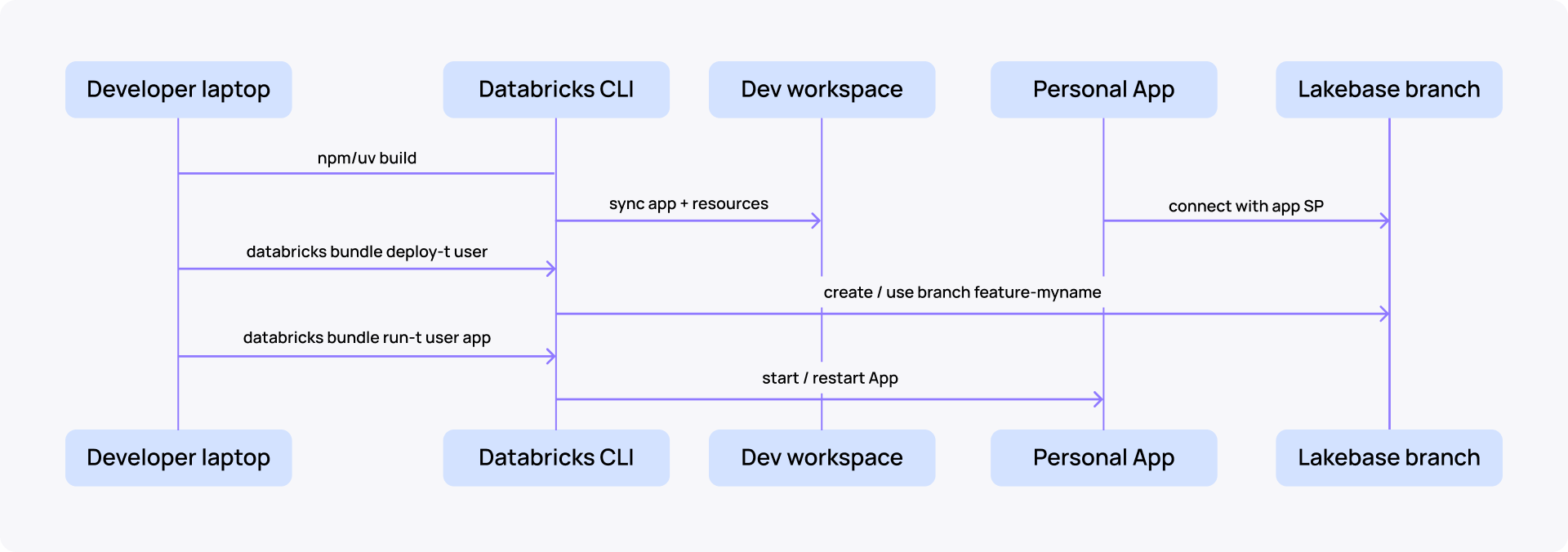
The deployment flow looks like this:
How Lakebase branching changes Databricks CI/CD
Lakebase branches are copy-on-write Postgres clones—sub-second to create, scale-to-zero when idle, disposable by design. That is what makes per-developer and per-PR environments practical, not just possible.
What each branching property unlocks in CI/CD:
- Zero-copy, ~1 s creation regardless of database size (Databricks' own Backstage catalog: 63 MB cloned in ~1 s) → fast enough to create on every PR open, push, or CI run.
- Production-shaped data on day one → no synthetic fixtures, no stale staging snapshots; tests run against a real schema with real row distributions.
- Isolated writes → destructive tests, schema migrations, and seeds don't leak to production or to other developers.
- Scale-to-zero pricing → idle branches cost ≈ $0; only active CI traffic accrues compute.
- TTL + auto-cleanup → every preview branch has an expiry, removing the "stale staging" problem by construction. (Manage branches on Databricks.)
- Point-in-time recovery as a primitive → a recovery branch is just source_branch_time = <ts>; incidents get a routine undo path.
- Agent-grade ephemerality → Databricks reports AI agents create ≈ 4× more databases than humans; branching is what makes ephemeral OLTP for agents feasible.
Caveats to plan for:
- No merge operation. Promotion = DDL replay on the target, not a branch merge. (Databricks community Q&A.)
- 30-day max branch TTL. Protected branches cannot be deleted or reset.
- OAuth-only auth. PATs are rejected; use databricks postgres generate-database-credential for scoped JWTs.
- Branch sprawl is real. Enforce naming conventions and aggressive TTL, or storage and audit surface grow unbounded.
Environment promotion model for Databricks Apps
Don’t make environments from branches.
Use new targets/workspaces for real environments. Use Lakebase branches for short-lived isolation. Lakebase branches are intended for isolated development, testing, experimentation, and schema-change validation without affecting production data. (Databricks Branches.)
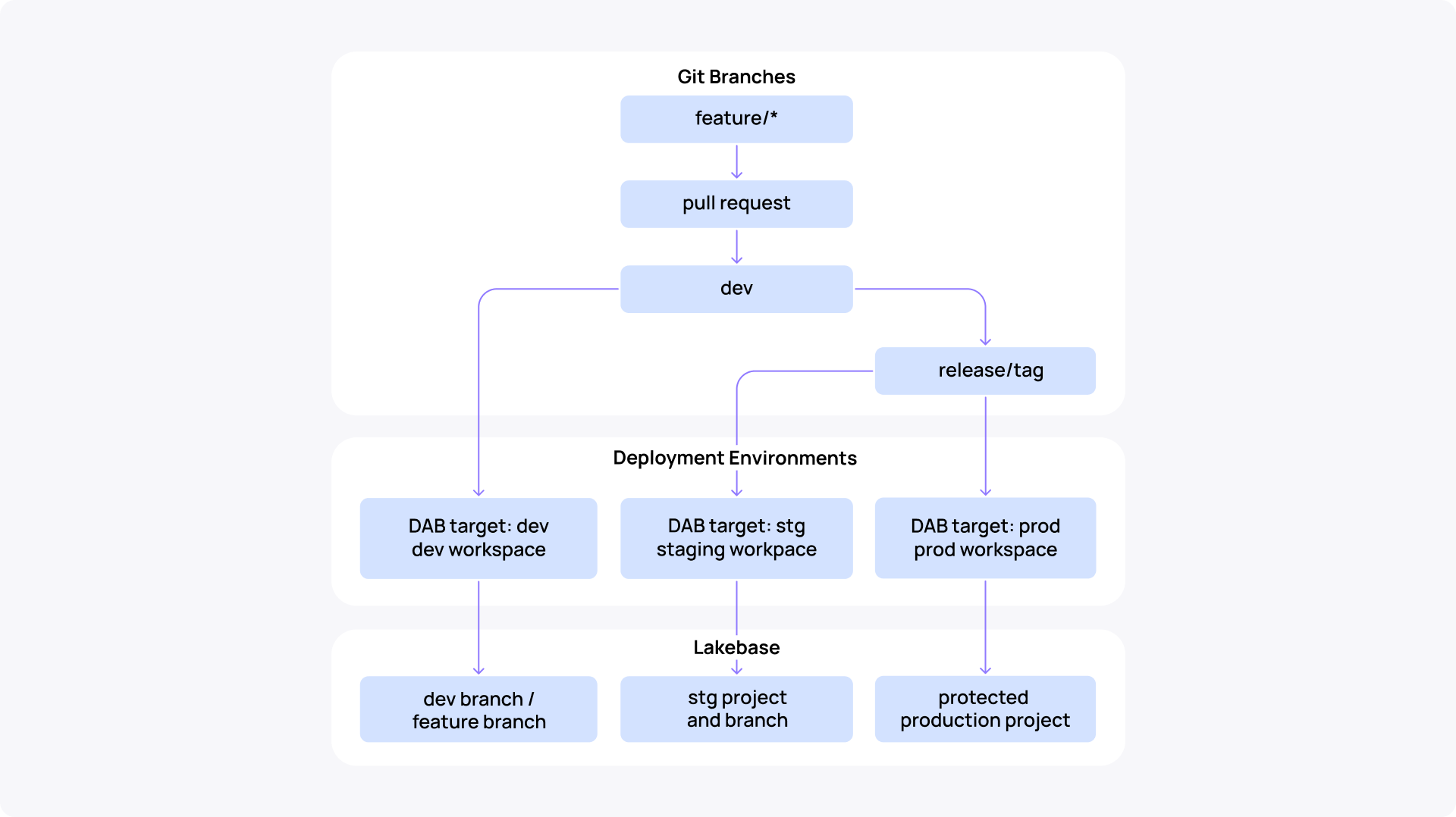
- Git branches drive code
- Workspaces drive environment isolation
- Lakebase branches drive data isolation for short-lived work
Personal/local deployment: user target + personal Lakebase branch
For local work, deploy the same bundle to a user target in mode: development. Development mode is designed for iteration and automatically applies dev-oriented behaviors such as user-specific naming/prefixing for supported resources, paused schedules, and relaxed deployment locking. (Declarative Automation Bundles deployment modes.)
Minimal target shape:
targets:
  user:
    mode: development
    workspace:
      root_path: /Workspace/Users/${workspace.current_user.userName}/.bundle/${bundle.name}/${bundle.target}
    variables:
      name_suffix: -dev-${workspace.current_user.domain_friendly_name}
      lakebase_branch_id: feature-${workspace.current_user.domain_friendly_name}
Sandbox lifecycle:
npm run build                         # build frontend + backend
databricks bundle deploy  -t user     # sync App + Lakebase + per-user branch
databricks bundle run     -t user app # (re)start the App
databricks bundle destroy -t user     # tear down when done
Bundle state is keyed by ${workspace.current_user.userName} in root_path, so two developers deploying the user target into the same workspace never collide.
Feature branches: preview app + preview Lake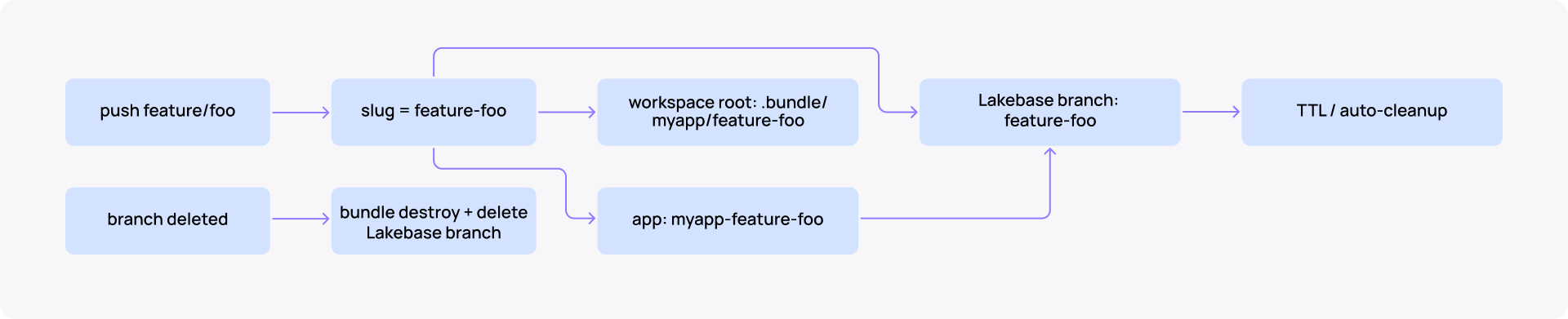 base branch
Each feature branch should get its own short-lived App and Lakebase branch in the dev workspace. Lakebase supports branch creation, expiration/TTL, reset from parent, and deletion, which makes it fit preview environments well. (Manage branches on Databricks.)
Recommended preview naming using the same feature/foo example as the diagram above:
Git branch:          feature/foo
Preview slug:        foo
App name:            app-dev-foo
Lakebase branch:     lb-foo
Bundle root path:    /Workspace/Shared/.bundle/app/preview-foo
Teardown fires on two triggers: branch delete (immediate) and an hourly cron (TTL sweep for previews older than 4 hours).
on:
  delete: {}
  schedule: [ cron: '0 * * * *' ]
Both call databricks bundle destroy --var=... and then delete the Lakebase branch via API.
How to structure DAB targets across personal, preview, and production environments
One bundle, four targets that map cleanly onto the three isolation layers: L1 personal, L2 preview, L3 env.
Modes split: development for personal sandboxes, production for everything CI deploys.
targets:
  user:                                          # L1 — personal sandbox
    mode: development
    workspace:
      root_path: /Workspace/Users/${workspace.current_user.userName}/.bundle/${bundle.name}/${bundle.target}
    variables:
      name_suffix:        "-dev-${workspace.current_user.domain_friendly_name}"
      lakebase_branch_id: "dev-${workspace.current_user.short_name}"

  dev:                                           # L3 — shared dev workspace
    mode: production
    default: true
    git: { branch: dev }                         # CLI refuses deploy from any other ref
    workspace: { host: https://acme-dev.cloud.databricks.com }
    variables: { name_suffix: -dev, lakebase_branch_id: production }

  stg:
    mode: production
    git: { branch: stg }
    workspace: { host: https://acme-stg.cloud.databricks.com }
    variables: { name_suffix: -stg, lakebase_branch_id: production }

  prod:
    mode: production
    git: { branch: prod }
    workspace: { host: https://acme-prod.cloud.databricks.com }
    variables: { name_suffix: -prod, lakebase_branch_id: production }
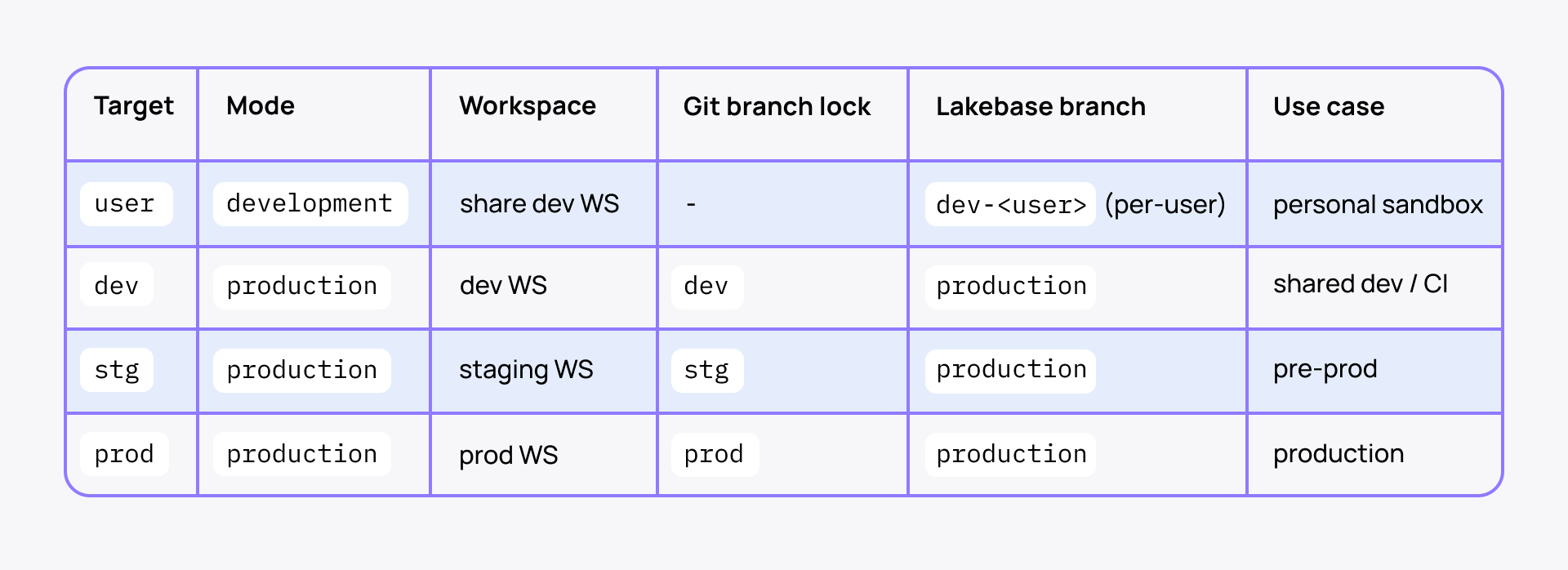
L2 PR previews reuse the dev target with --var=lakebase_branch_id=lb-<slug> overrides—no new target needed.
A mode: production target with git.branch: prod makes accidental production deploys structurally impossible. The CLI refuses bundle deploy -t prod from any branch other than prod. It is a deploy-time safety net independent of CI. A developer running the command from a feature branch on their laptop simply cannot reach prod.
Why keep Lakebase binding declarative
A Databricks App can bind a Lakebase Autoscaling database as an App resource. Databricks injects Postgres connection details into the App and creates/reuses a Postgres role for the App service principal with connect/create privileges. (Databricks Lakebase.)
Bundle pattern:
resources:
  apps:
    app:
      name: my-app${var.name_suffix}
      source_code_path: ./app
      resources:
        - name: lakebase
          postgres:
            branch: projects/${var.project_id}/branches/${var.lakebase_branch_id}
            database: projects/${var.project_id}/branches/${var.lakebase_branch_id}/databases/${var.database_id}
            permission: CAN_CONNECT_AND_CREATE
Building applications on Databricks at scale?
Check the Apps Factory playbook to build and run 100+ apps, saving up to 100 dev days/app.
How to version and promote Databricks App deployments
Promote an immutable Git SHA or release tag, not whatever main points to at approval time. The same commit flows through dev → staging → prod. Only the target config and the gating GitHub Environment differ. (Deploy a Databricks App.)
Each GitHub Environment owns its per-target wiring (host, client ID, gate). Databricks recommends GitHub Environment as the federation policy entity type, and GitHub Environments support required reviewers, wait timers, and branch/tag restrictions. (Databricks GitHub Actions, GitHub docs on Deployment environments.)
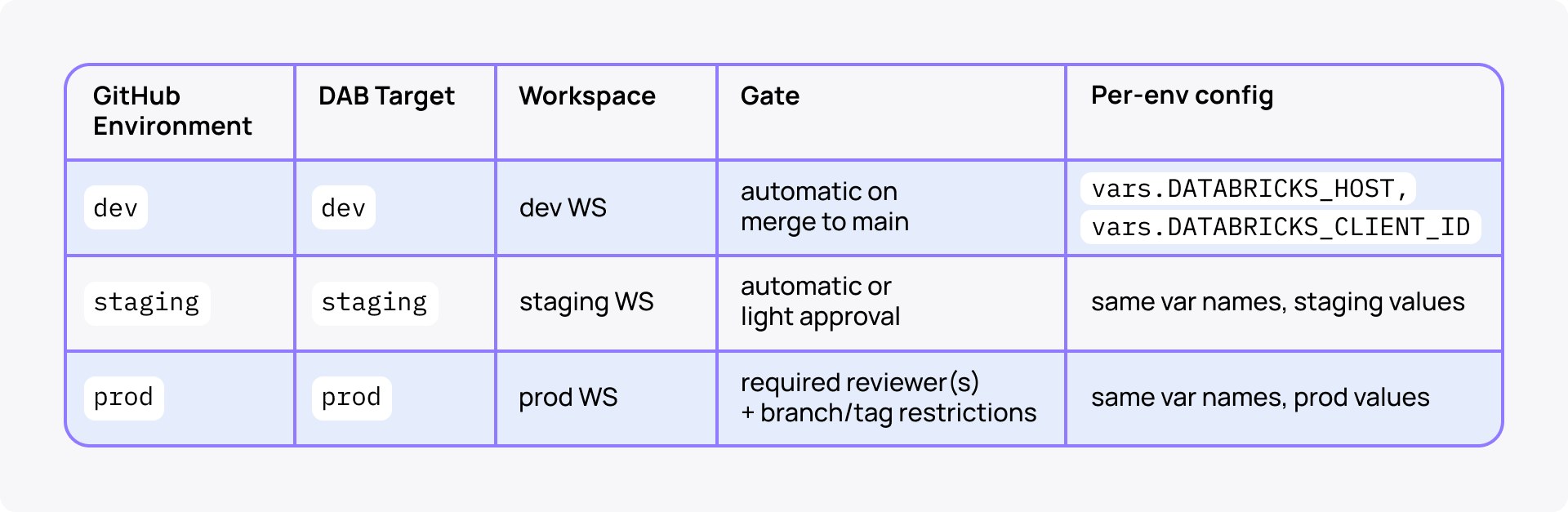
The promotion workflow takes both a target and a ref (SHA or tag) input, checks out that ref, and runs the same bundle validate → deploy → run sequence—only environment and target change between calls.
on:
  workflow_dispatch:
    inputs:
      target: { type: choice, options: [dev, staging, prod], required: true }
      ref:    { type: string, required: true, description: "Git SHA or release tag to promote" }

jobs:
  deploy:
    environment: ${{ inputs.target }}              # ← gates secrets, reviewers, branch rules
    concurrency: databricks-app-${{ inputs.target }}
    steps:
      - uses: actions/checkout@v4
        with: { ref: ${{ inputs.ref }} }           # ← pin to immutable commit
      - uses: databricks/setup-cli@main
      - run: databricks bundle deploy -t ${{ inputs.target }}
      - run: databricks bundle run my_app -t ${{ inputs.target }}
Rollback=re-dispatch with a previous good ref. The bundle YAML is identical; only the resolved commit changes.
Version should still flow one way through the bundle: Git SHA/tag → build artifact → bundle variable → App env → health endpoint/logs. Bundle variables can be supplied at deploy/run time, including through environment variables such as BUNDLE_VAR_*. (Substitutions and variables in Declarative Automation Bundles.)

GitHub Actions flow:
Note: Databricks explicitly warns that databricks bundle deploy uploads source and updates resources, but does not restart the App process. The workflow must run the App resource after deploy. (CI/CD for Databricks.)
Best promotion strategy on Databricks
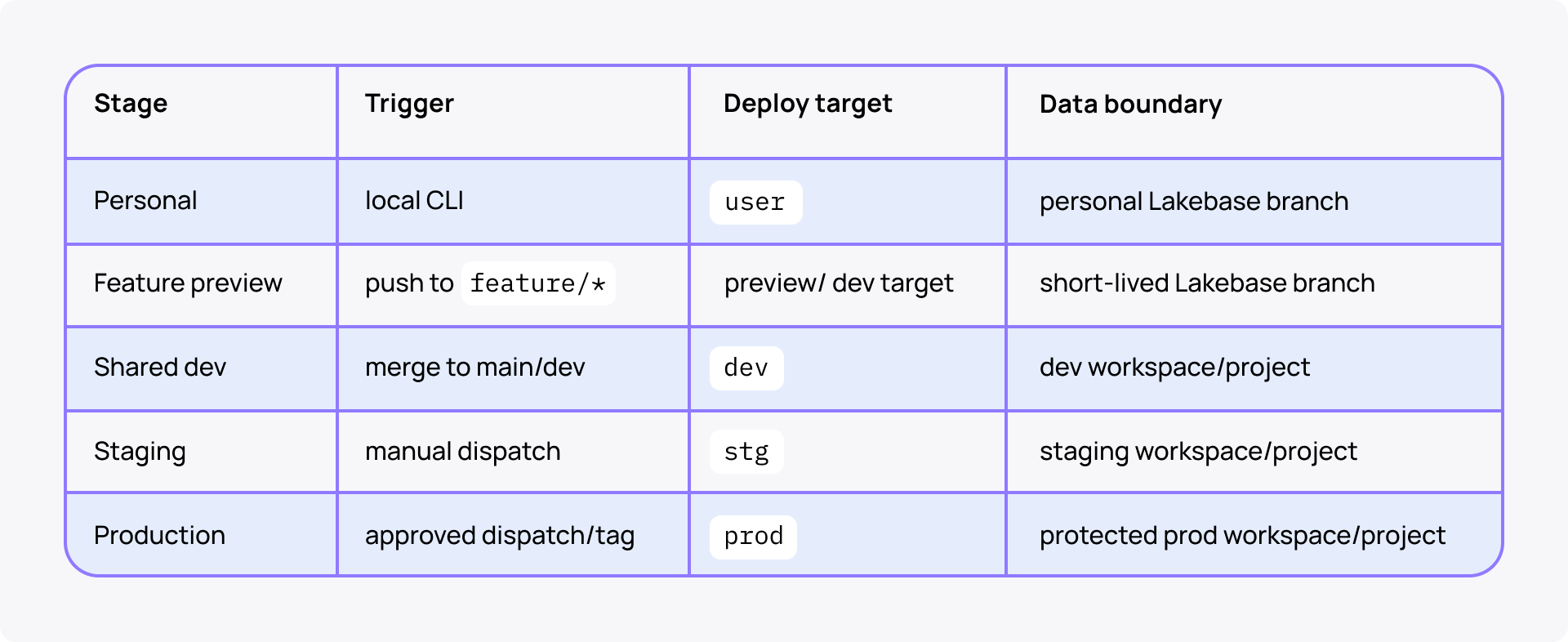
Use GitHub Environments to gate stg and prod. GitHub supports deployment protection rules such as manual approval, wait timers, and branch/tag restrictions for environments. (GitHub docs on Deployments and environments.)

Promotion rule set:
Why bind agents and jobs as App resources
Databricks Apps can integrate with Lakeflow Jobs, Model Serving endpoints, Lakebase, SQL warehouses, secrets, UC tables, volumes, vector search indexes, and more through App resources. This keeps IDs out of code and lets the App service principal receive least-privilege permissions. (How to add resources to Databricks app.)
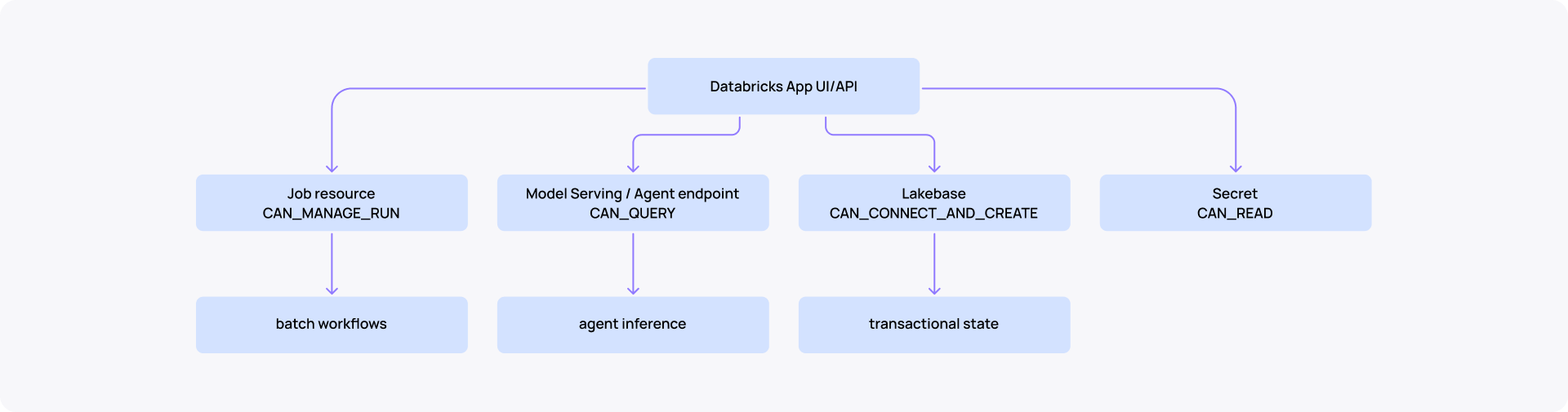
Agent promotion should be version-pinned.

This means your CI/CD pipeline can pin a specific agent version per environment the same way it pins an app artifact. Dev gets the experimental model. Prod gets the champion. The wiring is declared in the bundle, avoiding manual endpoint updates and version drifts.
How to set up authentication and identity
Three identity facets coexist. Design them together, not separately.
- CI → Databricks. Runs bundle deploy/run (see ‘Today’ and ‘Outlook’ below).
- App runtime → Lakebase/UC/endpoints. App's auto-provisioned SP, granted in the bundle.
- Humans → App/Lakebase/Jobs. User-group ACLs, declared in the bundle (see ‘User- and service-principal groups in the bundle’ below).
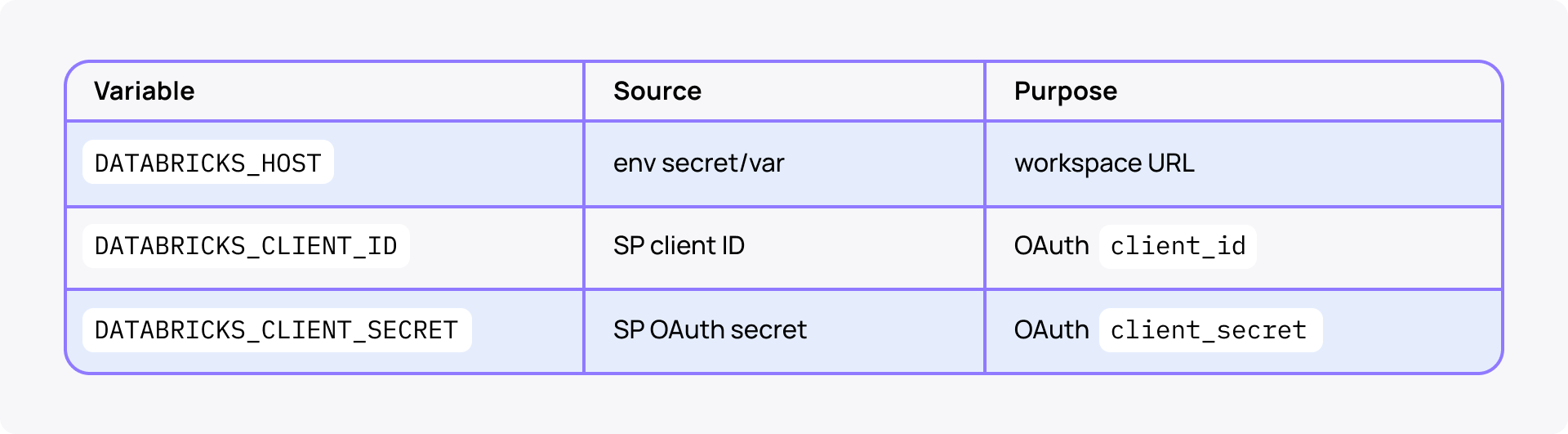
Today: OAuth M2M with a service-principal secret
Three env vars, set at job level so every step inherits them:
jobs:
  deploy:
    environment: ${{ inputs.target }}
    env:
      DATABRICKS_HOST:          ${{ secrets.DATABRICKS_HOST }}
      DATABRICKS_CLIENT_ID:     ${{ secrets.DATABRICKS_CLIENT_ID }}
      DATABRICKS_CLIENT_SECRET: ${{ secrets.DATABRICKS_CLIENT_SECRET }}
Trade-off: simple and works locally via ~/.databrickscfg, but the secret is long-lived in GitHub and rotates manually.
Outlook: GitHub OIDC/workload identity federation
GitHub Actions authenticates without storing a Databricks secret. Databricks documents DATABRICKS_AUTH_TYPE=github-oidc, DATABRICKS_HOST, DATABRICKS_CLIENT_ID, and GitHub id-token: write. (Databricks GitHub Actions.)

The swap surface from OAuth M2M:
+ permissions: { id-token: write, contents: read }
  env:
-   DATABRICKS_CLIENT_SECRET: ${{ secrets.DATABRICKS_CLIENT_SECRET }}
+   DATABRICKS_AUTH_TYPE: github-oidc
    DATABRICKS_HOST:      ${{ vars.DATABRICKS_HOST }}
    DATABRICKS_CLIENT_ID: ${{ vars.DATABRICKS_CLIENT_ID }}
Federation policy subject must be stable—route every job through a GitHub Environment: repo:<org>/<repo>:environment:<env>.
There are two known limits:
- no wildcards in sub (workaround = Environments)
- 20 federation policies per SP (workaround = one SP per env, not per branch)
User- and service-principal group in the bundle
With CI deploys, you won't have access to Apps & services without explicit group ACLs. Only the deploy SP can restart the App or grant Lakebase access. Declare ACLs in databricks.yml so identity, env, and permission travel together.
# databricks.yml — bundle-wide; overridable per-resource
permissions:
  - group_name: ${var.admin_group}            # owners / on-call → CAN_MANAGE
    level: CAN_MANAGE
  - group_name: ${var.viewer_group}           # broader team → CAN_VIEW
    level: CAN_VIEW
  - service_principal_name: ${var.deploy_sp}  # CI SP → CAN_MANAGE
    level: CAN_MANAGE
Per-env group split (variables override per target—promotion to prod cannot inherit dev's CAN_MANAGE):
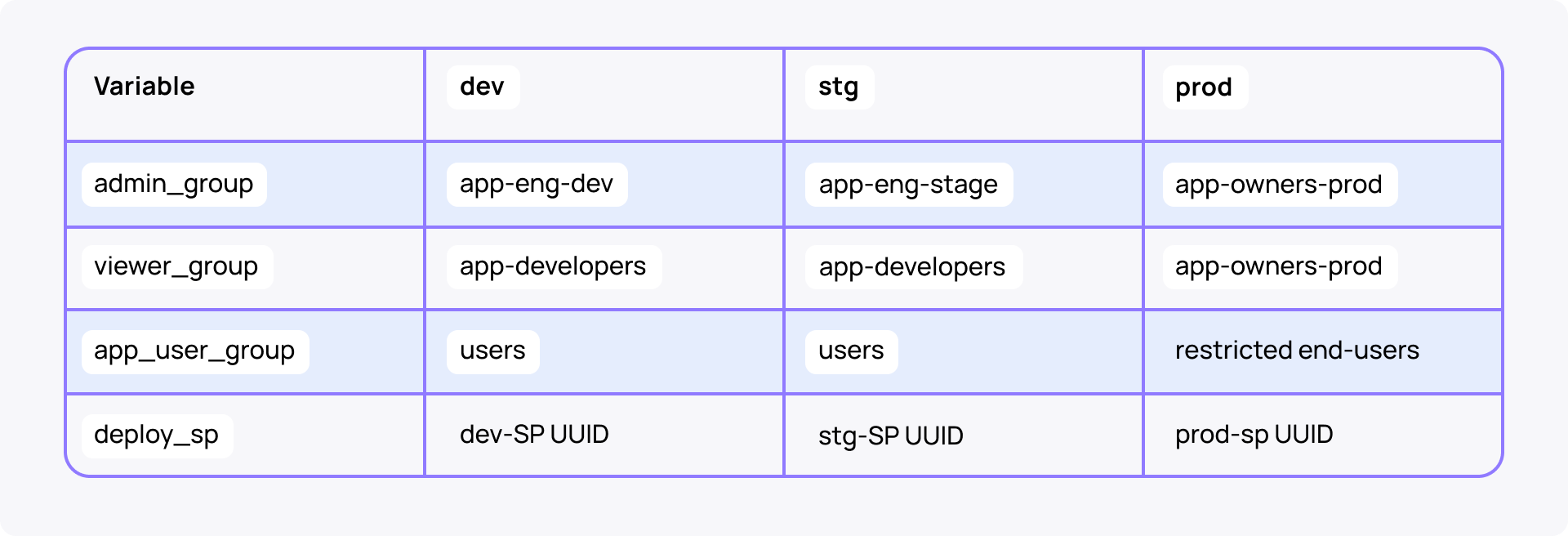
Use run_as on Jobs to execute as the App SP (stable audit trail) rather than the deploy SP.
Two failure modes this protects against:
- deploy succeeds, but humans can't operate (no group has CAN_MANAGE)
- dev groups silently inheriting in prod (the most common audit finding)
Benefit of unified Databricks CI/CD at scale
This unified Databricks CI/CD setup removes the need for per-app, per-environment wiring that often kills deployment velocity at scale. Every new app inherits the full pipeline out of the box—same gates, promotion path, and identity model.
If you run not 1, but 10, 50, or 100 applications, the efficiency gains compound. Check the Apps Factory playbook to see how the unified CI/CD works in the ecosystem and, when combined with a template-based agent-native approach to development, helps save hundreds of dev days per application.
Next up: Databricks Apps costs governance and observability (full setup at fleet scale, plus sample app and video demo).