
"Native or cross-platform?" is the wrong question now. The one that matters is narrower: which parts of a product must never differ across platforms, and whether the tooling around that split is finally ready for production.
In a recent article I went over the announcements of KotlinConf 2026. KMP is certainly mature, with some rough edges around iOS. Let’s see how it compares to other frameworks, and how we got here from the native/cross-platform debate’s early days.
The old trade-off was too narrow
For years, mobile teams treated native and cross-platform as opposing choices. Each side had a real case.
- Native gave the highest ceiling: platform-authentic UX, day-one access to new OS features, strong performance, direct security APIs, and fewer compromises around push notifications, widgets, payments, wearables, maps, camera, background work, automotive, and now on-device AI.
- Cross-platform promised speed: one team, one codebase, faster iteration, less duplicated work, and a lower cost of entry. That promise still holds for short-lived campaign apps, web-first products, internal tools, content-heavy experiences, and early prototypes.
A note on the AI angle: The original economic case for cross-platform was “cheaper and faster than building twice.” AI coding agents have quietly weakened that case. If an agent can help a competent engineer produce quality native code in a fraction of the time it used to take, the incentive to generate lower-quality “shared-everything” code to save effort gets smaller. So the real reason to share code holds up regardless of AI speed: the logic that must stay identical across platforms should live in exactly one place.
Most long-lived products eventually learn the same lesson: sharing everything is not the same as reducing risk. OS upgrades still happen. Native integrations still matter. Plugins age. Accessibility and platform behaviour still need platform-specific QA.
Kotlin Multiplatform is useful because it changes the question from "native or cross-platform?" to "what should never drift between platforms, and what should be free to feel native?" Share business logic, data models, networking, contracts, validation, and state. Keep native UI, platform APIs, gestures, accessibility, and device-specific integrations where the user feels them.
Native implementation, shared logic
KMP is not "Flutter in Kotlin" or "React Native with a different language." It is a way to write Kotlin once and compile it natively for Android, iOS, desktop, web, and server, without giving up native performance or platform APIs. JetBrains is explicit that KMP is for sharing logic (business rules, data models, networking), with Compose Multiplatform as an optional shared-UI layer on top.
Google's Android docs agree, calling KMP stable and production-ready for sharing business logic across Android and iOS.
That distinction is the whole point. A KMP project can take several shapes:
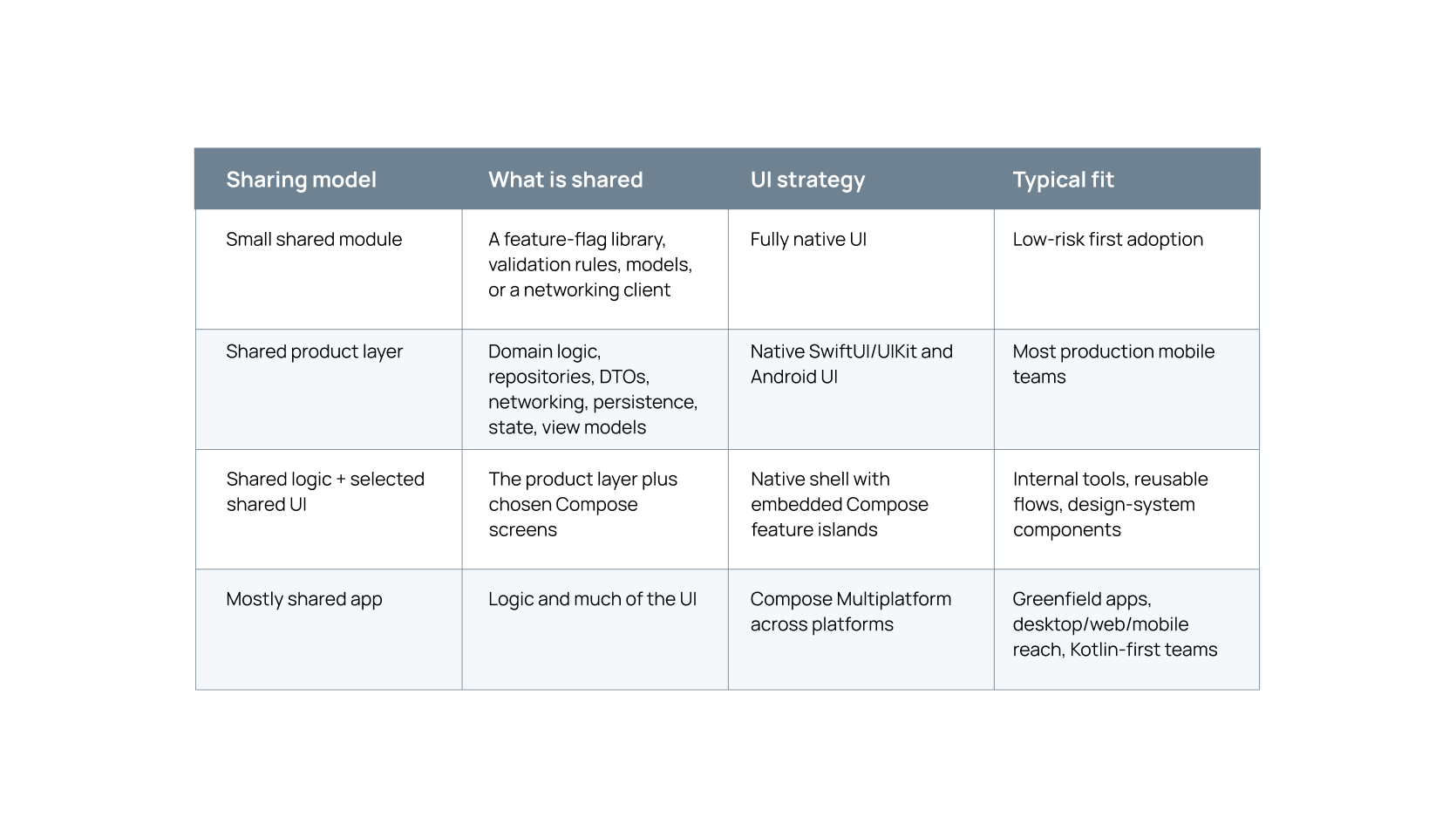
The strongest default for serious mobile products is also the simplest: share the behaviour that must not drift, and keep everything users touch native. Widen the shared layer only where it clearly pays off.
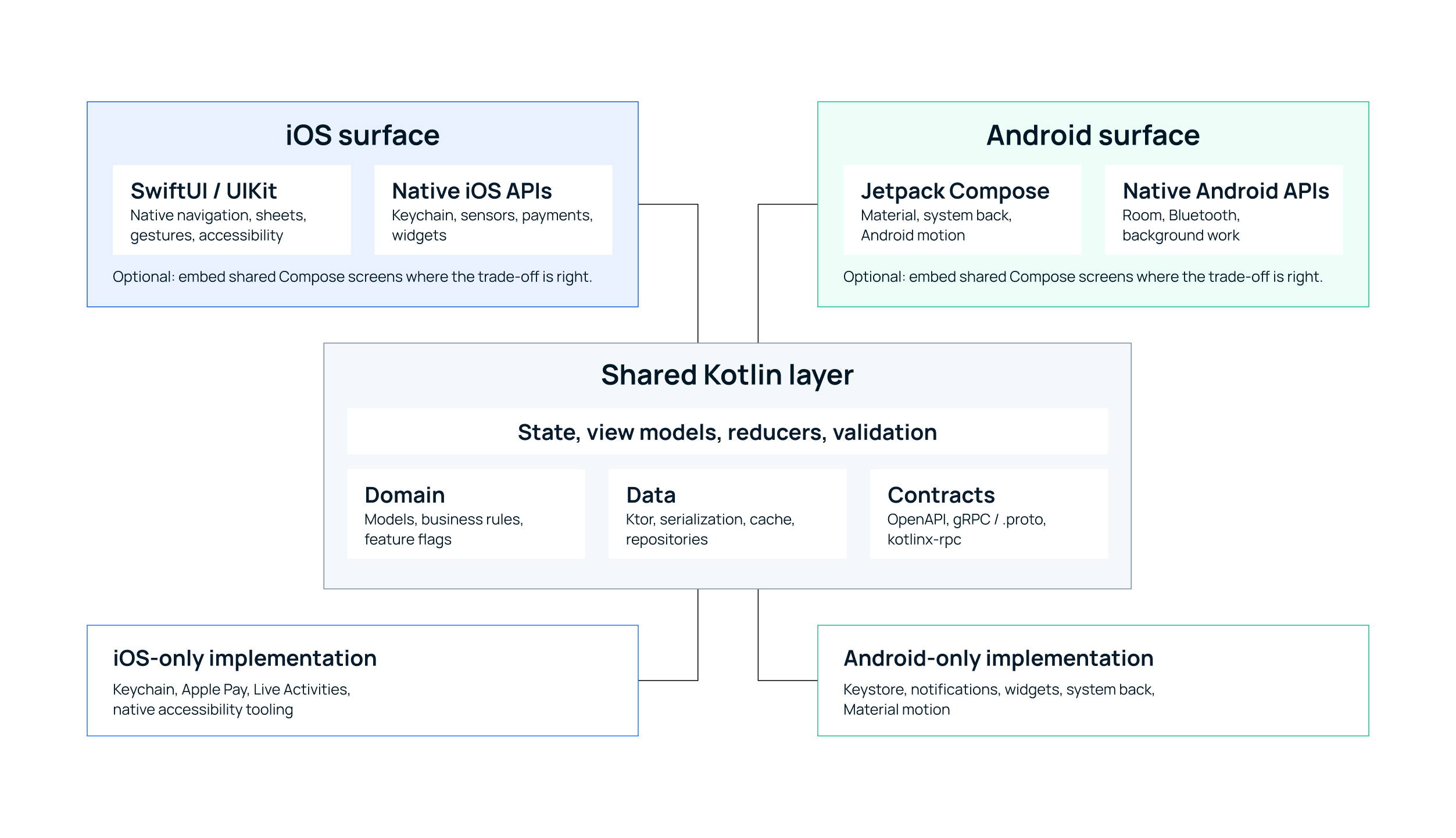
Share the product rules and the data flow. Keep the UI, platform behaviour, and device APIs native. On each platform, the code that talks to the user stays first-class.
The boundary matters more than the API. Kotlin's mechanism for it is expect / actual: shared code declares what every platform must provide, then writes the logic once against that declaration. Each platform supplies the real implementation.
// commonMain — compiled into both the Android and iOS apps
// 1. Declare what every platform must provide, without saying how.
expect class SecureStorage {
    suspend fun readAuthToken(): String?
}

// 2. Write the rule once, against that declaration.
class SessionService(private val storage: SecureStorage) {
    suspend fun isLoggedIn(): Boolean =
       storage.readAuthToken() != null
}

// androidMain — the real implementation on Android, backed by the Keystore
actual class SecureStorage {
    actual suspend fun readAuthToken(): String? =
       encryptedPrefs.getString("auth_token", null)
}

// iosMain — the real implementation on iOS, backed by the Keychain
actual class SecureStorage {
    actual suspend fun readAuthToken(): String? =
       keychain.read("auth_token")
}
The isLoggedIn rule is written once and runs on both platforms. Only the storage underneath it changes: Keystore on Android, Keychain on iOS. Written this way, KMP sidesteps both traps: the duplicated logic of native-only apps, and the lowest-common-denominator UI of "one UI everywhere" frameworks.
The architecture we keep coming back to
In a production app or a modernization, the shared module should hold the parts that cause drift when they are written twice:
- data models, serialization, and API clients;
- validation, business rules, and feature flags;
- repository interfaces and selected persistence;
- state machines, reducers, and view models that can be
- exposed cleanly to Swift and Android;
- localization and formatting rules, where consistency matters;
- typed service contracts for talking to the backend.
The platform layer keeps what users recognize as native: navigation, gestures, haptics, keyboard behaviour, accessibility; Apple- and Android-specific APIs (Keychain, Keystore, widgets, live activities, background work, Bluetooth, NFC, payments, automotive); and any screen where the two platforms should intentionally differ.
This is also why KMP adopts well incrementally. You do not rewrite the app. You extract one painful duplicated module (feature flags, say, or validation), then move networking, repositories, and state into shared code as the team gets comfortable.
A personal note: identical mobile UIs are usually the wrong goal
I have never understood why so many projects assume the iOS and Android apps must look identical. Users rarely hold two phones side by side. They compare your app to every other app on the same device.
An iOS user brings iOS muscle memory: edge-swipe back, familiar sheets, native text selection, VoiceOver, system typography. An Android user brings Android muscle memory: system back, Material patterns, ripple feedback, dynamic color, TalkBack.
So consistency should not mean "the same pixels everywhere." It should mean a consistent product promise and information architecture, the same business rules and data correctness, and an equally high accessibility bar on both platforms. The UI can still speak each platform's dialect.
There are exceptions. Games, branded media, and immersive entertainment can reasonably pick one strong custom visual universe. But a banking, commerce, health, telecom, or travel app is rarely better because an Android screen mimics iOS, or because an iOS screen is forced into a Material pattern. This is where KMP's model lines up with good product thinking: share the behaviour that must not drift, and let each platform's UI stay a first-class surface.
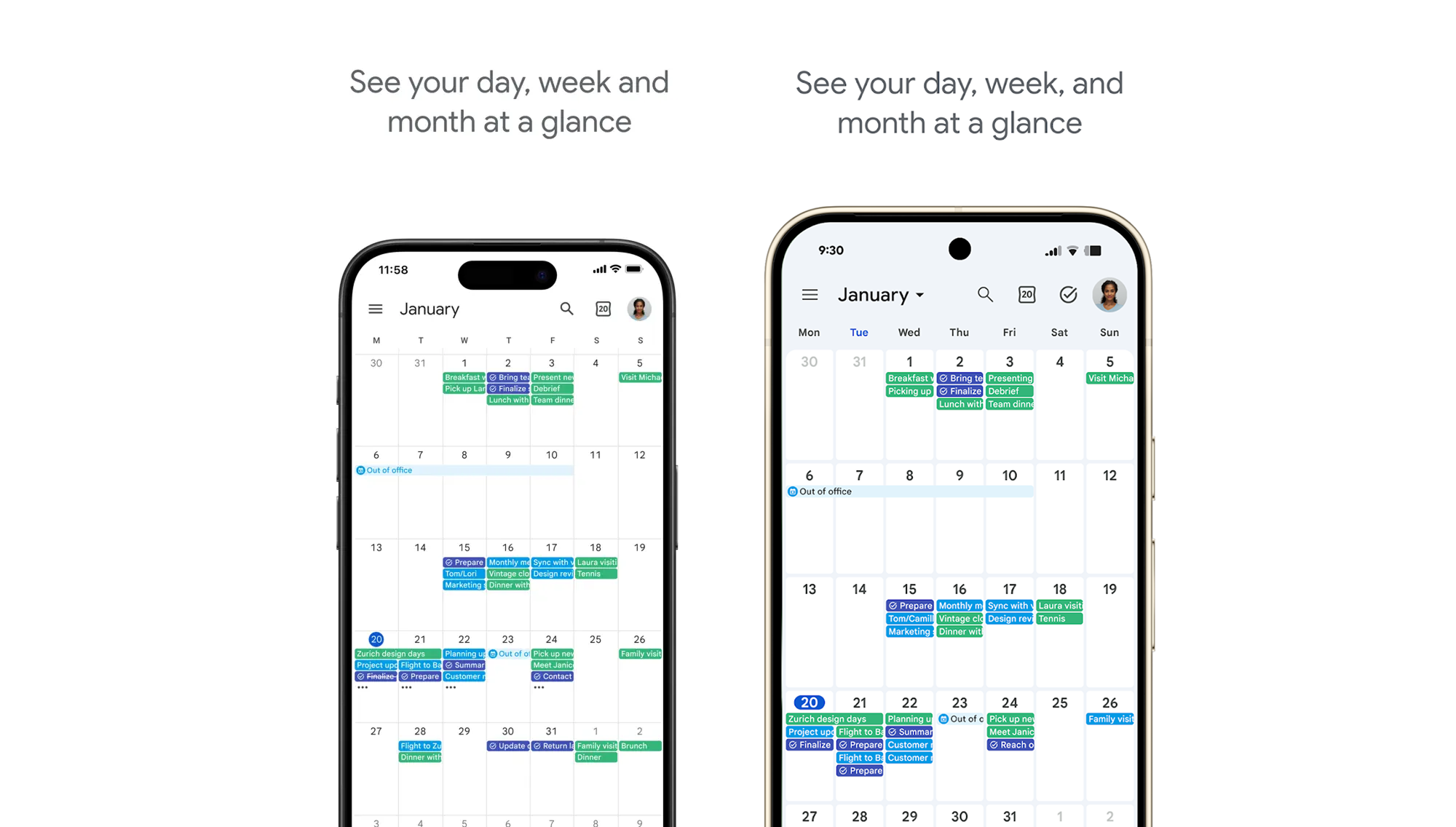
Google Calendar’s nearly identical images on the App Store and the Play Store. Notice the Android UX patterns? No wonder iOS users have a hard time adjusting.
Besides the Google Calendar example above, several others stand out where shared UX decisions clashed with user habits. Think of X/Twitter’s introduction of swipeable feeds in 2023: millions iOS users complained about losing their chronologically sorted feeds and constantly mis-swiping. They were forced to issue an update that remembered the user's last selected tab rather than resetting to "For You."
Speaking of socials - remember Spotify’s push of TikTok-like vertical video feeds? This angered both iOS and Android users, who simply wanted to get to their morning commute playlist instead of swiping an endless list of videos. Spotify promptly walked back on this update, too.
How KMP compares with React Native, Flutter, and Ionic/Capacitor
As cross-platform demand grew, several frameworks took turns being the default. React Native was the first breakthrough; simple apps worked well, complex ones less so. Flutter offered a more stable environment and pixel-consistent UI through its own rendering engine. Ionic/Capacitor kept a strong niche wherever web skills already existed. All three are legitimate, and a fair 2026 comparison should not freeze them in their early years.
React Native's New Architecture has been the default since 0.76: it replaces the old asynchronous bridge with JSI-based interop, faster JavaScript/native communication, and concurrent rendering support. Flutter's Impeller renderer is now the default on iOS and modern Android, precompiling shaders for more predictable frames. These frameworks work. The question is which trade-off best fits your product, team, and roadmap.
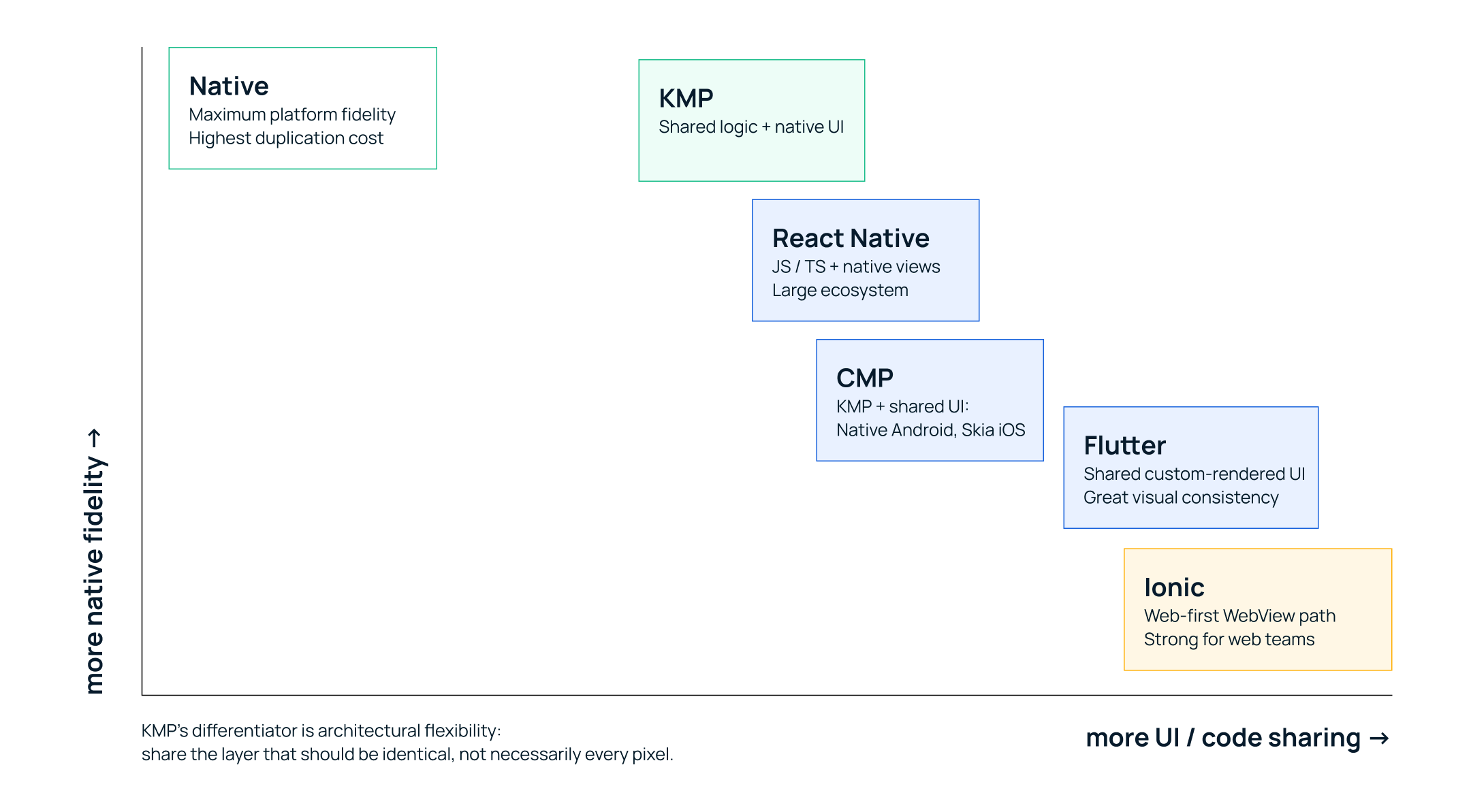
Native sits top-left (most fidelity, least sharing); Ionic sits bottom-right (most sharing, least native fidelity). KMP occupies the spot most products actually want: share the logic, keep the UI native, with Compose Multiplatform available when you do want to share UI.
One difference changes the decision. React Native and Flutter are mainly ways to build a shared app surface. KMP is mainly a way to build a shared product layer, with the UI native by default and Compose Multiplatform available per screen.
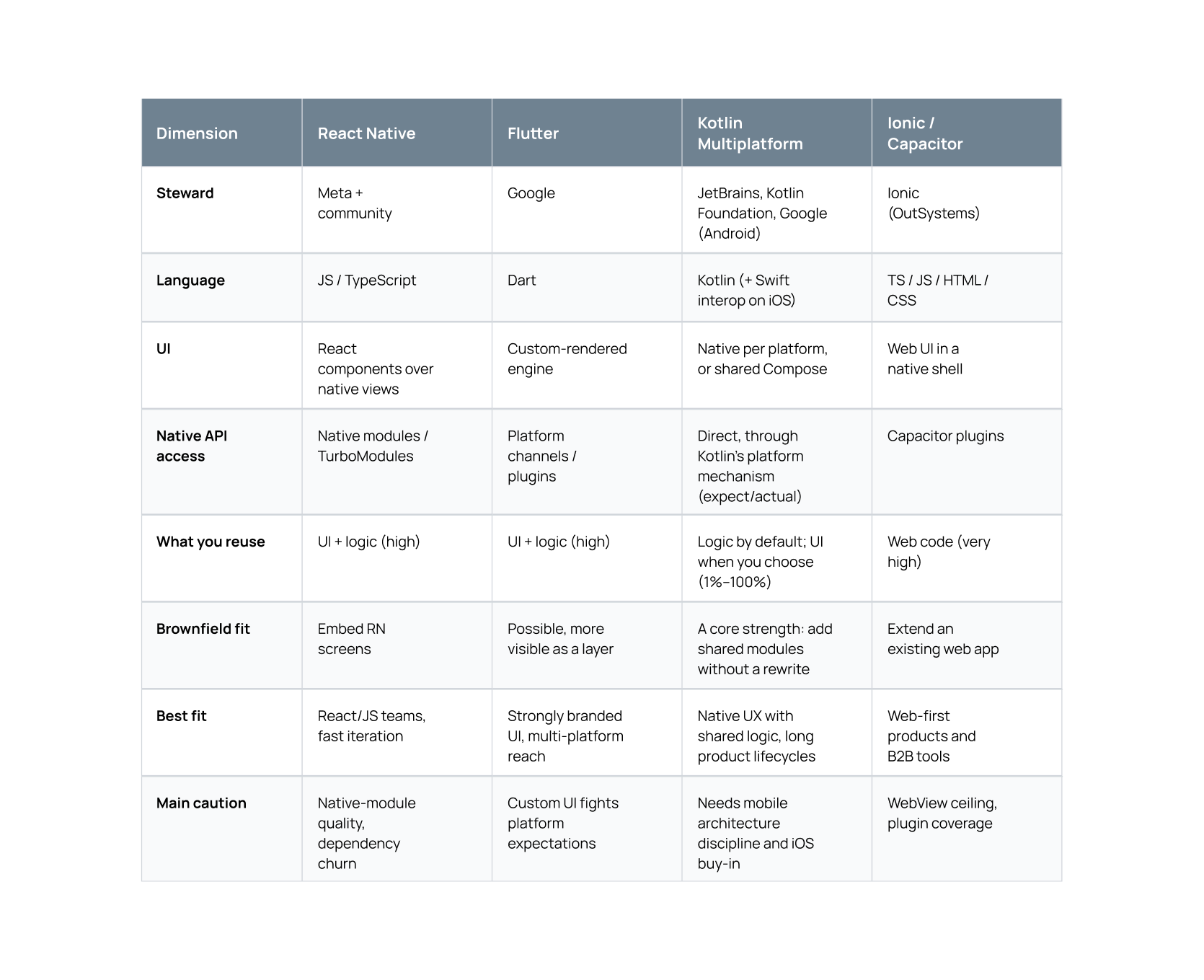
A second advantage rarely shows up in feature tables: prototype-to-production continuity. A lot of cross-platform stacks are excellent for a proof of concept and then get rebuilt for production. With KMP, the shared layer you write to move fast is the same layer you keep. That is where it pulls ahead of the cross-platform field: the prototype is not throwaway.
Where KMP shines
KMP is a strong fit when:
- the product has significant business logic that must stay consistent across platforms;
- Android and iOS need native UX, but duplicated domain code is getting expensive;
- the team already has Kotlin, JVM, Android, or backend-Kotlin experience;
- the app is long-lived and needs gradual modernization rather than a rewrite;
- backend contracts, mobile clients, and AI flows can share one Kotlin vocabulary;
- you want a prototype that can become production code instead of a throwaway demo.
One asymmetry is easy to miss. On Android, KMP gives you an essentially fully native app from the start. Kotlin is already the native Android language, so there is no penalty and nothing to bridge. The "cross-platform tax" only ever applied to the iOS side, and the iOS side is exactly where 2026 improved most. That asymmetry is the whole pitch: a native Android app and a native-quality iOS app, sharing one tested core.
Where KMP still needs honest expectations
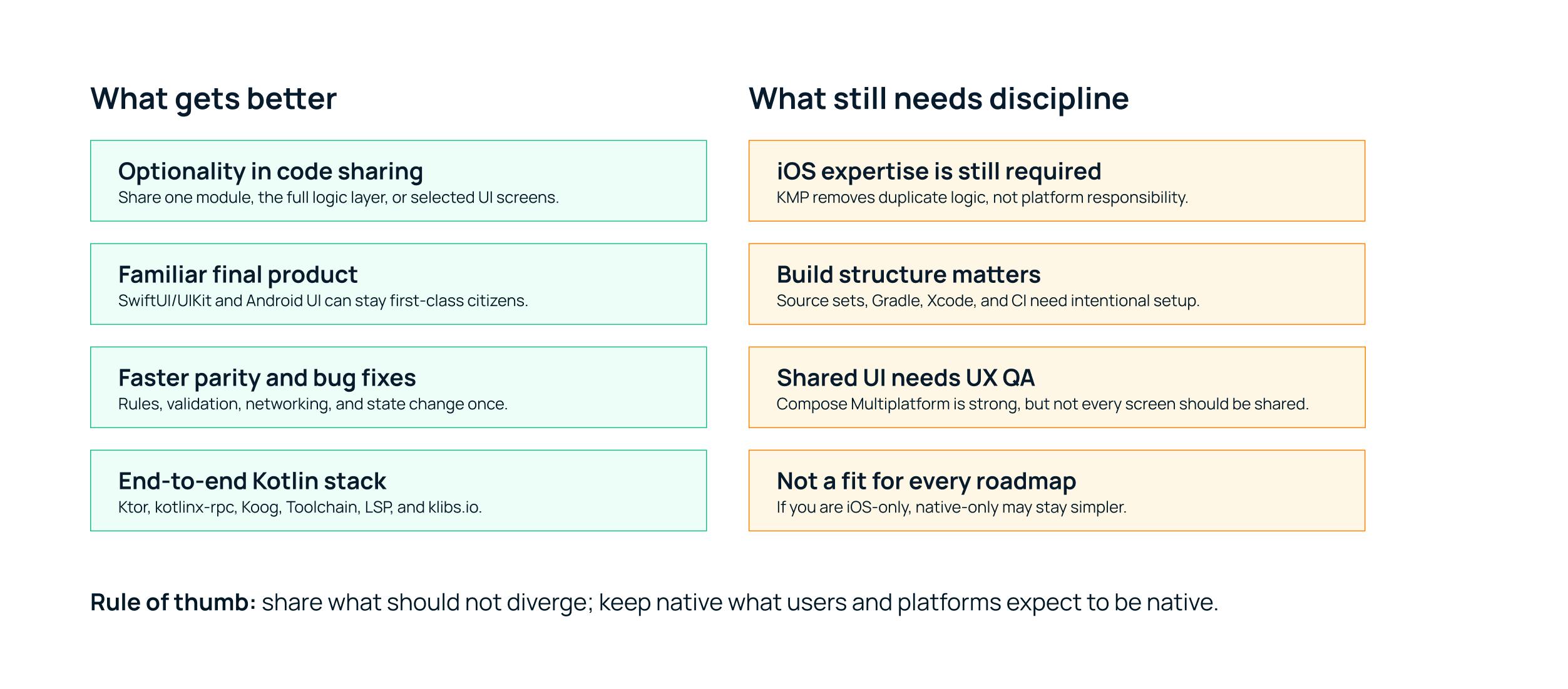
KMP is mature enough to build a production app on. It still has rough edges worth naming up front.
- You still need iOS expertise. SwiftUI, UIKit, Xcode, signing, accessibility, and App Store realities do not disappear. KMP works best when iOS engineers help shape the architecture rather than inheriting a shared module after the fact.
- You still need build discipline. Source sets, Gradle, Xcode, CI, and dependency alignment take deliberate setup. The new default structure helps; it does not replace judgment.
- Shared UI is a product decision. Compose Multiplatform is stable on mobile and desktop and increasingly capable, but not every screen should be shared. A checkout flow or onboarding screen may be worth it; a platform-sensitive navigation flow may be better left native.
- Swift interop is improving, not finished. Swift Export and SPM import are Alpha; for production iOS interop today, mature options like SKIE are still the safer choice.
- If you are iOS-only, or your Android plans are distant and speculative, KMP may be overhead you do not need. Native Swift can simply be the better call.
A practical way to choose
- Choose fully native when platform-specific experience and day-one OS features dominate the roadmap, and the team can sustain two implementations.
- Choose Flutter when the product needs a consistent custom UI across many platforms and pixel-level brand control matters more than platform idioms.
- Choose React Native when the organization has strong React/TypeScript skills and needs fast iteration, and can manage native modules.
- Choose Ionic/Capacitor when the product is web-first and does not need a premium native interaction model.
- Choose KMP when you want native experience and native access, but duplicated business logic is a cost you no longer want to pay.
The thing we keep coming back to is the combination. KMP gives you a native foundation, native quality, and direct SDK access, inside one Kotlin ecosystem that now reaches device, web, and backend, with AI tooling that understands the language. That combination is what produces the productivity jump. It works for prototypes, and it increasingly holds up in production.