TL;DR
- Databricks provides 3 compute sizes: M, L, and XL, with a limit of 5 instances per app.
- Vertical scaling is native, but request throughput barely grows with size: one instance of any size topped out at ~730–960 requests/s in our tests. (An example GET query where Lakebase is being read).
- Horizontal scaling is implemented on Databricks Apps by setting up 1-5 instances behind a managed load balancer (no autoscaling). Throughput grows almost linearly: 4,640 requests/s sustained on 5 XL instances.
- Databricks Apps stack directly impacts performance: from ~10 concurrent browser sessions for a simple Streamlit app, and 50+ for AppKit or FastAPI + React. On the API side, 1 M instance serves 370–750 requests/s and 5 L instances serve 1,100–4,700 with horizontal scaling.
- In users: One or two instances can cover a few tens of thousands of users, enough for a majority of enterprise applications. Five instances cover more than 100,000 users by GitLab’s sizing rule: 20 requests/s per 1,000 users.
- Heavy-duty tasks can be offloaded with serving endpoints and Lakeflow Jobs, keeping the app thin. Serving adds under 20 ms with route optimization; a serverless job starts in ~8–22 s.
- Scale to zero is in Beta with out-of-the-box Serverless Micro Apps (Genie App Builder), though only for new apps and with a 10-second wait time at cold start.
How many users can this app serve? I get this question after every Databricks Apps workshop or stage talk. A short answer: a few tens of thousands of users, enough to handle an app for a mid- to large enterprise. An honest answer, as always, starts with “it depends.”
It all depends on the app. How many people use it at the same time? How many requests does each action make? How much of that traffic writes, and how much work the app pushes elsewhere?
Nobody can quote a users-per-instance number without knowing all that, and above a certain scale, QPS is no longer a deciding number.
So what we do is measure. Since we started working with Apps back in 2024, we ran numerous performance tests on real applications and stacks. Here are the numbers from load-testing every compute size and instance count against Lakebase, along with the current scaling capabilities of Databricks Apps.
But before I start, a short disclaimer: All the numbers are coming from internal tests on real machines, using relatively complex apps, not starters. Browser-session tests ran with k6 to measure rendering performance; Apps+Lakebase QPS tests ran with Locust. This is not an official benchmark. So treat the results as directional and test your apps in your own environment.
Vertical scaling on Databricks Apps
How it works
Vertical scaling is available natively on Databricks.
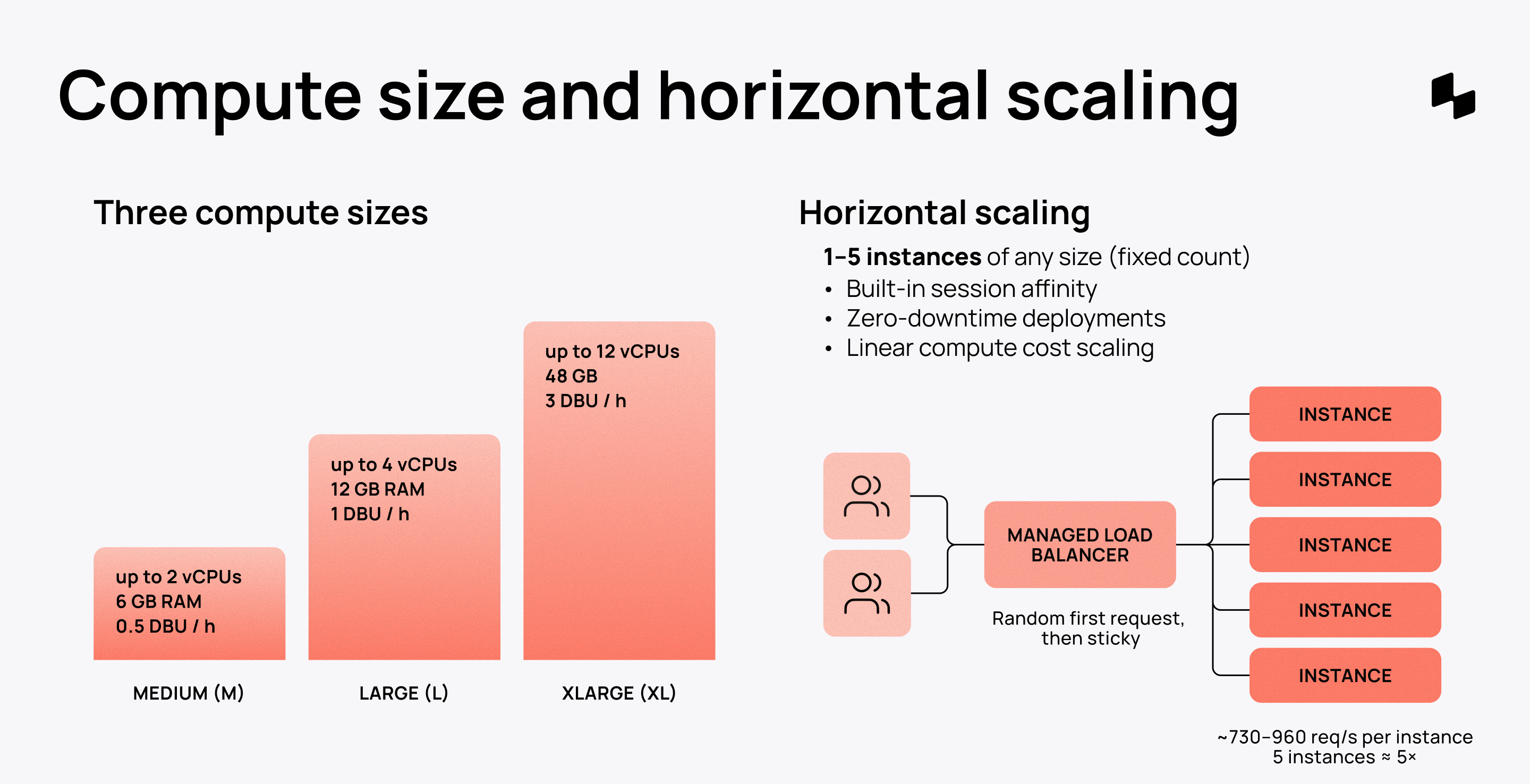
Databricks provides three compute sizes:
- Medium (M): up to 2 vCPUs, 6 GB RAM, 0.5 DBU/h
- Large (L): up to 4 vCPUs, 12 GB RAM, 1 DBU/h
- XLarge (XL): up to 12 vCPUs, 48 GB RAM, 3 DBU/h
You pick the instance size when you create or edit your app. For most apps, M is enough, as per Databricks’ own guide. In our load tests, one Medium instance served 370–750 requests/s on Lakebase-backed requests at a p99 under 250 ms. (I go into more detail with actual tests below ↓)
Here’s an interesting finding that may change how you read this.
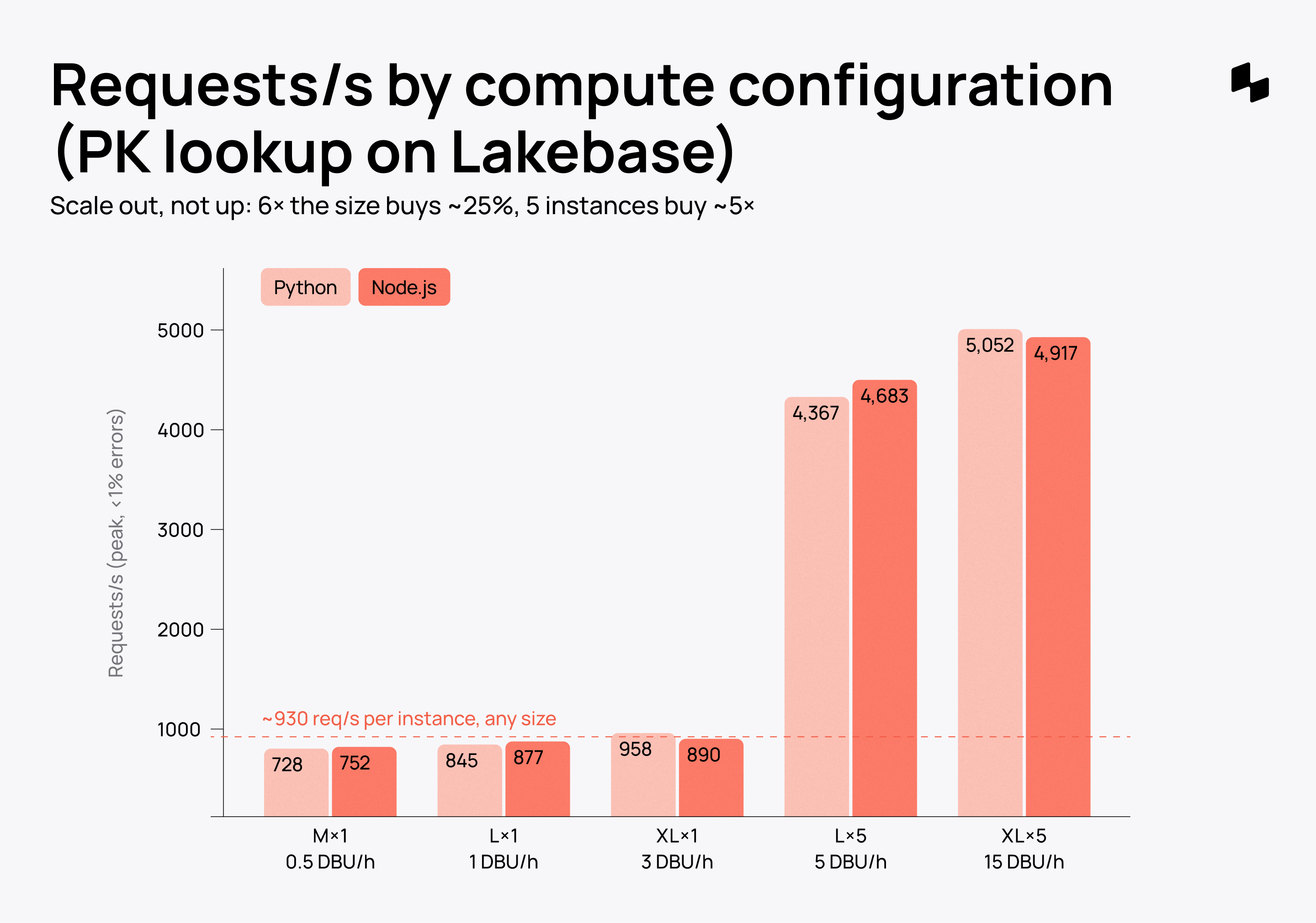
If the task behind the endpoint is not CPU/memory heavy, or optimized for scaling, request throughput per instance barely depends on size: M, L, and XL topped out at 728–752, 845–877, and 890–958 requests/s on the same lookup. Instance CPU stayed low, and Lakebase answered in under 10 ms, so unless you have a heavy task, the limit can be the Apps ingress in front of each instance. Six times the vCPU bought about 25%. So size up when the app is CPU- or memory-bound (Python on Medium came close to CPU saturation on the heavier request). For request rate, add instances.
And even if you decide to move up, first check if you’re offloading enough.
How to offload tasks effectively
Before you think of adding more compute, ask if the app is doing something it shouldn't do. The problem could be not compute, but the architecture of your Databricks application. In most cases, it makes sense to keep the app layer thin and offload the heavy-duty work downstream. Here’s how:
Serving endpoints
- Up to 1,000 endpoints per workspace by default (raisable), autoscaling on provisioned concurrency.
- Adds under 20 ms overhead with route optimization (per the docs).
- Use cases: Large number of simultaneous (AI) operations.
Lakeflow Jobs
- Starts in ~8 s on serverless without dependencies and ~22 s with one pip dependency (our measurement). Standard-mode serverless and classic clusters take minutes.
- Customizable clusters for heavy-duty jobs.
- Use cases: Ingestion, document parsing, embedding, conversion, image processing.
Lakebase
- Index the hot query. In our test, one sort that couldn’t use its index cut throughput from ~4,200 to ~1,100 requests/s on the same five instances.
- Serve precomputed Delta data through synced tables instead of computing it per request.
- Cache hot keys briefly in the app. Each instance keeps its own cache.
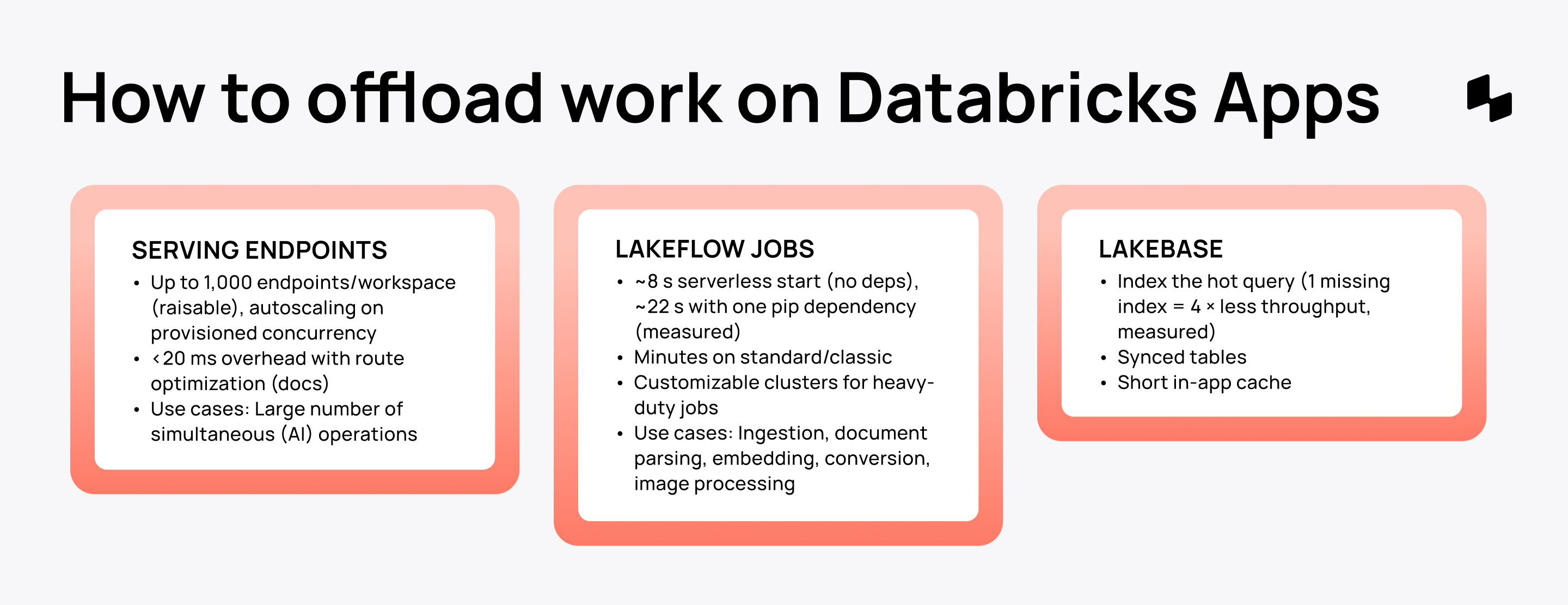
Databricks’ best practices agree on this approach. App compute is optimized for UI rendering, so push queries, batch work, and inference downstream.
Horizontal scaling on Databricks Apps
When one instance’s ~700–950 requests/s is not enough, or you need availability, time to think of scaling Databricks Apps horizontally.
How it works
Databricks Apps horizontal scaling is GA as of September 2026. It allows you to run your app across multiple instances, up to 5 instances per app, and up to 20 scaled apps per workspace. Both limits can be raised through your Databricks account team.
- Instances added manually. You set the instance size and a fixed count. Databricks recommends at least 2 for availability. There is no load-based autoscaling, and every instance is billed while the app runs.
- Load balancing. A managed router sends a user’s first request to a random instance and keeps later requests on it. In our tests, traffic split 16–24% per instance, as long as each client had its own routing identity.
- Session affinity. Requests from the same user go to the same instance, best-effort. Browsers get this through a routing cookie. API clients send an X-Routing-Key header.
- Zero-downtime deployments. A new deployment rolls out to a build instance first. The others keep serving until it succeeds.
- Linear cost. Compute cost scales with instance count.
Converting an existing app is done from the Settings tab with no downtime, and you can reverse it. Try it on a duplicate first, because newly created horizontally scaled Databricks Apps get no pre-installed Python libraries, and the instance count is set to 1 after conversion.
Mind that the Logs tab shows one instance at a time. But setting up Databricks Apps monitoring and telemetry can give you a full performance picture across every app.
What we measured
The throughput grows almost linearly with instances. Five XL instances served 5,052 requests/s on a primary-key lookup, about five times one XL instance (958).
Two things to plan for: the scale-up API call failed on the first try about half the time (fine on retry), and past the peak the router returns HTTP 502s instead of queueing, so keep headroom.
Databricks Apps performance measurements
Now the most interesting part. Once again, the numbers are based on internal tests for real-world applications on Databricks Apps, and do not represent an official benchmark.
How we tested (Lakebase API tests)
- 7 Databricks Apps: Python (uvicorn + asyncpg) and Node.js (cluster + pg), one worker per CPU, on M × 1, L × 1, XL × 1, L × 5, and XL × 5.
- Endpoints: a primary-key lookup on 1 M rows, and a complex request with three Lakebase queries plus scoring and hashing over a ~2 KB JSON response, in a heavy (unindexed sort) and an indexed variant.
- Lakebase: 16–32 CU autoscaling, scale-to-zero off, one primary and two readable secondaries, managed PgBouncer (only available with password authentication for now).
- Load: distributed Locust on 6–30 serverless hosts, no think time, 10 → 400 clients, 60 s per level, each client with its own X-Routing-Key. A request is counted only if it returns HTTP 200 with the app’s own timing header.
- Every number is the best level with under 1% errors. AWS us-east-2, 21 October 2026.
BROWSER RENDERING
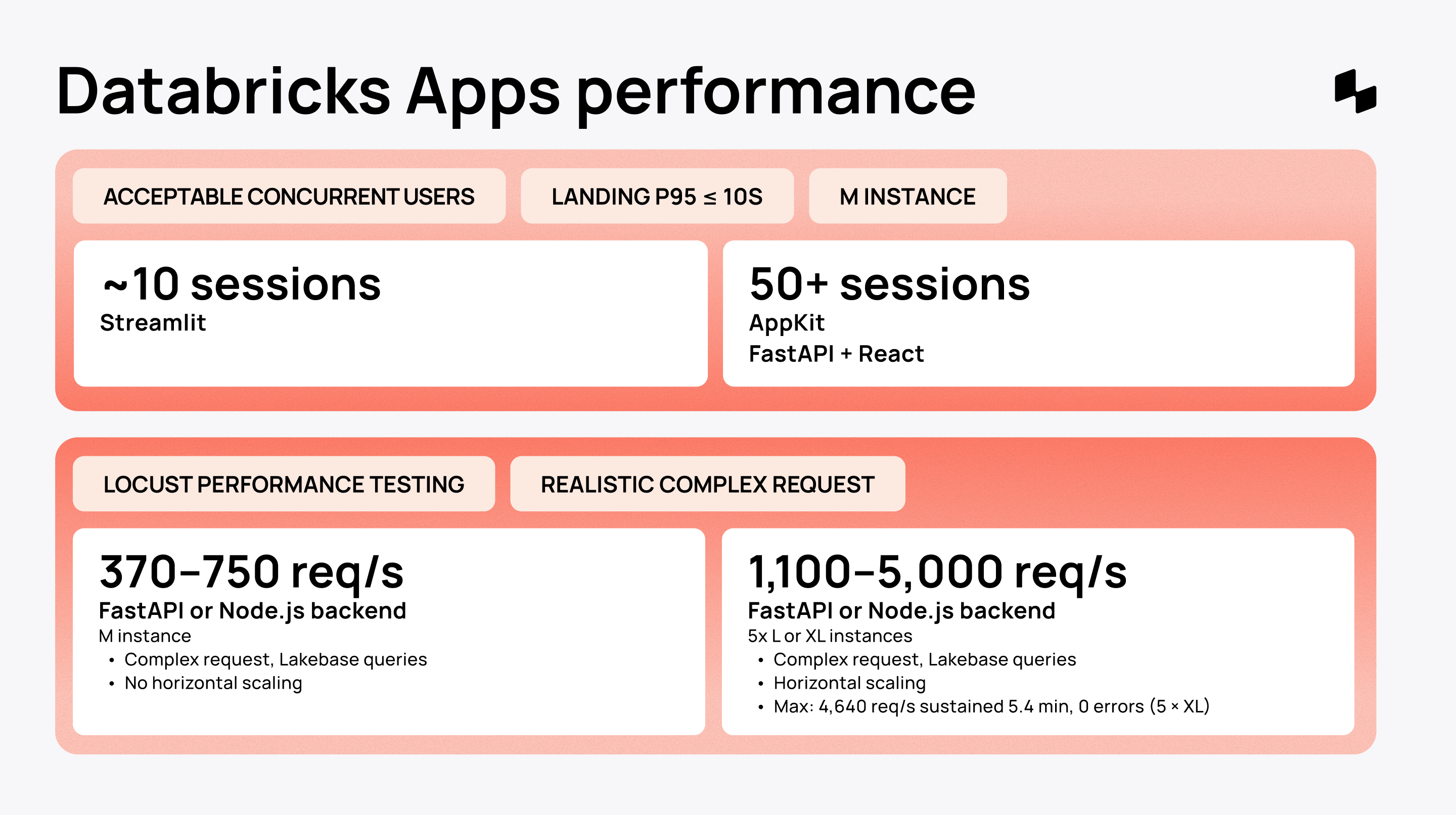
Streamlit: ~10 concurrent sessions
- Stack: Streamlit on a Medium instance.
- Test: Grafana k6 for browser rendering (p95 ≤ 10 seconds).
- Use cases: a low-code data app or a working prototype.
Streamlit served 10 simultaneous users perfectly and 50 in an acceptable way. But that doesn’t mean that Streamlit can only confidently handle 10 users. There’s a huge gap between a Streamlit-based build and a full-stack application.
Mind that Streamlit has its own custom WebSocket rendering, so it’s really hard to compare it to full-stack. I tried to measure it honestly with real browser sessions and used k6, which measures rendering performance, not via an API benchmark.
AppKit/FastAPI+React: 50+ concurrent sessions
- Stack: AppKit-based Node.js + React or FastAPI+React on a Medium instance.
- Test: Grafana k6 for browser rendering (p95 ≤ 10 seconds).
- Use cases: a modular app for common use cases.
An AppKit-based or a full-stack app can serve 50+ concurrent users on a rendering test, a full tier above Streamlit.
FULL-STACK TEST (APPS + LAKEBASE)
1 M instance: 370–750 requests/s
- Stack: custom React frontend with a FastAPI or Node.js backend on a Medium instance.
- Test: Locust performance testing with realistic complex requests.
- Use cases: a complex, custom full-stack app with its own business logic.
One Medium instance served 728–752 requests/s on the primary-key lookup (p99 45–63 ms), 698–744 on the indexed complex request, and 367–573 on the heavy one at a p99 under 250 ms.
The minimum Medium instance without horizontal scaling is enough for an internal app with tens of thousands of users (see the conversion below). Node.js and Python stayed within 10% of each other once scaled out. On a single Medium with the heavy request, Node.js delivered about 40% more.
5 L or XL instances: 1,100–~5,000 requests/s
- Stack: custom React frontend with a FastAPI or Node.js backend on 5 Large or 5 XLarge instances via horizontal scaling.
- Test: Locust performance testing with realistic, complex requests.
- Use cases: a complex enterprise-scale app serving tens of thousands of users.
Five Large instances served 4,367–4,683 requests/s on the lookup and 4,156–4,220 on the indexed complex request. The heavy request stopped at ~1,100 on both L × 5 and XL × 5, because the database sort, not the app, was the limit.
The maximum run held 4,640 requests/s for 5.4 minutes on five XL instances: 1.5 million requests, zero errors, p99 68 ms, Lakebase query p99 8 ms. A second identical app ran at the same time and held 4,811, so the ceiling is per app, not per workspace. Past the peak, throughput drops and the router returns HTTP 502s, so plan with headroom.
How to convert req/s to a user count
A user count becomes load only through a chain of assumptions.
- Which layer gets counted. One user produces far more database queries than API calls, and edge traffic sits in between. For example, Shopify’s Black Friday figures for the same buyers differ about 100× between database queries and API requests. Our tests count API requests, the layer an app instance actually serves.
- How often each person sends a request: Requests per action, think time between actions, and how sharply traffic peaks in working hours.
- How many of all users are active on a given day and at the same moment.
Each of these can move the answer 2–10× on its own, so any users-per-QPS figure is a range, not a constant.
Two references bracket the range for internal apps.
- GitLab’s reference architectures size self-managed instances at 20 API requests/s per 1,000 users, CI and other automation included: 1,000 requests/s for 50,000 users.
- A lighter internal tool, where 15% of employees use it on a given day with about 250 requests each and a 4× working-hours peak, needs only about 1.7 requests/s per 1,000 employees.
Applied to our measurements with 30% headroom:
- 1 × Medium (367–698 req/s): ~13,000–24,000 users by the GitLab rule; ~150,000–280,000 employees for a light internal tool.
- 5 × Large, heavy request (1,107 req/s): ~39,000 users by the GitLab rule; ~450,000 for a light tool.
- 5 × Large, indexed request (4,156 req/s): ~145,000 users by the GitLab rule; ~1.7 million for a light tool.
Even the conservative end puts an app for a few tens of thousands of users on one or two instances.
Two caveats apply:
- The load test’s clients have no think time, so they are not people. At light-tool pacing, 4,640 requests/s is roughly 65,000 people in the app at the same moment.
- And Locust runs a closed model, which sends less load as latency rises. A fixed-arrival-rate test would show overload more sharply.
Where this maths stops working
The conversion holds for request–response apps, but only up to a point. It breaks in three cases.
Real-time apps on WebSockets or streaming exchange messages, not requests, so connection count and message rate are the capacity measures. API and integration traffic is driven by machines and polling intervals, not people. And write-heavy workloads hit a different ceiling: every write lands on one Lakebase primary, and more app instances do not change that. OpenAI serves ChatGPT’s reads from one PostgreSQL primary with about 50 replicas, but moved write-heavy workloads to sharded systems to get there.
At many hundreds of thousands of active app users, requests per second stop being the deciding number. What decides is how much work each request does, how writes are partitioned, how failures are contained, and how teams split the system.
That is where the large-scale toolkit comes in. Here’s what we did not test here:
- CDNs and edge caching for public or cacheable content.
- Container platforms with load-based autoscaling (Kubernetes HPA, KEDA), where Databricks Apps uses a fixed instance count.
- Distributed caches such as Redis or Valkey, with explicit freshness and stampede rules.
- Read replicas, partitioning and sharding (for example PgDog or a sharded store) to spread writes and data.
- Queues and streams (Kafka, worker pools) to take slow work off the request path
- Rate limiting, circuit breakers and multi-region failover to contain overload.
- Splitting the system into services that independent teams own, which scales the organization more than the traffic.
Inside Databricks, the same ideas map to splitting traffic across several apps (two apps doubled throughput in our test), Lakebase read replicas and synced tables, Model Serving for elastic inference, and Lakeflow Jobs for background work. Beyond that, Databricks Apps becomes one component of a larger architecture, run by a dedicated platform team.
Scale to zero
First announced at Data + AI Summit 2026, Serverless Micro Apps (in the product: Genie App Builder apps in App Spaces, Beta since September 2026) run on a microVM-based runtime. Each app gets its own lightweight virtual machine, so it can start when needed and scale down to zero when idle.
Before that, Databricks Apps ran continuously, and on our own Databricks Apps projects we had to add a custom feature to scale down resources and avoid DBU cost when the app is not used. Micro Apps solved this with built-in scale-to-zero.
This is huge not only for prototyping, but also for a large ecosystem of applications that run in the organization sporadically and risk being deprioritized because of the accumulating costs.
A few caveats to look out for, though:
- It takes roughly 10 seconds to cold-start the idle app, so only go with this option if your users are fine with that.
- Existing apps can’t be automatically migrated to Micro Apps at the moment.
- Apps scale only between zero and one instance (no horizontal scaling), scale down after 30 minutes idle by default, and run only in Beta regions on AWS and Azure without general internet egress.
Verdict
So, how many users can Databricks Apps scale to?
One Medium instance easily handles 370–750 requests/s. Five instances go up to ~5,000, with 4,640 sustained for five minutes without an error. Even by GitLab’s conservative sizing rule, that is tens of thousands of users on one or two instances and well over 100,000 on five.
That covers the large majority of enterprise use cases. For an internal app serving a few tens of thousands of people, Databricks Apps is the right platform, with headroom to spare.
Despite that, read these numbers with every assumption and caveat attached. And test your apps in your own workspace against your own environment. Only at many hundreds of thousands of active users, or with write-heavy or real-time workloads, does the question shift from requests per second to architecture and organization. From there, Databricks Apps becomes one part of a larger stack.
See the full Databricks Apps scaling capabilities mapped out here.