
TL;DR
- Reference architecture defines three distinct layers—app, intelligence, and data+governance. Each is developed at its own pace and can scale independently.
- Genie is a universal entry point for a business user. Databricks Apps covers the full-featured serverless runtime: auth, hosting, and service management, and provides full observability.
- The app layer stays thin and stable. The intelligence layer stays flexible and easy to accommodate changes without redeploying the product.
- The data+governance layer relies on UC with medallion architecture for raw, curated, and rich data outputs. Everything runs through Lakebase with OLTP for low latency and cost efficiency.
- Lakebase may sync tables from an extra “application semantics” layer, which defines the application's entities, and materializes them in a pre-aggregated shape.
- Standardizing architecture makes it reusable. The same pattern works for a single use case app, grows to a full-stack flagship application, and can be reused to build an ecosystem of hundreds of apps for different needs in the org.
Databricks Apps made it incredibly easy to spin up an app. As a result, hundreds of Databricks applications are being built right now within the same org. Data, AI, sales, and ops ship them without ever talking to IT.
But without a standardized architecture and blueprints, each and every one of these apps is unique and has to be wired from scratch. This is neither practical nor safe.
To solve this problem, I have put together a reference architecture for Databricks Apps that can be reused, scaled up, and adjusted to any tier of app, from a PoC built in hours to a flagship enterprise application capable of serving thousands of users at the same time.
3 layers of Databricks Apps architecture
I want to start with a disclaimer.
When presenting this reference architecture at the Data+AI Summit this year, I introduced the layers unconventionally, moving upstream from business user to AI to data. I noted this upfront to the audience keen on a more traditional approach.
And now I’m making the same note here as well, for I’m going to use the same logic. Bear with me, you will see the reasoning behind it real soon.
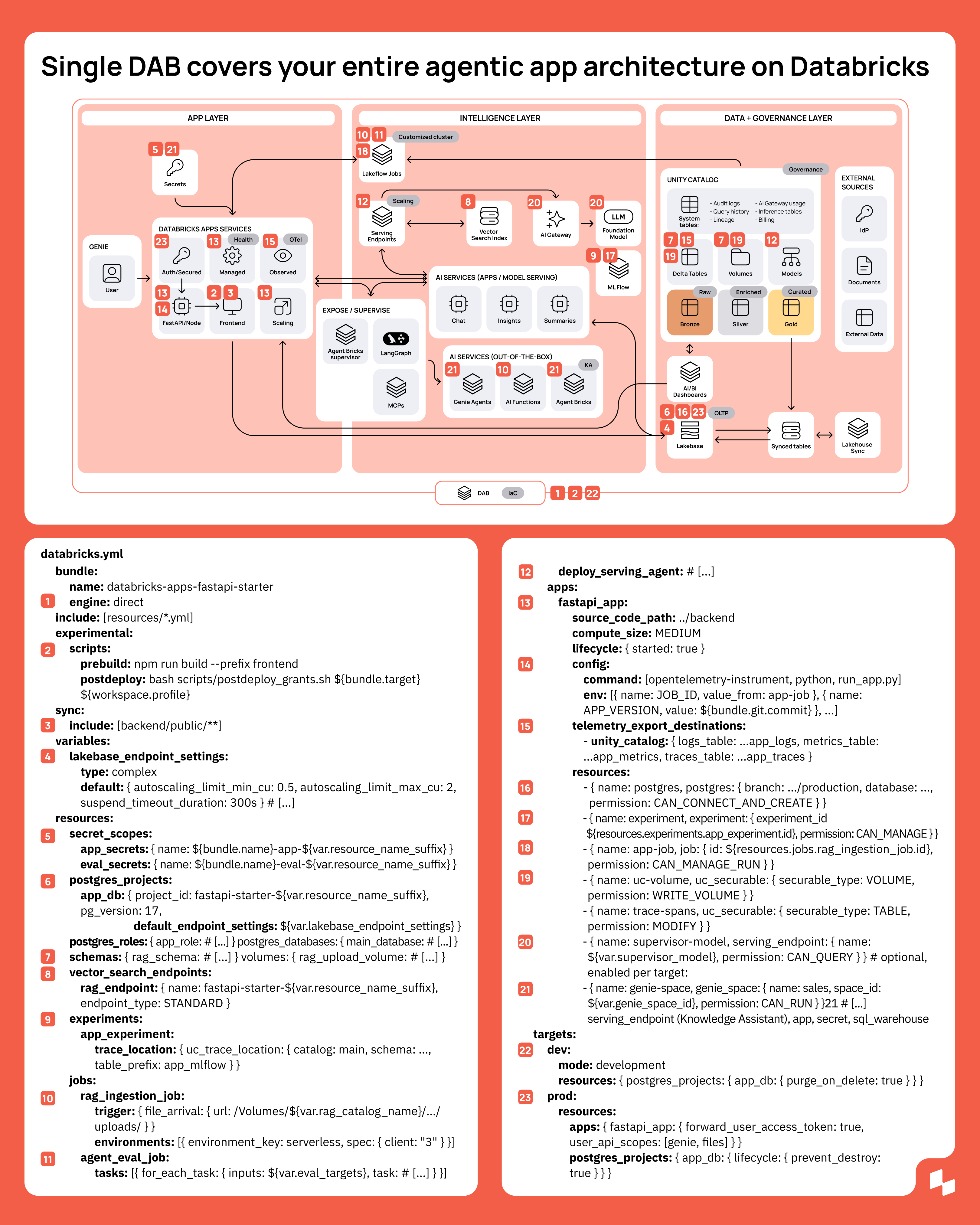
Here's what the full reference architecture diagram for Databricks Apps looks like:
All three layers can be developed at their own pace, are independently scalable, and live on Databricks under one governance and security framework.
App layer: entry point
Genie is the single entry point for any business user, from a data analyst to a C-level executive. From here, an app can integrate and orchestrate everything underneath it.
Databricks Apps has auth, security, and infrastructure already figured out. So you can skip the boilerplate, cutting weeks off the development time for provisioning, OAuth setup, and secrets management.
All-things-built-in keeps the app thin. The app layer can delegate all the heavy-duty jobs like reasoning, retrieval, and data access to the layers underneath it.
This also keeps the application stable since all AI experiments and data processing run in the background.
Building the app layer natively on Databricks provides another benefit: you get end-to-end app logging, observability, and cost control by wiring up Databricks Apps monitoring, OTel, MLflow Tracing, and Unity Gateway.
Intelligence layer: AI clockwork
All things AI live in the intelligence layer: serving endpoints, vector search (+ Lakebase search if it fits your use case), Unity Gateway, the out-of-the-box AI services like Genie Agents, AI functions, and Agent Bricks.
The reason why we place AI in its own layer is simple: app and AI development run at different speeds.
Application development requires stability, predictability, and controlled deployments. AI code needs fast iteration, quick model switches, and frequent experiments and tests.
Pushing both through one release cycle would hurt one or the other. That’s why we use a bimodal architecture approach to accommodate the needs of both.
Unity Gateway is a single control center for every model call in the app, covering auth, audit, agent registry, traces, rate limits, budgets, and model routing. It enforces safety, compliance, and cost control. Wired up with the app’s unified logging, it provides granular AI cost attribution per user and per team.
Data+governance layer: the foundation
The foundational layer runs all data workloads and hosts the medallion data architecture: Bronze to store, Silver to refine, and Gold to deliver insights to business users.
Unity Catalog governs it all: audit logs, query history, lineage, Unity Gateway usage, inference tables, billing. It also provides fine-grained access control (ABAC, RLS/CLS) for every user, function, and team.
Important: RLS and other fine-grained access controls are not automatically synced to Lakebase. You can resolve this in two ways:
Either not sync tables with Lakebase and, if you still need the data, you can get it through a slower but direct Lakehouse query, or
Re-enforce and implement a governance layer for Lakebase individually.
Lakebase makes this whole architecture work, now faster and more effective (and cheaper!) than ever. With OLTP and OLAP united under LTAP, Lakebase bridges analytics and transactional workloads, synced tables update within seconds, and all data work becomes simpler and more cost-effective.
DABs/IaC
With the current generation of DABs, the entire architecture is deployed in one go with a single set of DAB config. One databricks.yml setup hosts the app, its Lakebase database, search index, jobs, MLflow experiment, Genie spaces, secret scopes, and binds them as resources. A single Databricks bundle deploys builds, provisions, starts, and grants in one run, according to the deployment target.
Databricks Apps architecture for various tiers of apps
Reusability is the strongest feature of this Databricks Apps architecture. You can start with the smallest version that fits one use case and solves one problem—prototyped in hours, shipped in days. And you can build it up to a full-stack enterprise application, adding modules and components on demand.
MVP app for a single use case: Ship in days
This is the starting point. Small enough to minimise orchestration and connection points, but big enough to handle a fully functional single use case application—a chat, a custom workflow or dashboard, or even just a headless microservice.
Straightforward flow, simple topology: Genie→Databricks Apps→AI services (e.g. Genie Agents or build custom ones using Unity Gateway)→Lakebase→Unity Catalog.
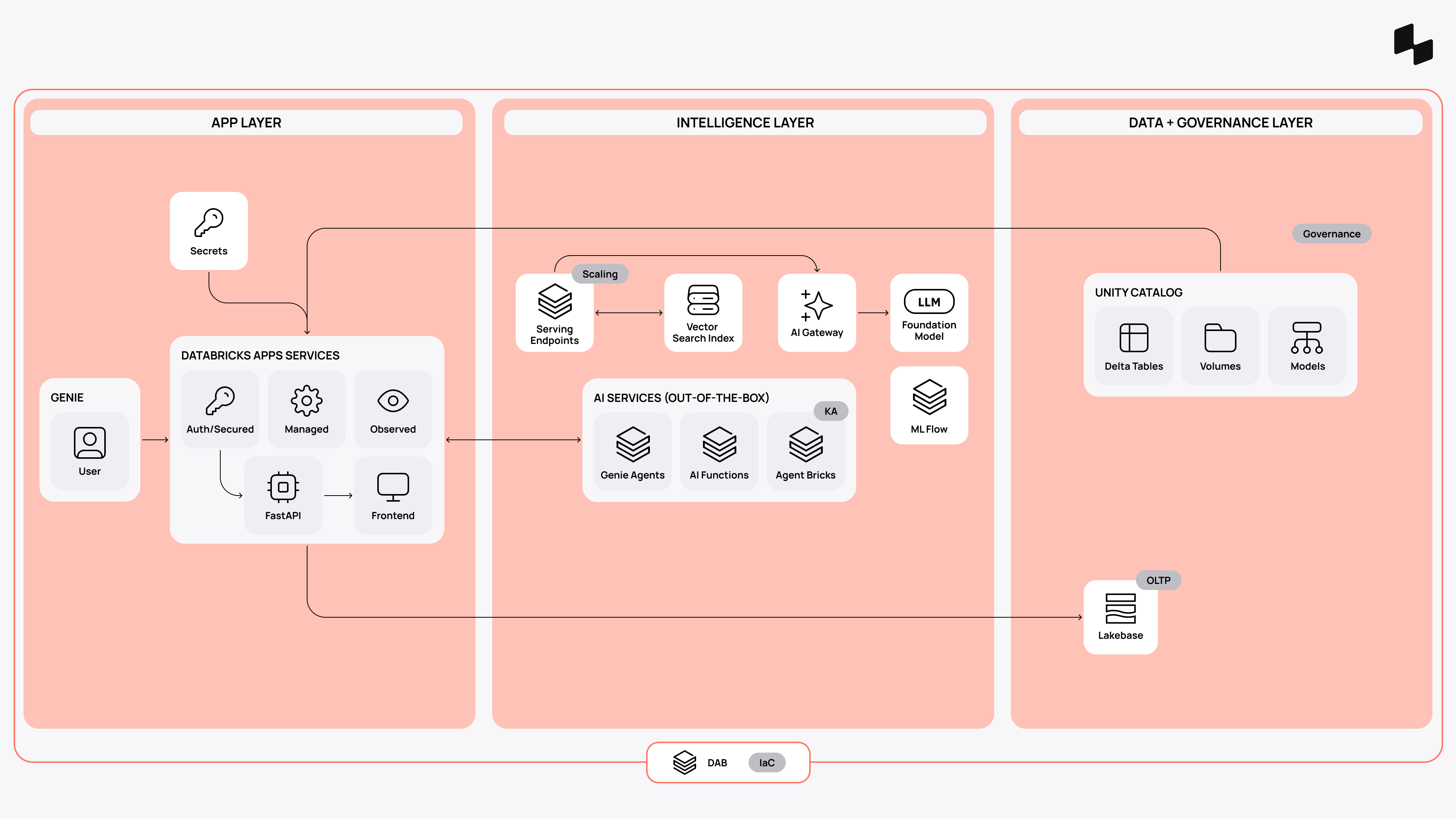
Why it works:
- All things are native: no need for a new app silo/data migrations, custom connectors, or long infra setups.
- Governance is (mostly) inherited; security is built-in.
- Templated build takes only days to ship.
Flagship enterprise application: Ship in weeks
Let’s say you have to go beyond a single use case and ship an enterprise AI application with custom business logic, complex data workflows, and thousands of users (and agents).
Same starting point, but now with a build-up. Custom agents complement native AI services. LangGraph and Agent Bricks supervisor orchestrate multiple tools and agents instead of a single model call. Lakeflow Jobs take care of scaling for heavy-duty data workflows. Bronze → Silver → Gold model sorts out data and feeds different consumers. Lakebase handles analytics and transactional data in one room.
On top of the medallion, an extra application semantics layer can also be introduced, holding the product's data contract—the operational entities and derived measures, pre-joined and pre-aggregated for request-time reads, with their business definitions encoded in one governed place. Genie Agents, Dashboards, and other ways of user consumption are less sensitive to changes in the gold layer. So decoupling the application semantics guarantees that every screen, API, model, and agent answers the same question the same way.
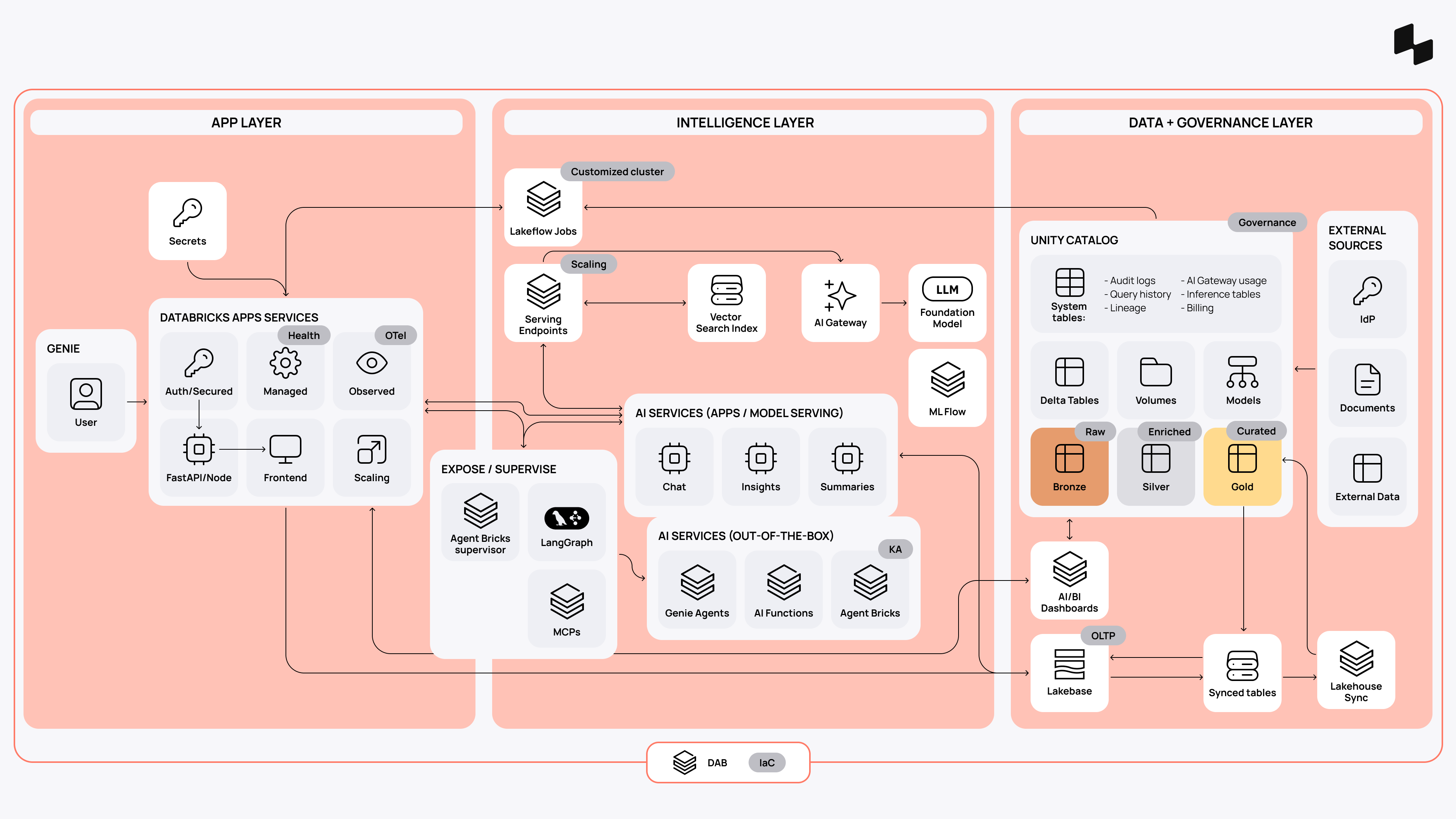
Why it works:
- Same foundation, multiplied complexity, and still no need for migration or long infra setups.
- If you need to scale Databricks Apps, you can add instances and offload heavy load to Lakeflow Jobs and serving endpoints.
- All-around data and AI governance under Unity Gateway, MLflow, and Unity Catalog.
App ecosystem: Ship repeatably, at scale
Remember I mentioned an org that spins up apps faster than token limits reset? It is actually happening right now, and it is not always a good thing. Because without a proven standard, this inevitably leads to tech debt, shadow IT, and very real (and expensive) security risks.
Back to the reference architecture. One standardized, adjustable blueprint is what this org needs to turn app sprawl into a repeatable, reliable development process. So any team can build apps, of any size and scale, under a single governance, observability, and cost control.
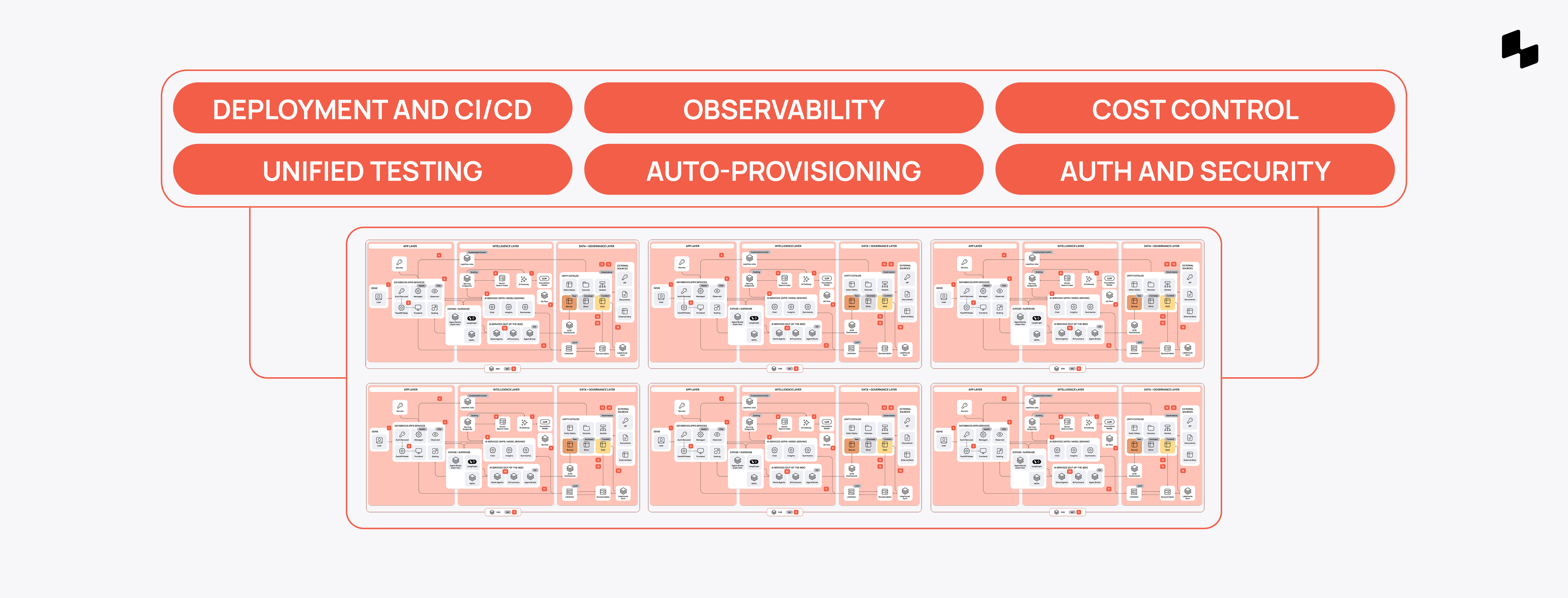
That’s exactly what we do with Apps Factory. We put together a tailored operational layer (templates, standards, guardrails, checklists, agentic engineering and monitoring setups) that fully enables organizations to build, run, and scale hundreds of agent-native apps on Databricks—repeatably and completely on their own. It takes from 4 weeks to set up and saves 30% of effort per app for years. Check it out→
Key takeaway: Why a one-platform approach works
Fewer connections means fewer things can break down. It also means faster and cheaper builds, stronger reliability, and ironclad security and governance, which—let’s be honest—are not so easy to guarantee when you’re starting from a clean slate.
One can argue that this also means platform lock-in. Which is not entirely untrue, but also not as simple as it sounds. The compounding benefit of having every single component, module, and service in one place is unbeatable. It is measured in real dollar value, and real weeks, if not months, of time saved.
Plus, you can always migrate should you decide to.