Most enterprises I work with fear moving forward with agentic engineering. The biggest concerns are security and governance, as well as cost control.
The fear is reasonable: a coding agent calls models, invokes tools, and acts on data. It’s hard to tell which model it used, what it cost, or what it was allowed to do. This walkthrough puts those answers in one place using Unity Gateway on a live Databricks workspace.
What does Unity Gateway do?
Every model, MCP server, and skill your coding agents use is a Unity Catalog securable behind Unity Gateway, with grants, limits, policies, and usage logs. You still own the agent framework. But the path it takes to models and tools becomes governed under Unity Gateway.
Coding agents call Unity Gateway, which routes to model services, model provider services, MCP services, and skills.
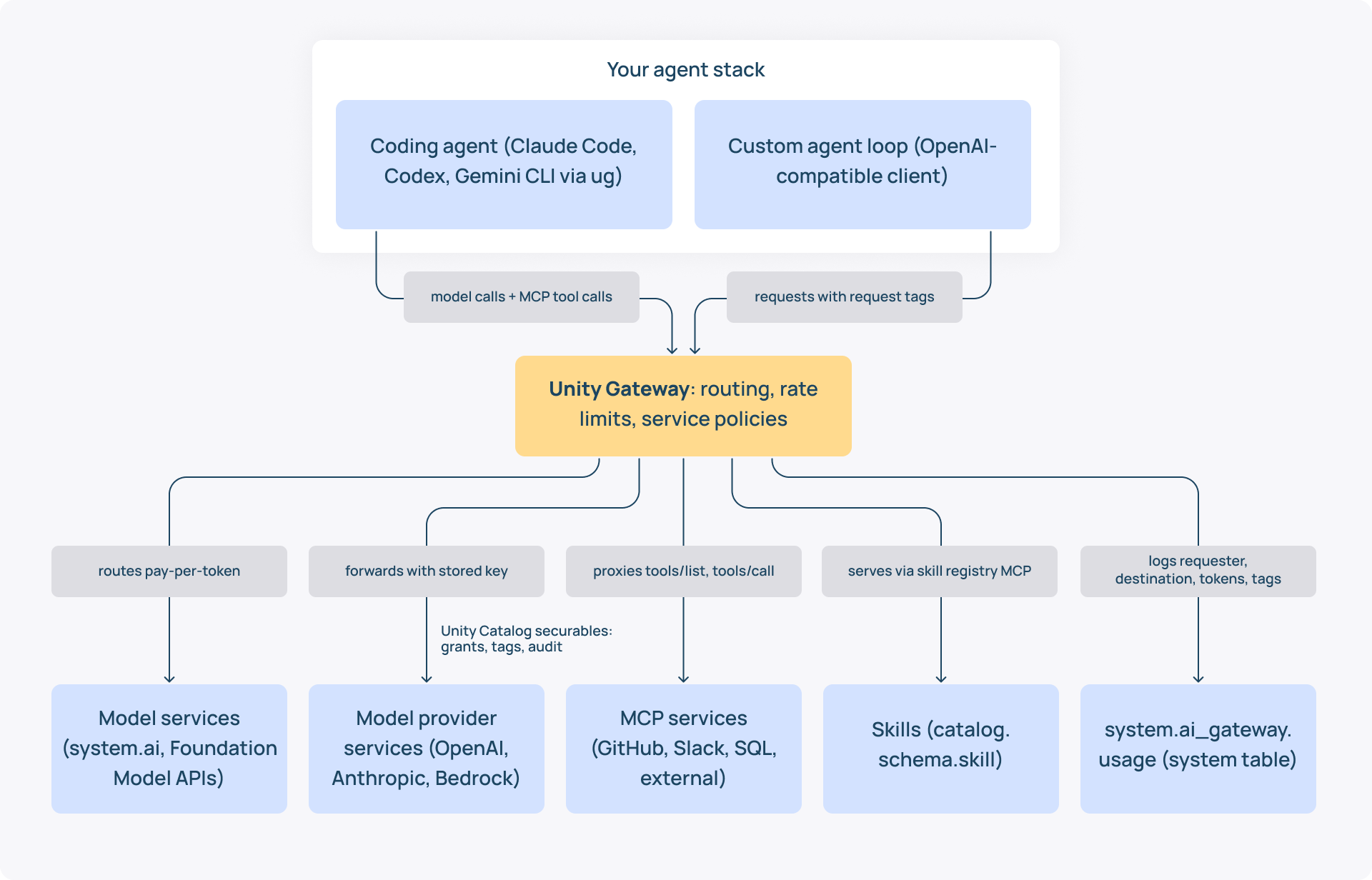
Databricks Unity Gateway governs only the traffic that passes through it. Its tracing can record local tool calls, but shell commands, Git pushes outside an MCP service, and skills copied by hand need their own controls.
In the GA announcement, Databricks defines the scope of Unity Gateway in three terms: Cost, Control, Choice. This article shows how it plays out in real builds.
But before that, a quick rundown of where it’s coming from.
Where is Unity Gateway coming from?
Before April 2026, Mosaic AI Gateway governed one serving endpoint. From April 2026, the same controls attach to Unity Catalog securables. From August 2026, it’s in GA.
The 15 April 2026 announcement made AI Gateway part of Unity Catalog as Unity AI Gateway. The recent renaming led to docs and the page header dropping AI and calling it Unity Gateway. The sidebar still says AI Gateway.
- 16-18 June 2026, Databricks Data + AI Summit. Contextual Service Policies, budgets for external providers, tracing, Smart Routing, and a partner ecosystem, framed as "Agents are the most privileged actor."
- 4 August 2026. Unity Gateway is in general availability, with service policies, Smart Routing, tracing, and agent services still in Beta.
Four securables of Unity Gateway
Model services, model provider services, MCP services, and skills all carry a three-part name, an owner, tags, and standard grants:
- Model service. A governed LLM endpoint with routing, rate limits, an optional inference table and policies; system.ai ships one per Foundation Model APIs model.
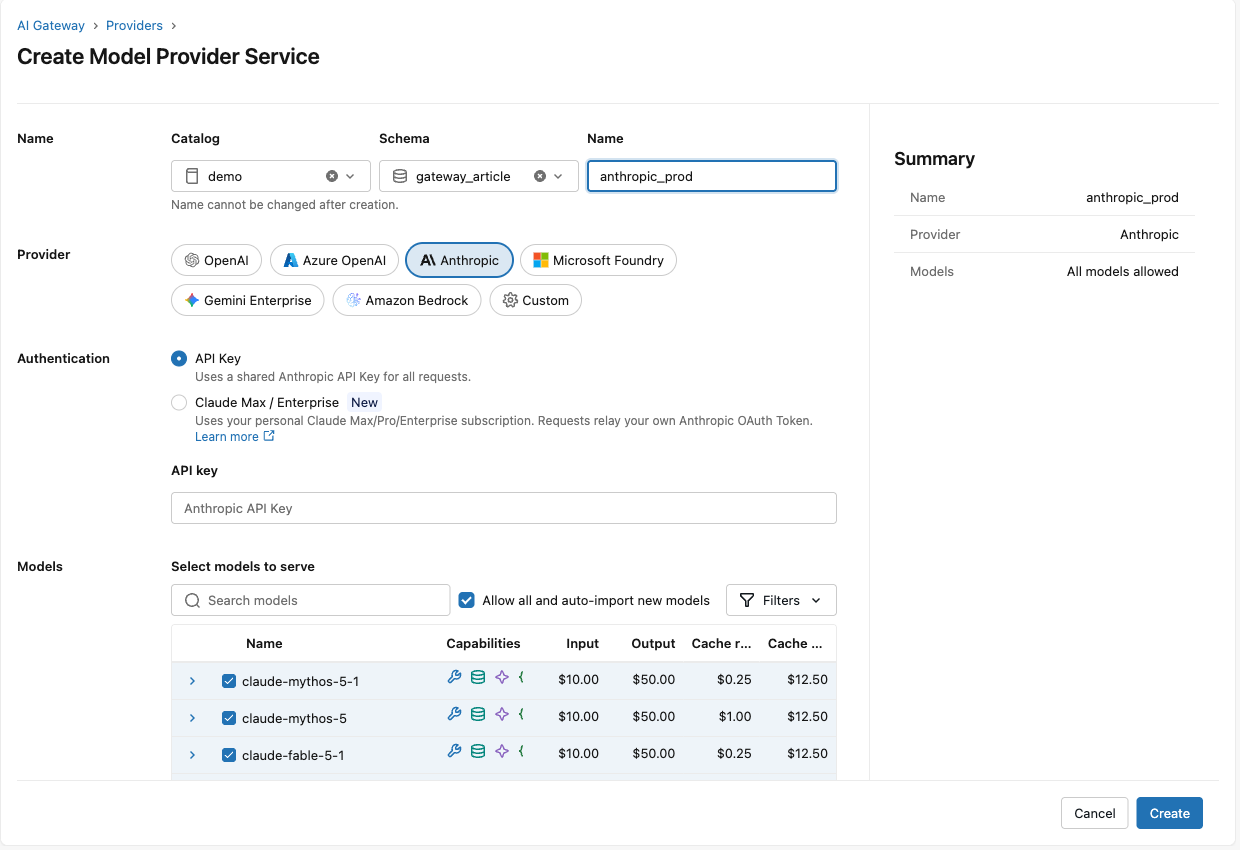
- Model provider service. A governed connection to OpenAI, Anthropic, Amazon Bedrock and others; the key stays in Unity Catalog.
- MCP service. A governed MCP server, Databricks-managed or external, with tool filters and policies.
- Skill. A folder published to a schema as catalog.schema.skill, shared by grant.
Before you start
To start with Unity Gateway, you need:
- a Unity Catalog-enabled Databricks workspace in a supported region,
- the Databricks CLI signed in,
- Unity Gateway CLI installed, and
- Unity Gateway-related preview features enabled in the workspace.
Find the Unity Gateway page
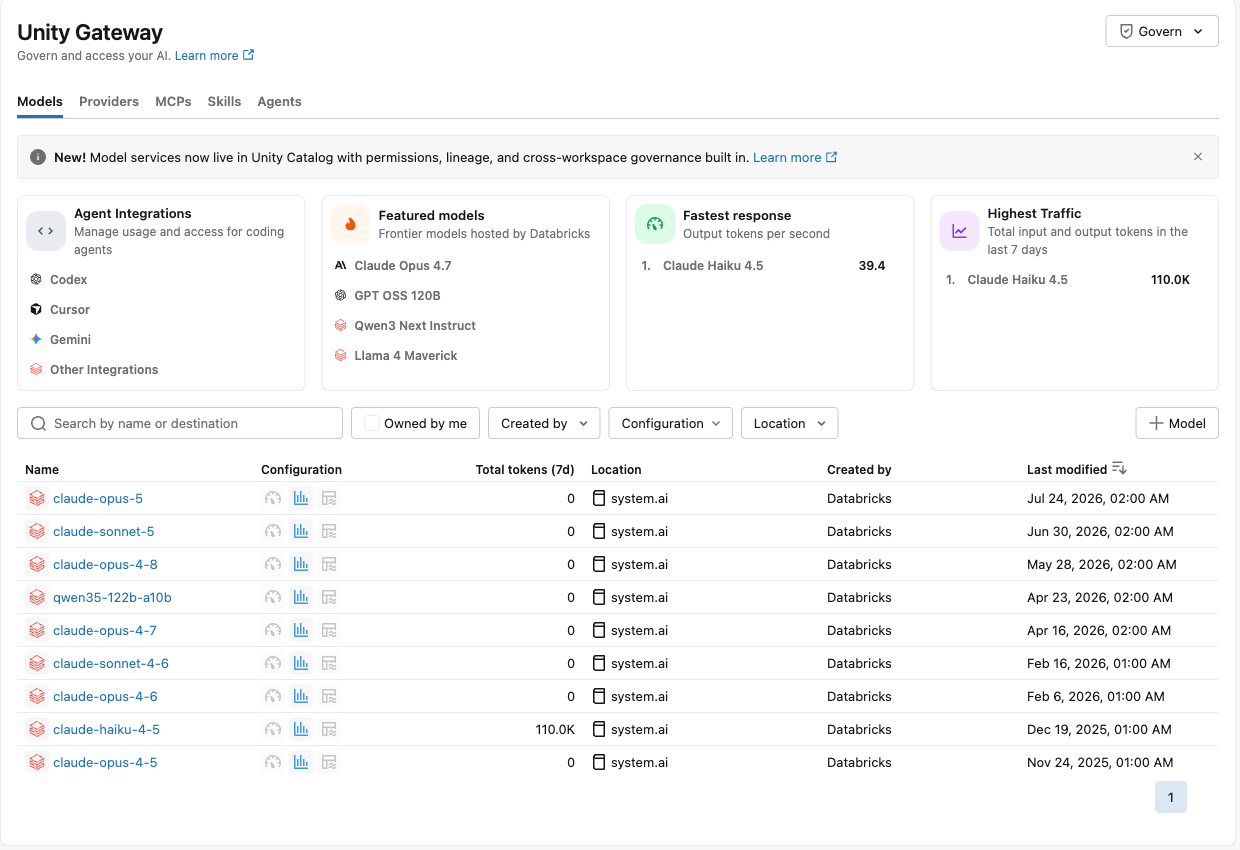
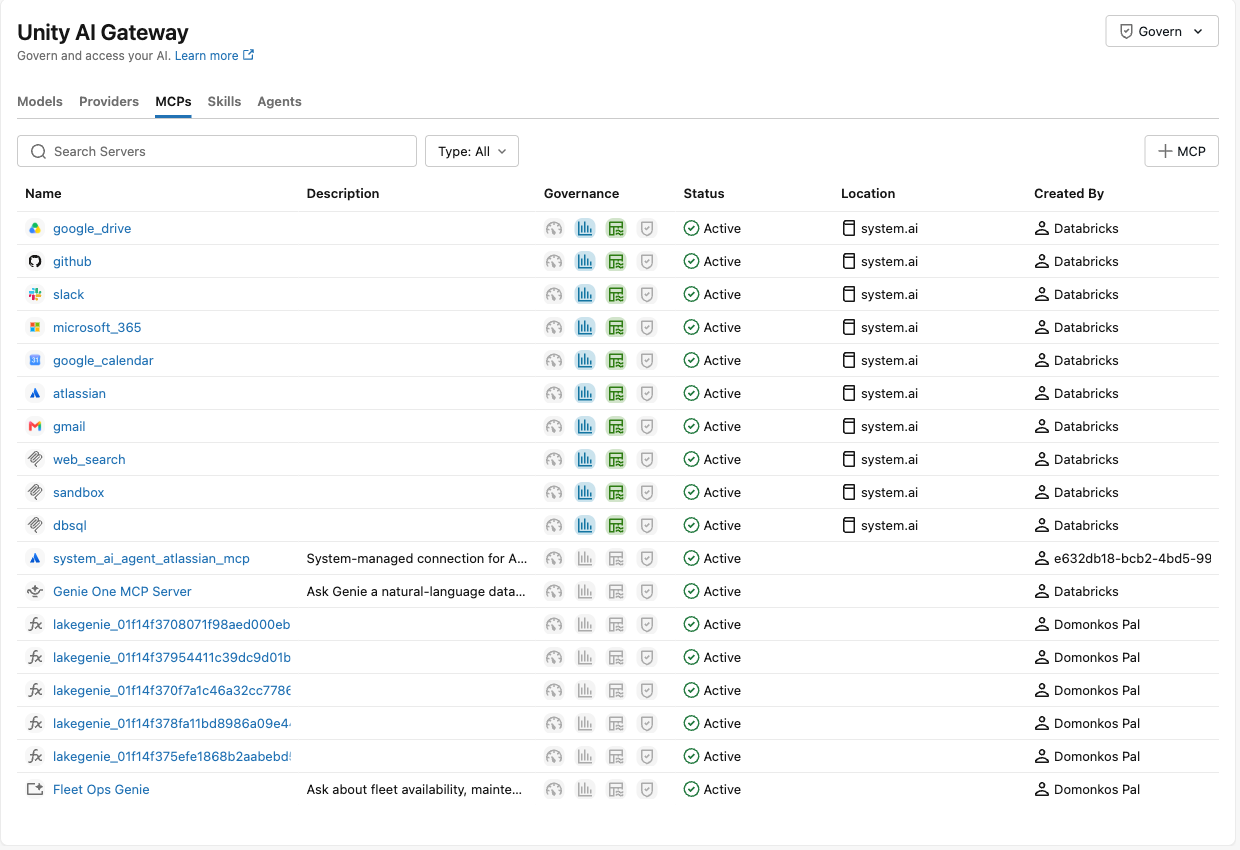
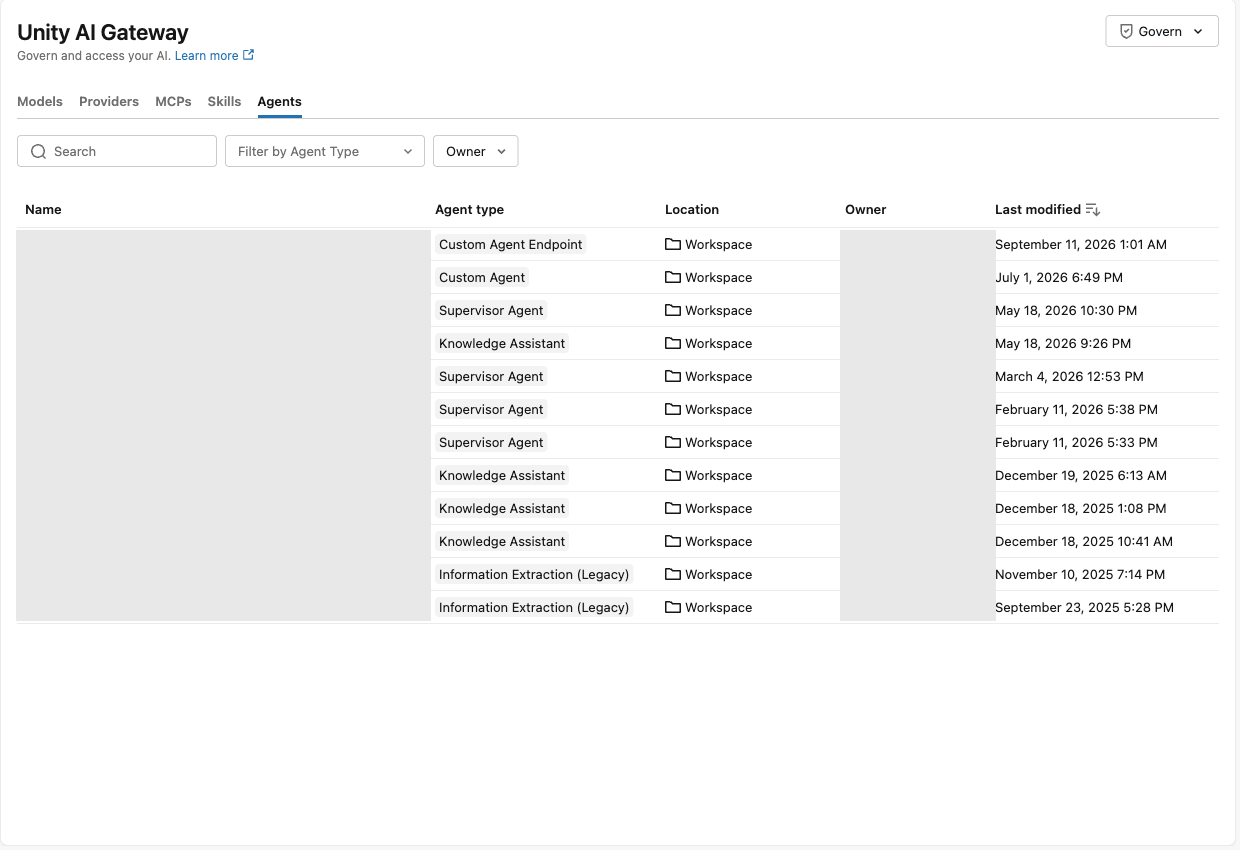
The AI Gateway sidebar entry opens tabs for Models, Providers, MCPs, Skills, and Agents, and every row is a governed object. By default all account users have EXECUTE on the system.ai model services, so restricting models is a deliberate step, e.g., tag with a GRANT policy.
Know who can call the gateway
Querying needs the Workspace access entitlement, or Consumer access with the Consumer access to Unity Gateway preview, so business users qualify too. It lets analysts and operations staff use governed models without Workspace access.
- To create a model service. CREATE SERVICE, USE CATALOG and USE SCHEMA on the target schema, plus EXECUTE on each destination model.
- To call a model service. Granting EXECUTE on the service is the access step; model services use definer's privileges, so callers need nothing on the destinations.
How to give your agents one governed front door
A model service is a stable three-part name your agents call, while the platform team changes what runs behind it. The demo service is demo.gateway_article.dev_assistant, and any OpenAI-compatible client reaches it by that name on the workspace's /ai-gateway/mlflow/v1 path with a Databricks token.
1. Create a model service
One databricks ai-gateway create-model-service call with a routing destination creates the service. The UI offers the same under Create. In Catalog Explorer, the path is Create, then Service, then Model service, with the primary destination picked from a list.
databricks ai-gateway create-model-service \
 schemas/demo.gateway_article dev_assistant --json '{
 "config": {"routing": {"destinations": [{
   "name": "primary",
   "destination_type": "DESTINATION_TYPE_PAY_PER_TOKEN_FOUNDATION_MODEL",
   "pay_per_token_config": {
     "model": "models/system.ai.databricks-claude-haiku-4-5"},
   "traffic_percentage": 100 }]}}}'
2. Grant it and check the governance setup
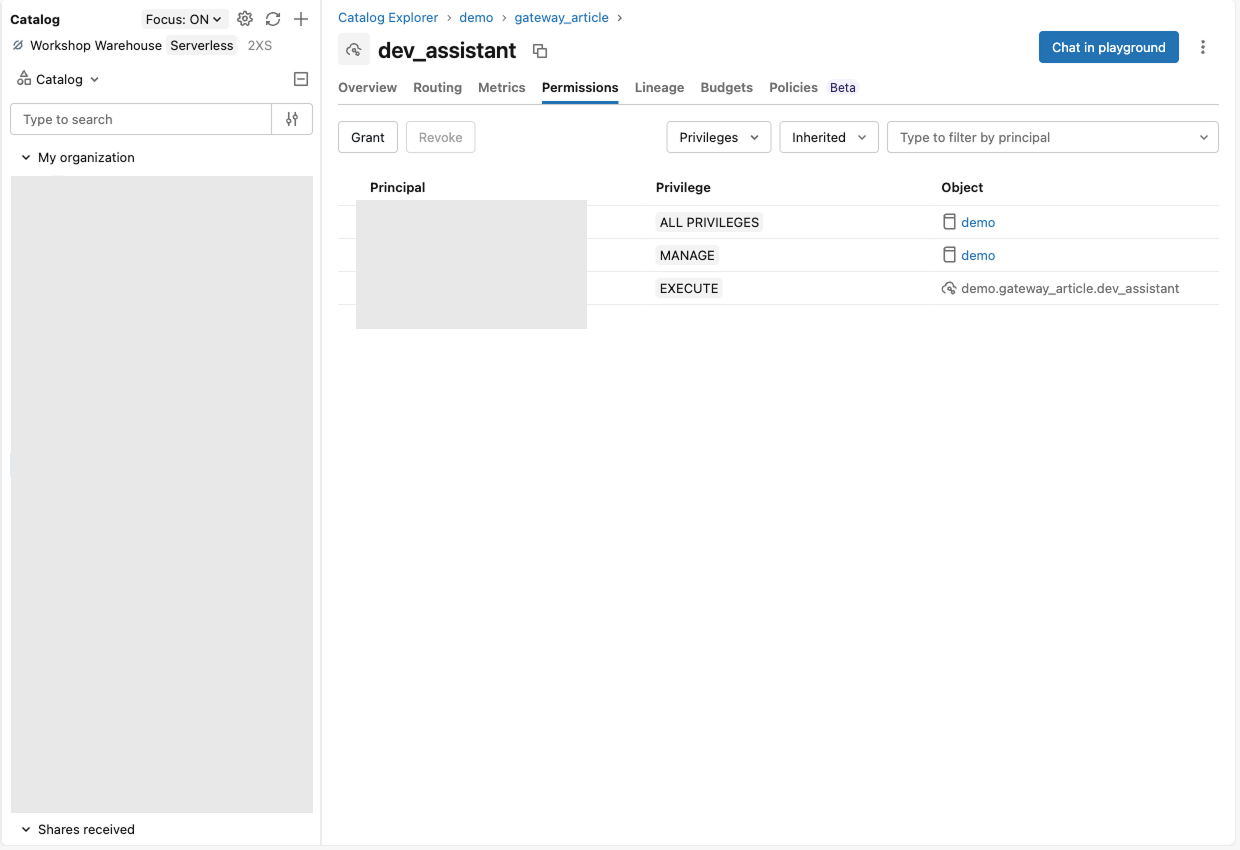
Granting EXECUTE on the service is the whole access-control step, and the overview page tracks usage tracking, inference table, rate limits, and policies. Grant from the Permissions tab or with one CLI call.
databricks grants update model_service demo.gateway_article.dev_assistant \
 --json '{"changes": [{"principal": "workshop_admin", "add": ["EXECUTE"]}]}'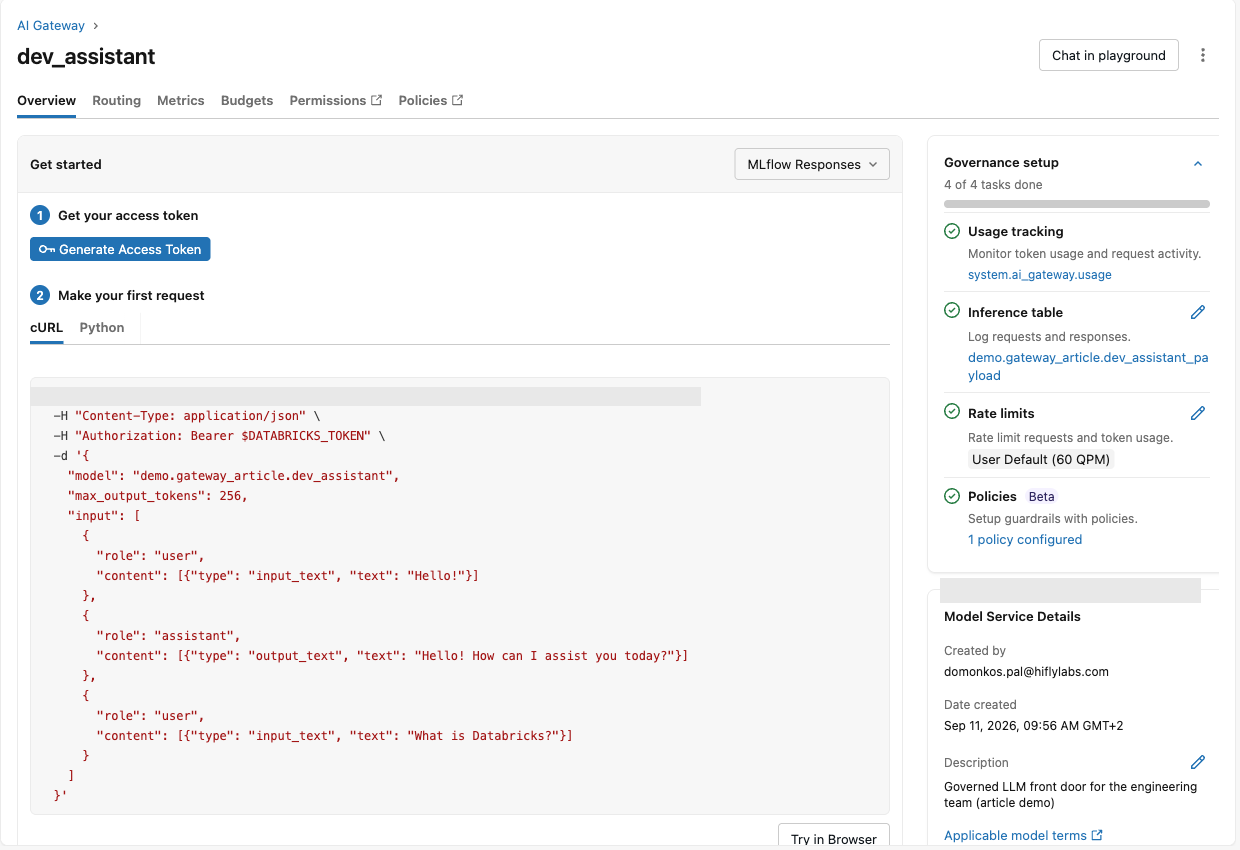
3. Change the model behind the name
Routing supports up to five destinations with traffic percentages plus a fallback list, and clients keep calling the same name. A change propagated in about a minute in the demo workspace, and both models answered during the transition.
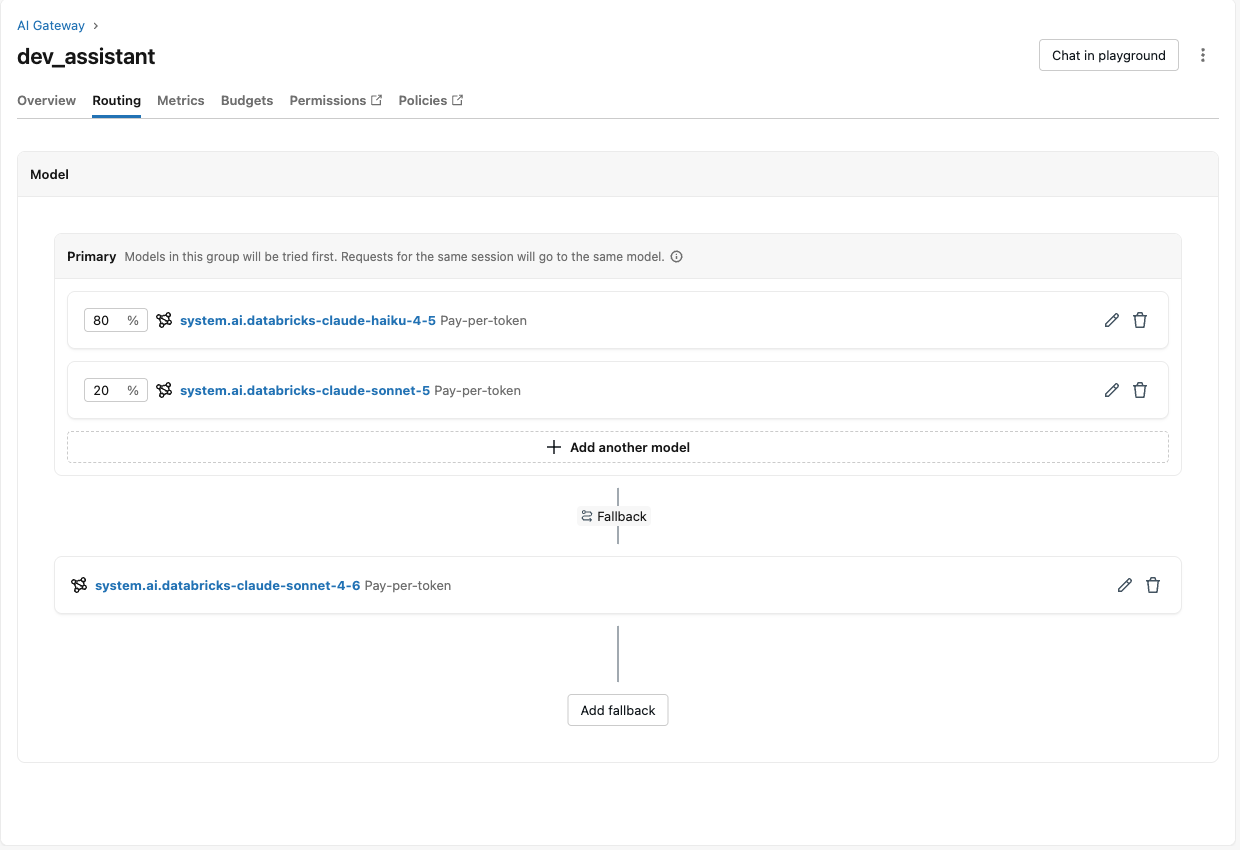
The name is stable, the wire format is not. While the service pointed at gpt-oss-120b, Claude Code failed, because that model does not accept the Anthropic passthrough path. You have to validate a replacement against the features your client needs.
How to route your coding agent through it
The Databricks Unity Gateway CLI connects Claude Code, Codex, Gemini CLI and others to the gateway with one command and no provider key.
Launch the agent through ug
ug claude signs in and starts Claude Code against the gateway, and ug usage shows the developer their own spend. On first run the CLI asks for the workspace URL, opens a browser to sign in, and writes the agent's config; later runs go straight to the agent.
ug claude        # or: ug codex, ug gemini, ug opencode, ug copilot, ug pi
ug usage         # your gateway spend for the last 7 days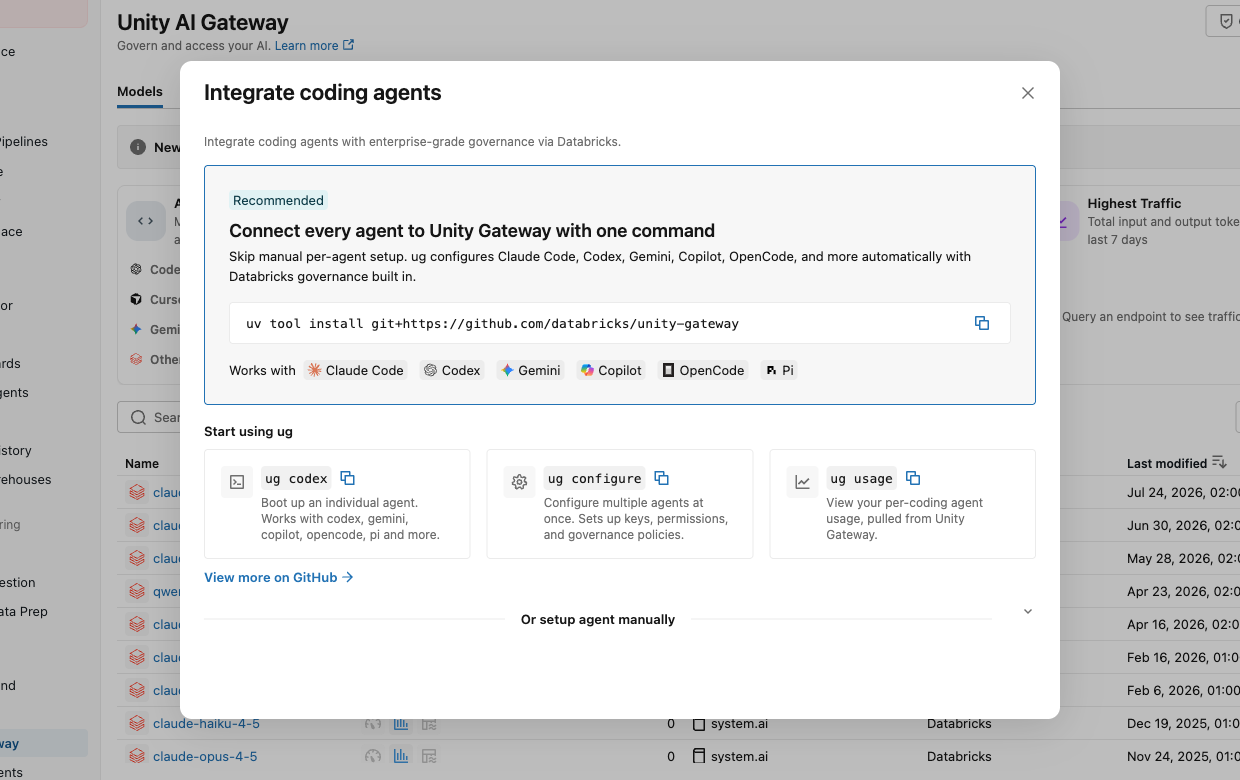
Cheat sheet for ug commands
Get started
- uv tool install git+https://github.com/databricks/unity-gateway: install
- ug configure --workspaces <url> or ug configure --profiles <profile>: connect a workspace
- ug configure --agents claude,codex: set up several agents at once
- ug configure --dry-run: preview the config changes without writing them
Launch
- ug claude, ug codex, ug gemini, ug opencode, ug copilot, ug pi: start an agent through the gateway
- ug cursor: MCP only; Cursor's model calls still bill your Cursor account
- ug codex --model system.ai.glm-5-2: launch on a specific model (Yes, you can do this with any OpenAI-compatible model :)
- ug claude --provider <catalog.schema.service>: route through a model provider service
- ug claude --enable-smart-routing: let Smart Routing pick the model (Beta)
- ug claude --workspace <url>: launch against another workspace
Tools, skills, tracing
- ug mcp add / ug mcp remove: add or remove Databricks MCP servers
- ug skill add or ug configure skills: add Databricks skills
- ug configure tracing: send session traces to an MLflow experiment
Check and fix
- ug usage: your spend and budget
- ug status: workspace, agent configs, saved models
- ug doctor: diagnose the local setup and offer fixes
- ug claude --refresh: refresh auth, models and the managed config
- ug revert: undo ug's changes and restore the backed-up agent configs
- ug upgrade: update ug
Platform admins
- ug setup help: walks through the managed-config setup in order
- ug setup mcps / ug setup skills: choose the MCP servers and skills developers get
- ug setup spend-tiers: move developers to cheaper agents as the budget is spent
- ug setup show → ug publish: review, then publish to the workspace
- ug export: export the managed config as JSON
What changes you will see on the laptop
The agent's config points at an /ai-gateway path with a Databricks token instead of a provider key, giving the platform one usage row per request. Claude Code uses /ai-gateway/anthropic, Codex /ai-gateway/codex/v1 and Gemini CLI /ai-gateway/gemini, each with a short-lived Databricks token the launcher refreshes.
Through Databricks Unity Gateway, Claude Code can bill two ways; choose one per team:
- Gateway metering. A Databricks bearer token outranks a claude.ai login, so usage is metered on the gateway. Claude Code's own /usage still prices it at list price by default.
- Subscription relay. Databricks relays an existing Pro, Max, Team, or Enterprise subscription's OAuth token, so requests bill against that subscription under its plan terms while the gateway still governs and tracks them.
How to control agent cost with Databricks Unity Gateway
With a new frontier model roughly every five days, engineers set the strongest one and move on. To be honest, that’s what I do as well. But what if we suggest a tested default, a way to escalate, and ug usage so they can see their own spend?
Databricks' post on AI coding costs, drawn from talks with Uber, Stripe, Coinbase and Ramp, calls it a dual mandate: broad access inside a roughly fixed envelope per user.
Why engineers default to the frontier model
Databricks calls it choice overload. Many developers set "the most capable at the highest effort" and move on. The habit is not always wrong: on Databricks' tasks, Sonnet 5 was 1.7 times cheaper per token than Opus 4.8 yet cost more per task, $2.09 against $1.94.
A newer model does not always win either. Stripe kept Opus 4.7 off its menu after it found out it cost more without a real quality gain.
For optimal flexibility, pick one model policy per team:
- Default plus escalation. Publish a tested default model in Unity Gateway's Agent Configuration, which ug syncs on the next launch, and agree on an effort level for it. Grant a separate frontier model service to the people who ask for it.
- Smart Routing. The gateway picks a system.ai model per session, and can pick another for subagent work. Each user needs EXECUTE on every candidate, so anyone denied the frontier model cannot use it.
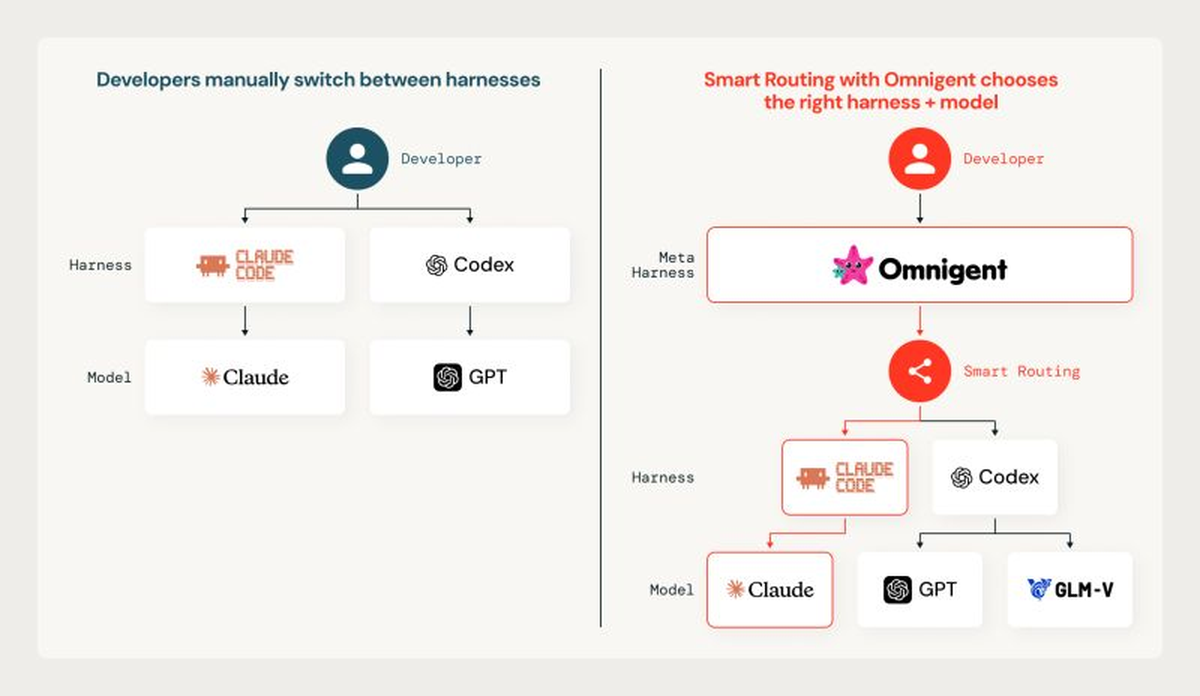
- Omnigent. A meta-harness that picks the harness and the model per task.
Smart Routing matches the task to the model
Smart Routing is task-aware, and it cut cost per task by 35% internally and 56% on public benchmarks while matching frontier quality. A small, fast model classifies the task at the start of a session, and the router stays with one model for the session to keep the prompt cache warm.
ug claude --enable-smart-routing
ug claude -- "<prompt>"
It is Beta and picks only among system.ai models; pass the prompt on the command line, because an interactive root session is not routed. Or use Omnigent.
- Result: On Databricks' own workloads, Smart Routing beat any single model at 65% of the cost per task of Claude Opus 5, according to the August update.
- Limit: The router decides once per session to protect the prompt cache, so a wrong first call is not corrected mid-session; Databricks lists that as its next problem.
Omnigent routes across harnesses
Omnigent is the open-source meta-harness over Claude Code, Codex, and custom agents. On Databricks, it runs managed, signed in with your workspace identity. You define an agent in a short YAML file and swap one line to change its harness or model.
(Personal note: I'm impressed with the whole thing, use it a lot, and grateful to get a chance to contribute.)
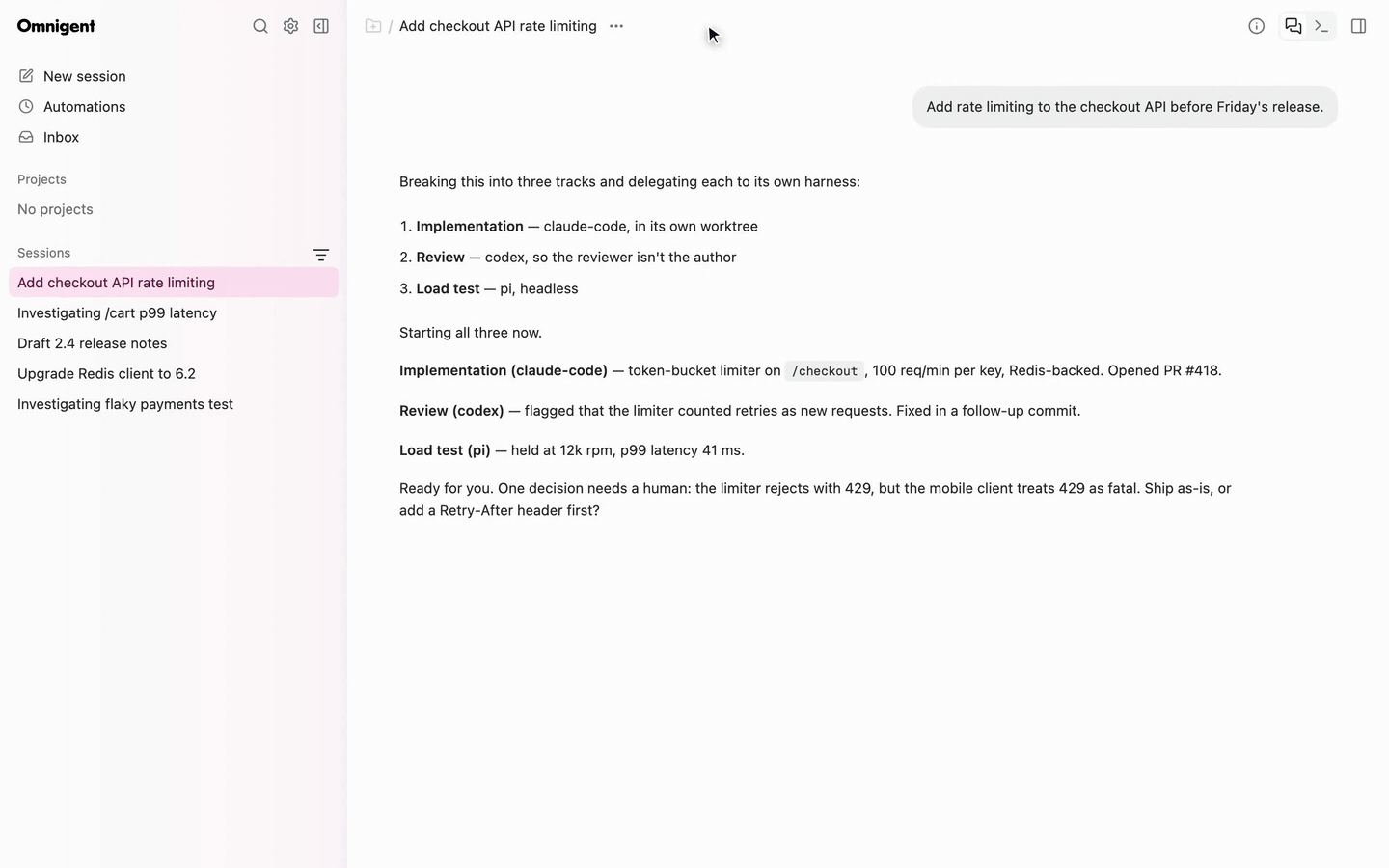
- Provenance. Apache-2.0 at omnigent-ai/omnigent, announced in June 2026. The command is omni.
- Managed on Databricks. Model access over Unity Gateway, routing by Smart Routing, and Sandbox hosts that keep running when the laptop is closed.
- Limits. Omnigent is in Beta and works only with the built-in contextual policies. No custom policy functions.
Match each control to the spend it can stop
No single control caps every kind of spend, because the harness, routing, rate limits, budgets, and capacity act on different scopes and time scales. Budgets alert or block on a near-real-time estimate and are enforced approximately. Every company Databricks spoke with used hard cut-offs only as a last resort.
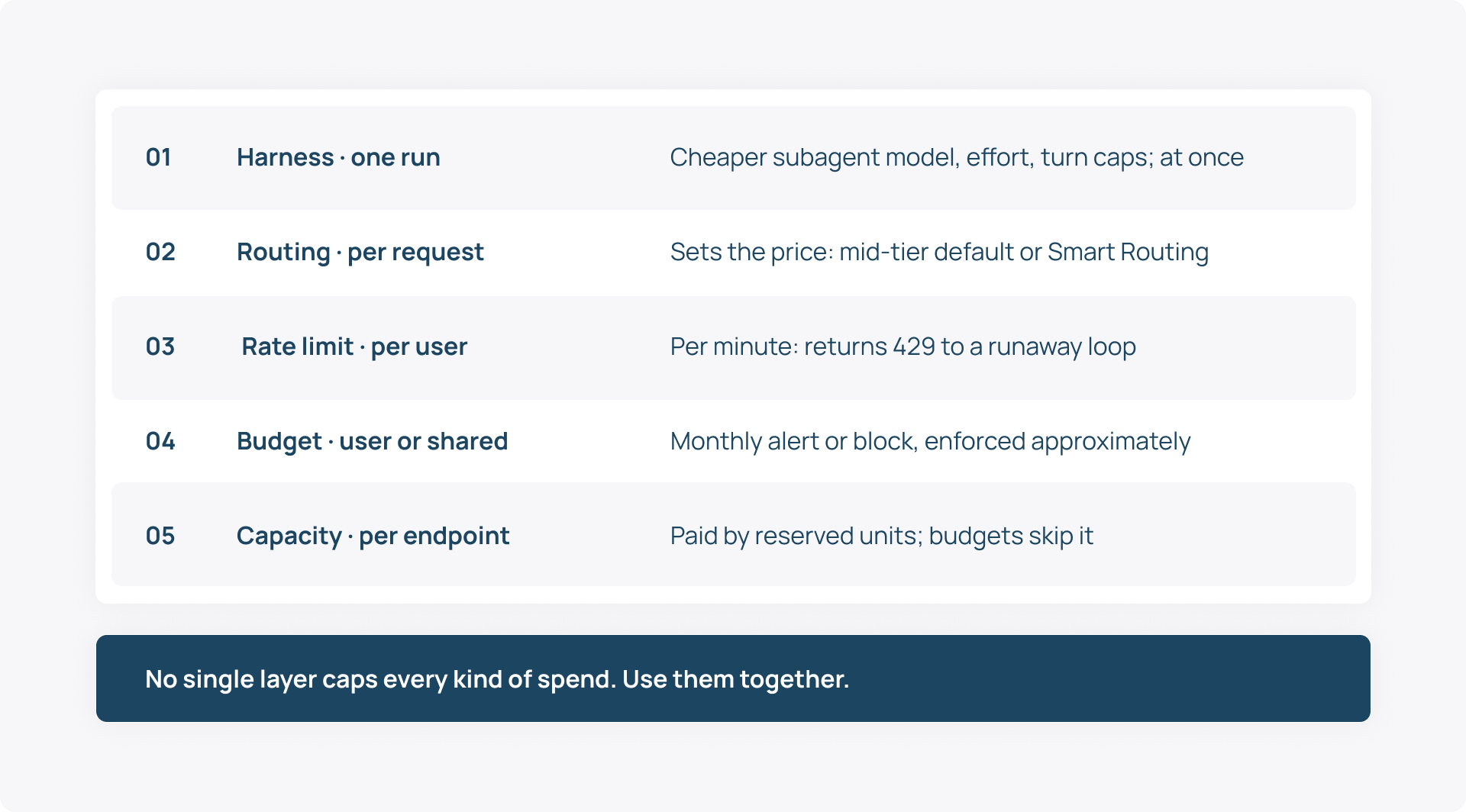
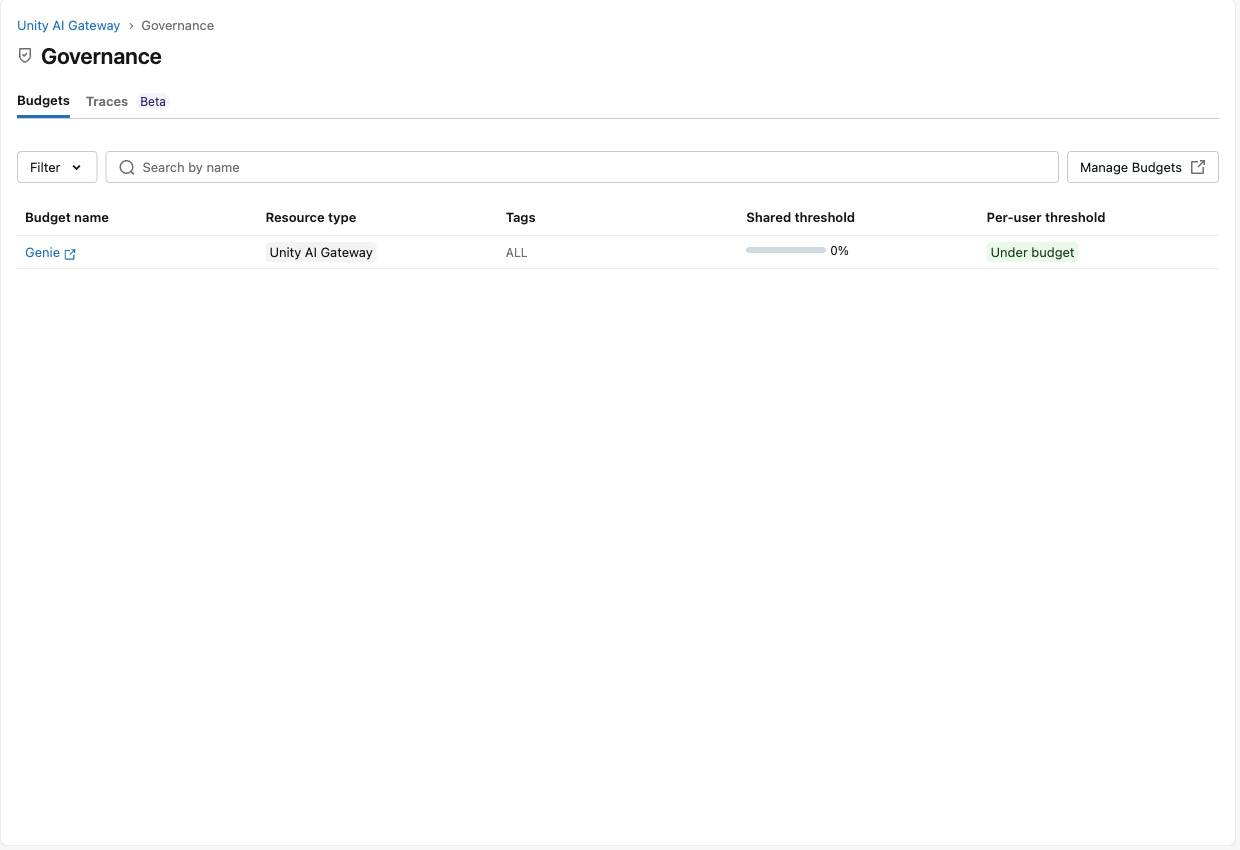
- Budgets. Thresholds are shared, per user or per-user overrides. They match model service tags, not request tags, and do not track provisioned throughput.
- Rate limits. Past a per-user tokens-per-minute limit the service returns 429, so a runaway loop slows down if its client retries and stops if it does not.
- Cheaper defaults. Agent Configuration can make lower-cost agents and models the default for new launches as spend reaches a budget threshold, without interrupting work in progress.
Measure cost per accepted task
Token counts mislead. In Quesma's independent RTK runs, cache reads were 94% and 98% of input tokens but only 30% and 26% of the bill. Tag each run and count dollars per accepted change, next to review time and defects.
- Tag. Send team, agent and run_id in the Databricks-Ai-Gateway-Request-Tags header; request_tags and token_details, with its cache-read count, land in system.ai_gateway.usage.
- Join. The usage table has no pull-request field. Claude Code's OpenTelemetry export, which Databricks can land in Unity Catalog Delta tables, counts the commits and pull requests Claude Code creates. So tag both sides with the same team and compare spend with pull requests per team.
- Skip leaderboards. Uber ran through its 2026 AI coding budget in four months after it ranked teams by AI tool usage. The COO said the link between usage and shipped features "is not there yet."
Cut token overhead
Tuning harness and caching settings cut generated tokens by almost 50% at Databricks without observed quality loss. By the time inference runs, the developer's prompt is a negligible share of the context. Tool output, skills, and gathered files dominate, so compaction and cache settings are where the money is.
- Keep the cache warm. When traffic is split, the gateway pins a session to one destination to reuse its prompt cache. In Claude Code a model change, and on most models an effort change, still re-reads the conversation uncached. So set both at launch and run /compact between tasks, as Anthropic advises.
- Use the documented config. Databricks' Claude Code settings set ENABLE_PROMPT_CACHING_1H and ENABLE_TOOL_SEARCH. Otherwise, Claude Code caches for five minutes outside an included subscription, and behind a custom-URL gateway without tool search it puts MCP tool definitions in every request instead of deferring them.
- Show fewer tools. MCP service tool filters limit which tools an agent sees.
- Narrow skills. Agents match a skill by its description, so one that matches every task is picked for every task.
- Trace the waste. Databricks Unity Gateway tracing sends coding-agent traces, local tool calls included, to a unified trace table. Databricks says it found seven MCP tool bugs this way, worth an estimated $1.2 million a year.
- Test tools in dollars. RTK's README says cutting up to 90% of bash output "is not the same as cutting your bill." In Quesma's runs the total bill fell 5% on one setup and rose 5% on another.
Bring your own model behind the same name
A model service can route to open-weight models on Databricks, to capacity dedicated to you, or to a model you run yourself, while the name, grants and usage table stay the same. One service can mix all three.
Start with open weights on pay-per-token
Foundation Model APIs already serve open models such as gpt-oss, Llama, Qwen, DeepSeek, GLM, and Kimi as system.ai model services, billed per token. Databricks' own benchmark tied GLM 5.2 with Opus 4.8 on quality at $1.28 per task against $1.94. Run the comparison on your own tasks.
ug codex --model system.ai.glm-5-2
The documented open-model recipes cover Codex and OpenCode; Claude Code failed against gpt-oss-120b earlier, so test the harness before you move a team.
Dedicate capacity for throughput and custom weights
Provisioned throughput reserves dedicated inference capacity, sized in model units for current models, for base models and for fine-tuned and custom pre-trained models of a supported architecture family. A model service routes to that serving endpoint.
- Sizing. Databricks' example gives Llama 4 Maverick on 50 model units about 3,250 tokens per second for 3,500 input and 300 output tokens. That is throughput, not time to first token, so measure latency at your own concurrency.
- Terms. On-demand capacity has no term commitment. A 1- or 3-month reservation lowers the unit rate.
- Cost control. Budgets do not track provisioned throughput. You pay for the units you allocate, so manage its size and uptime. A pay-per-token fallback in the same service retries requests that fail with 429 or 5xx.
Say "private tenant" precisely
Model Serving uses serverless compute, and the serverless compute plane is "managed by Databricks." Provisioned throughput is dedicated capacity there, not infrastructure you operate. Foundation Model APIs is a Databricks Designated Service that keeps to Databricks Geos for data residency.
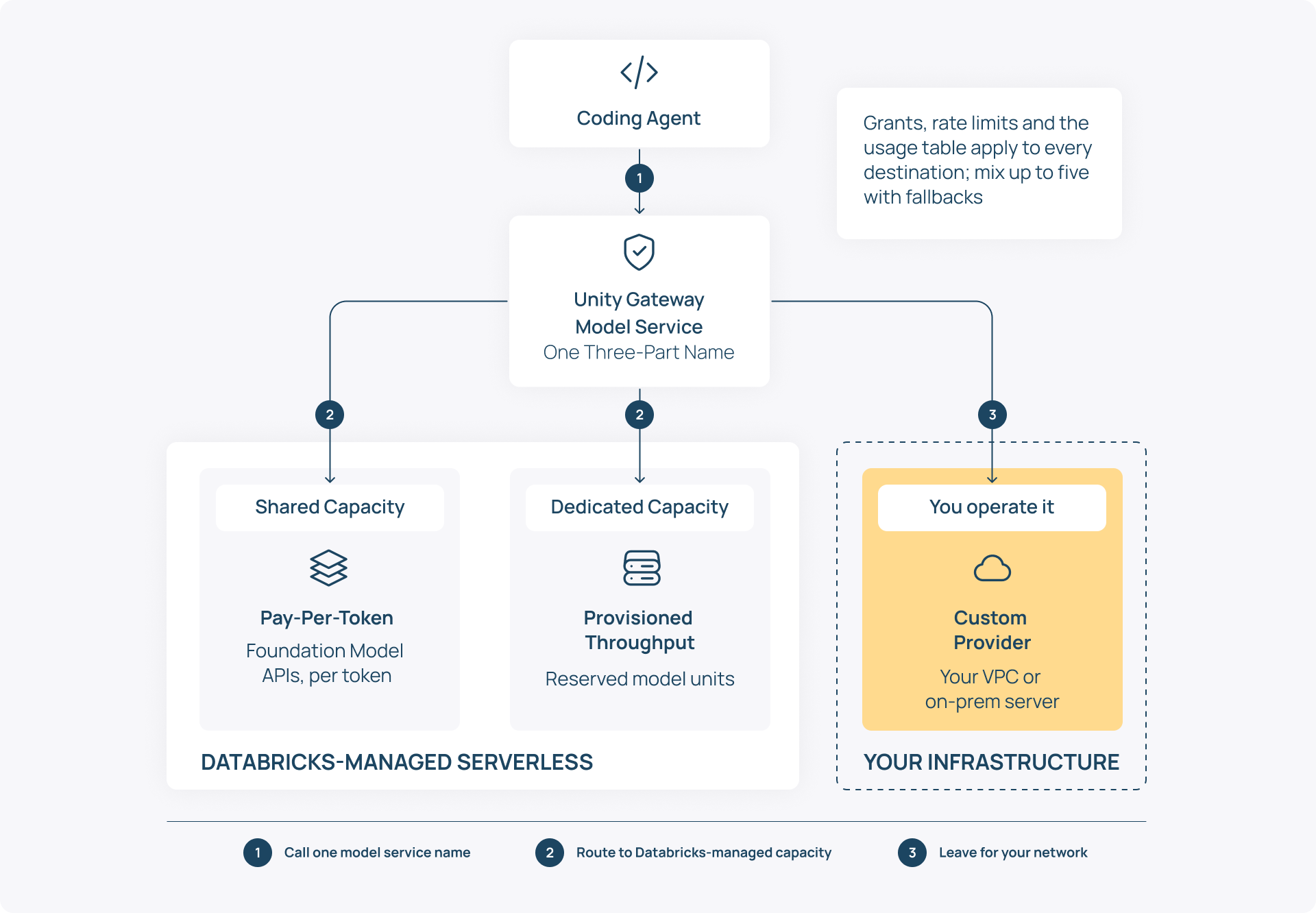
To keep the model on infrastructure you operate, serve it yourself, for example with vLLM behind an OpenAI-compatible endpoint, and register it as a custom model provider service with its base URL and a bearer token. Grants and the usage table still apply. Budgets price external spend from published provider prices, which your own model lacks.
How to govern tools and skills
MCP servers and skills are securables too. So the grants that control data control what an agent can call and what it is taught.
Managed MCP services in system.ai
Databricks ships governed MCP services for GitHub, Slack, Google Drive, SQL, and more, each with grants, tool filters, and policies. ug mcp add registers them with MCP-capable agents, and every tool call lands in the usage table with its tool name.
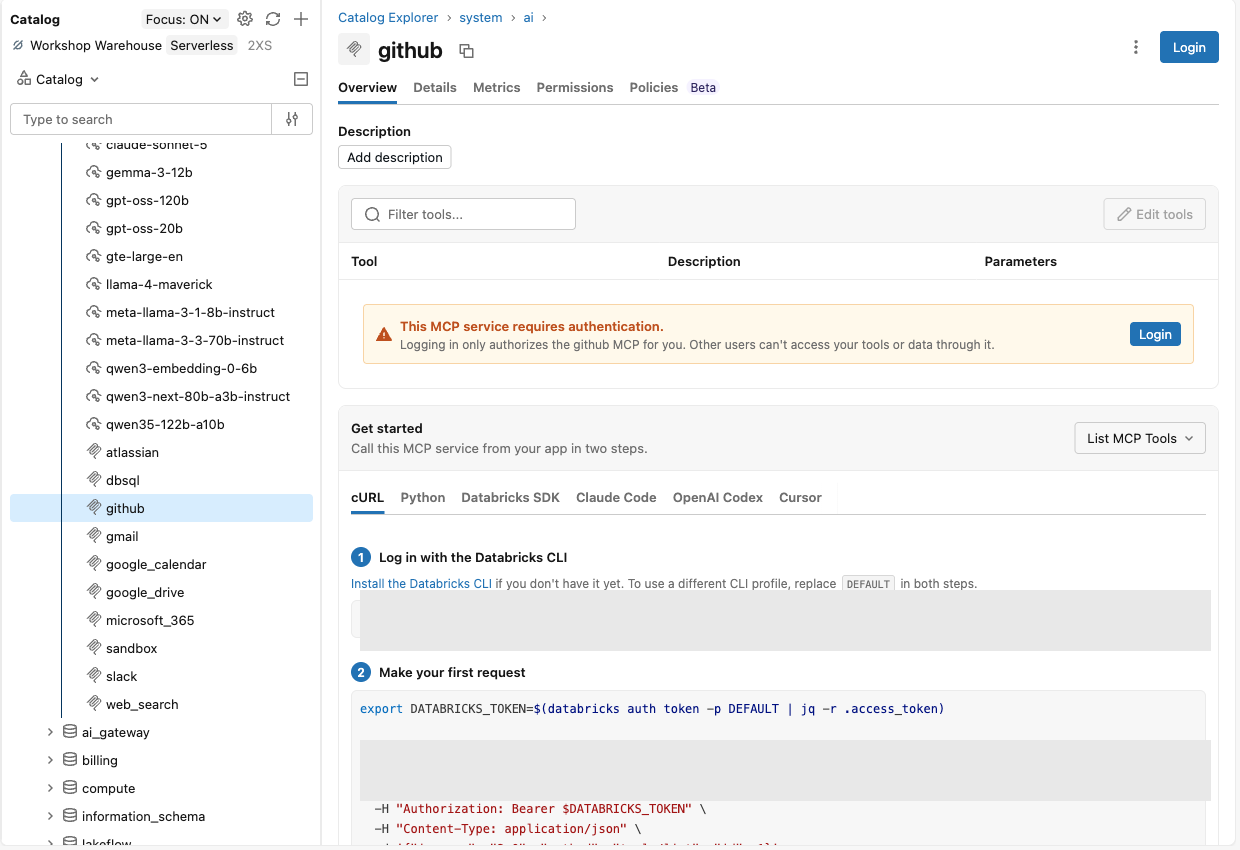
Restrict what GitHub tools an agent may call
Each user logs in to GitHub once, and the built-in GitHub policy with writes disallowed lets an agent read but not push. The login is per user, so the agent acts with the developer's GitHub permissions, not a shared token. The policy is attached on the service's Policies tab, and the tool filter decides which tools the agent even sees.
Publish a skill to Unity Catalog
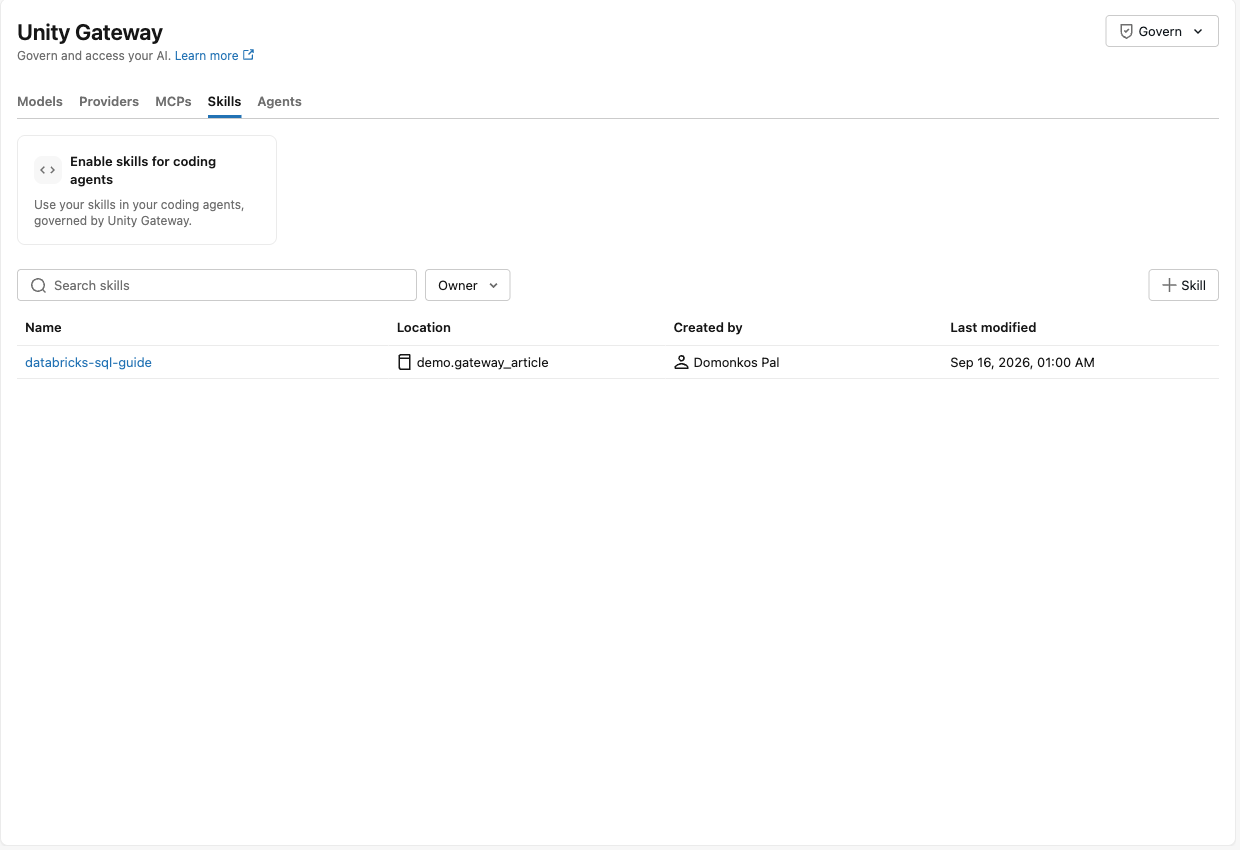
A skill is a folder with a SKILL.md. You can create it from the Skills tab or let the agent publish it, and it becomes catalog.schema.skill. The Skill button opens a form for the name, catalog, schema, and description. The bundle's files are uploaded afterwards with SKILL.md at the root. The description is what agents match against.
---
name: databricks-sql-guide
description: Databricks SQL conventions for writing queries. Use for any
 Databricks SQL authoring or review.
---
- Use snake_case for table, column, and CTE names.
- Prefer named CTEs over nested subqueries.
- Never use `SELECT *`; list columns explicitly.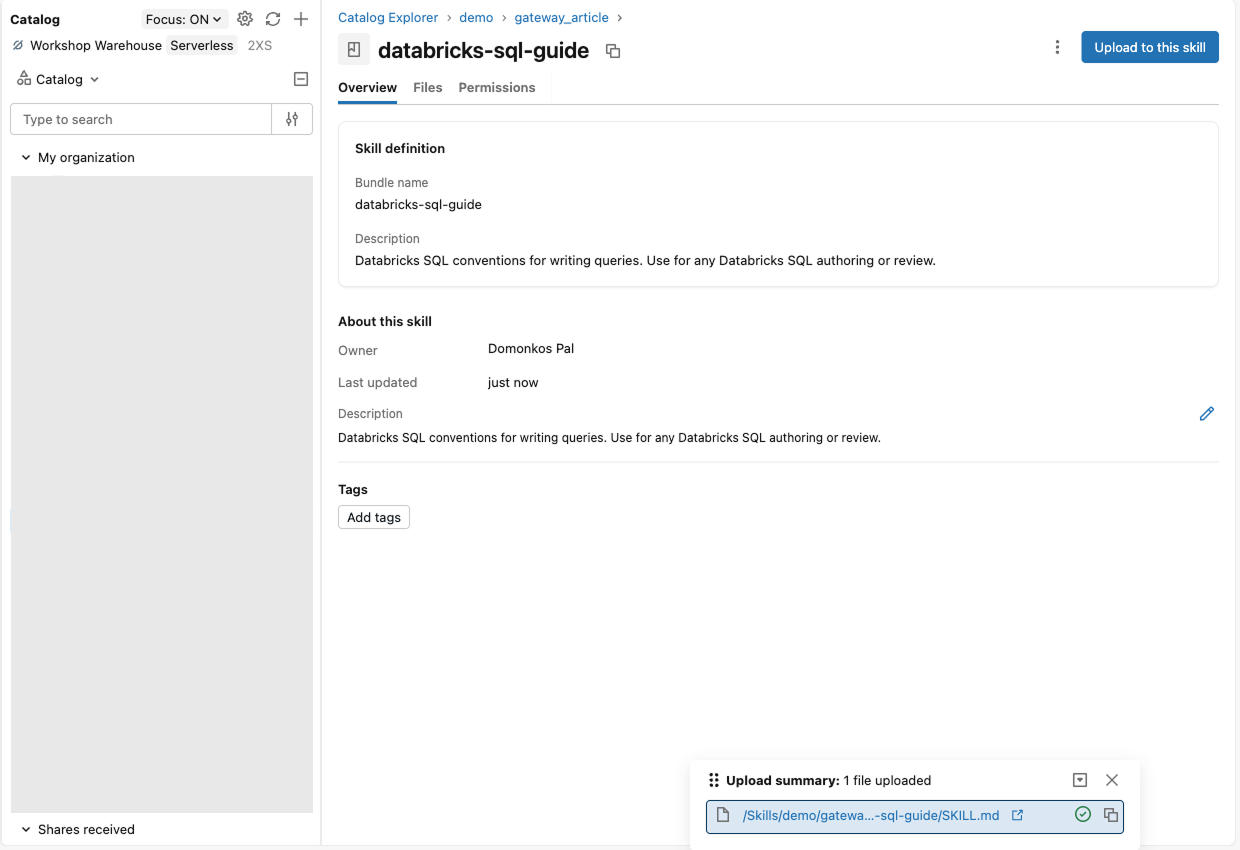
Share and consume skills under grants
Sharing a skill is a READ VOLUME grant, and one ug configure skills command per schema downloads or live-loads it into every agent. Skill contents live in Unity Catalog-managed storage, so authors need CREATE VOLUME and WRITE VOLUME on the schema, consumers READ VOLUME, and Unity Catalog audits every create, update, read and grant.
- Download. A point-in-time copy in .claude/skills/ and .agents/skills/; run the download again for updates.
- Live. Every skill in the schema appears as a tool named skill_<catalog>.<schema>.<skill>, so a new version reaches everyone at once.
Set the rules and check the evidence
Rate limits and service policies apply at the service, and system.ai_gateway.usage records the model, requester, and tags for every call.
Cap requests per user
A per-user default of 3 requests per minute lets a burst of five through and rejects the sixth with 429. Accounting happens after the response, so short bursts overshoot before enforcement converges.
- Where. The overview page's Rate limits Set up.
- Scope. Requests or tokens per minute, for the whole service, per user by default, or for a named user, group, or service principal.
Attach a service policy
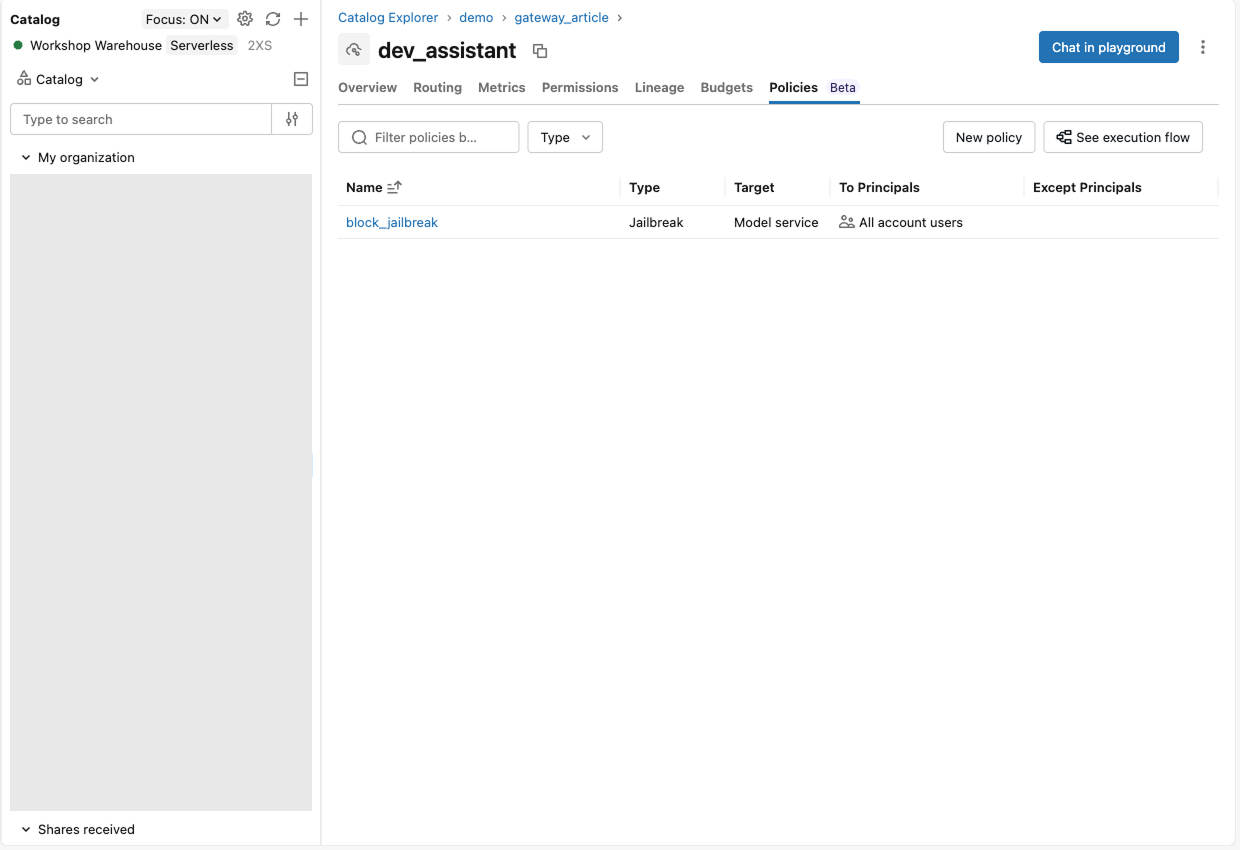
The built-in jailbreak policy denied an injection attempt with HTTP 200 and a databricks_service_policy object naming the reason. Attach it from the Policies tab. Built-in types cover jailbreak, unsafe content, hallucination, and sensitive data, and custom policies are SQL functions returning ALLOW, DENY, or ASK, where ASK holds a call for human approval.
Read the answers in the usage table
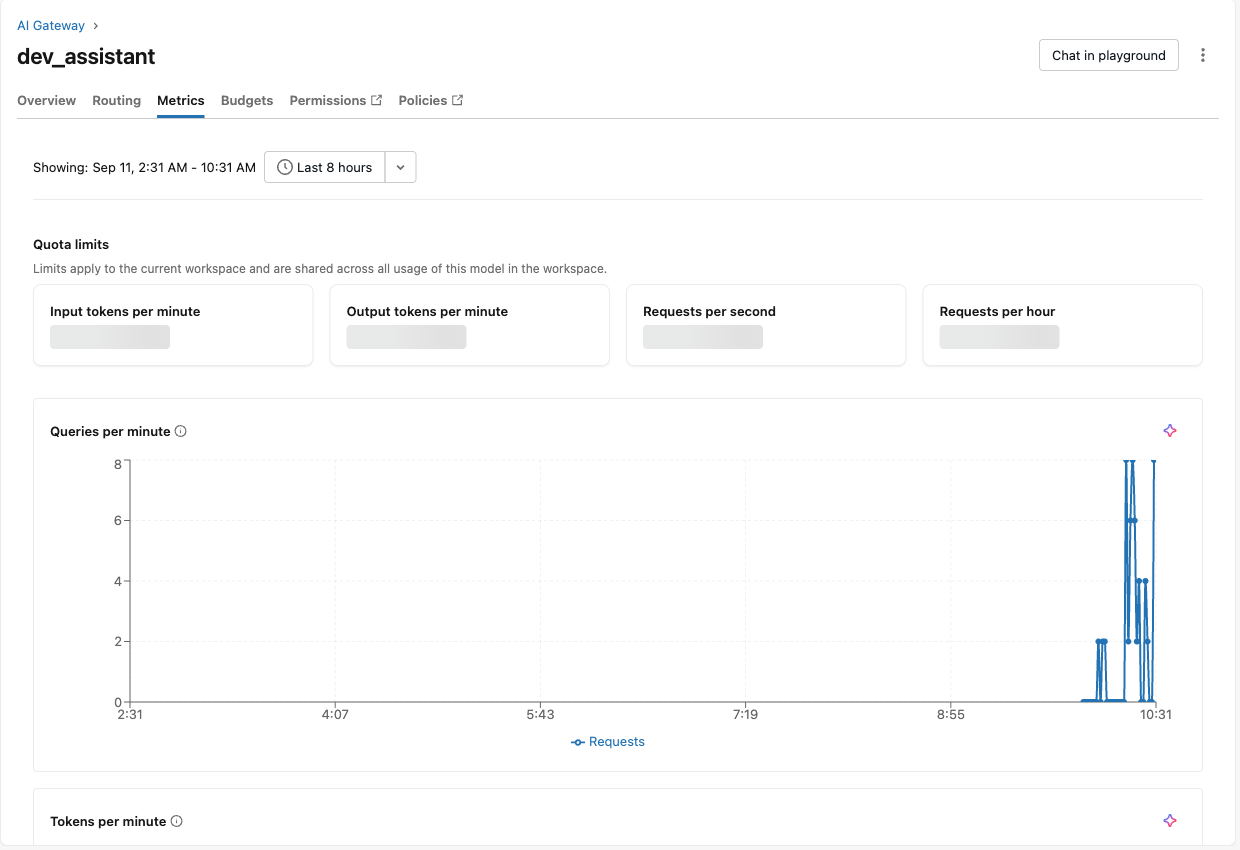
The usage table holds the served model, the requester, request tags, tokens, and policy verdicts, about an hour after the calls. The Metrics tab is the operational view. The built-in usage dashboard and the billing tables are the reporting view.
- Which model. Destination_model, including both destinations during a swap.
- What it cost. Tokens per team, agent and run_id from request tags, attributed to the requester even when untagged. Databricks-billed usage lands in system.billing.usage per service.
- What it was allowed to do. Policy verdicts and MCP tool names on the same rows.
What stays Beta, and how to pilot
Service policies, Smart Routing, Omnigent, skills, and agent registries were Beta on 11 September 2026. To start, first pilot with one team for four weeks. Measure attribution coverage, cost per accepted change, and human-reviewed policy false positives against a baseline month.
- Reference model services by three-part name. A model change is then a Routing edit.
- Tag every request with team, agent and run_id, and give developers ug usage before you give them a cap.
- Register tools as MCP services and skills as Unity Catalog Skills; grant both like tables.
Afterthought
As organizations shift towards more centralized agentic engineering, questions around costs and AI budget planning pop up more and more often. Tech leaders want to know how much they actually spend, and also how much of the speed and productivity boost they can afford at org scale. This setup provides a foundation for governed AI coding on Databricks with a clear-cut strategy for proactive cost control.