TL;DR
- AI coding on Databricks is supported by a range of toolkits, scaffolders, and workspace-integrated tools.
- Each tool works for its own goal, scope, and skillset. The choice depends on what you're building and where.
- Agentic engineering setup evolves with the complexity of your build: from low-code agentic apps to scalable full-stack applications to generative UI.
- Speed gains from agentic engineering are real. But human oversight, guardrails, clear architectural ownership, and iterative feedback are essential to keep it reliable.
“Programming via LLM agents is increasingly becoming a default workflow for professionals. The goal is to claim the leverage from the use of agents but without any compromise on the quality of the software.” Andrej Karpathy on X
The recent quote from Andrej Karpathy pretty much captures where we are.
Developer timelines on Databricks have been shrinking in the last 2 years. What used to take months and a five-person team now takes weeks and a single engineer.
The old way of software engineering is already in the rearview mirror.
First came Databricks Apps paired with DAB for fast deployment without infrastructure overhead. Now comes a new generation of tools and resources purpose-built for the Databricks environment to help coding agents generate reliable outputs.
Tools and resources for AI coding on Databricks
Coding agents are only as good as the context they work with. Without Databricks-specific grounding (schemas, metadata, logs, deployment states), they start hallucinating and shipping code that breaks in production.
The tools and resources I’m going to talk about solve this problem by giving your AI coding agent the Databricks context needed to plan, execute, and verify against your actual environment. Each has its own depth, purpose, and required skillset.
The choice depends largely on your stack, the workspace you work in, and what you want to build.
Agentic setups for building outside the Databricks workspace
Databricks Agent Skills
Databricks Agent Skills is the official skills library for AI coding assistants developed and maintained under the official Databricks GitHub org. It packages Databricks-specific knowledge, best practices, and workflows into task-specific Markdown instruction files that coding assistants automatically discover and load based on the task at hand.
It currently ships five focused skills: core, apps, jobs, lakebase, and pipelines. Although fewer than the other toolkits in this category, they cover the most critical surfaces.
Databricks Agent Skills is a reliable companion for app deployment correctness, Lakeflow Jobs scaffolding, Lakebase Postgres patterns, and pipeline design decisions.
And because it's an official Databricks product, it is deeply reviewed, tightly scoped, and maintained to a high standard.
The strongest part of Databricks Agent Skills is its Apps platform guardrails. It covers port binding rules, permission auto-grants, OBO scopes, and deployment correctness details that may break Databricks Apps in practice.
Best for: Any team that AI codes outside the Databricks workspace and wants an officially supported, robust Databricks guidance loaded into their assistant.
AI Dev Kit
AI Dev Kit is a broader toolkit. It goes beyond skills-only guidance by combining Databricks-specific knowledge and tools (MCP) for coding assistants. It’s designed to work on different projects on Databricks, not just apps.
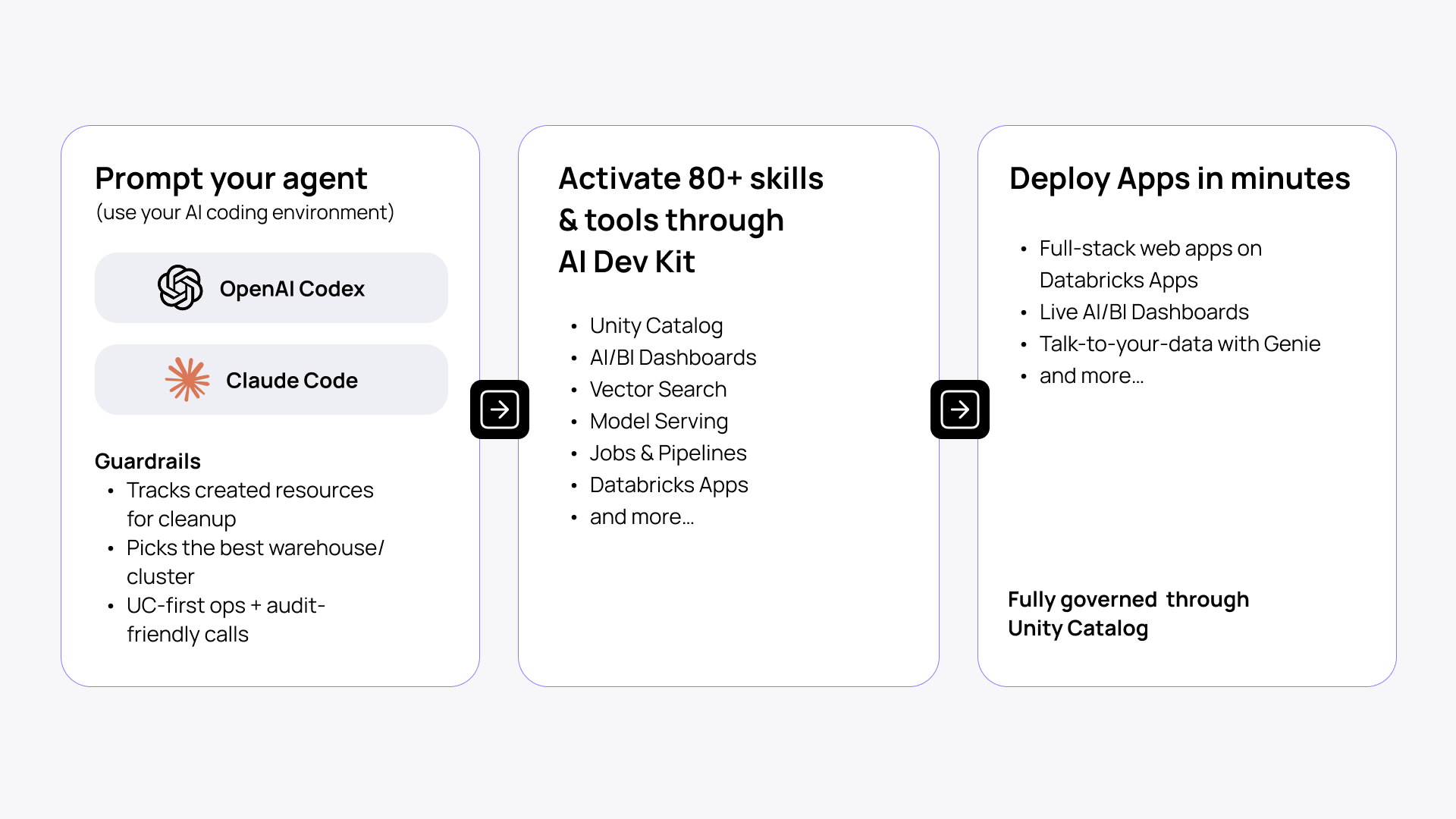
AI Dev Kit connects agents to ~20 Databricks-specific skills and ~50 MCP tools like Model Serving, Unity Catalog, Jobs, and more, allowing you to create anything from full-stack web apps to pipelines to MLflow experiments.
AI Dev Kit includes:
- Skills: best-practice playbooks for Jobs, SDP/DLT, Unity Catalog, Vector Search, Model Serving, Apps, and Lakebase. Includes apx (see below).
- MCP server (execution layer): tool-calls for SQL, clusters, workflows, governance, RAG search, serving endpoints, and dashboards.
- Python core library: databricks-tools-core exposes the same operations as reusable APIs, callable from scripts, notebooks, and apps.
- Builder app: a Databricks-native app for agentic engineering.
AI Dev Kit is a Field Engineering project rather than an official Databricks product. So it moves faster and covers more ground. But with a higher rate of change and a less formal review cycle compared to Databricks Agent Skills.
Best for: Full-stack applications and projects beyond apps that leverage various Databricks tools across the ecosystem (e.g., Genie, Agent Bricks, Unity Gateway, Vector Search).
See a detailed overview of Databricks AI Dev Kit.
| Databricks Agent Skills | AI Dev Kit | |
| Support | Official Databricks product | Field Engineering team |
| Includes | 5 focused skills | 26 skills+50 tools |
| Execution capability | None (knowledge only) | Through MCP tools (SQL, clusters, dashboards, etc.) |
| Acts as a | Knowledge pack and guardrail for Apps permissions, OBO, and deployment | Companion and knowledge support for working on full-stack apps and multifaceted Databricks projects |
App scaffolders
apx
apx is a Rust-based app generator that accelerates application development on Databricks. Built by the Field Engineering team, it helps you rapidly scaffold new apps (React+FastAPI), provides rules for AI coding agents out of the box, and MCP to look for documentation and logs for effective troubleshooting. Apx is best suited for complex use cases and ample customizations.
Stack: React frontend and Python + FastAPI backend.
Best for: Rapidly scaffolding applications, mainly for the engineers who prefer working with Python.
AppKit
AppKit is an official Databricks SDK for building full-stack Node.js + React Databricks applications.
AppKit supports a growing ecosystem of plugins (Genie, Analytics, Files, Vector Search, and Lakebase)—configurable, pre-built components for the most frequently recurring use cases, thereby minimizing the need to write (generate) custom code. Plugins make AppKit production-ready, with new ones being added by the Apps team continuously. Plus:
- Seamless integration with Databricks services (SQL Warehouses, Unity Catalog, etc.)
- End-to-end type-safety with automatic query type generation
- Built-in caching, telemetry, retry logic, hot reload, and error handling for production-ready development
The newer version of AppKit, which was launched recently, is significantly more powerful than the previous one. It is optimized for AI-assisted development and vibe coding workflows, making it the most established solution for typical app use cases. However, it is less suited for highly customized builds compared to apx.
Stack: React frontend and Node.js backend.
Best for: Dev teams (full-stack software engineers and web developers) who are more comfortable with Node.js backend and aim for a full-stack production-ready app.
| apx | AppKit | |
| Support | Field Engineering team | Official Databricks product |
| Best fit for | Data engineers, data scientists | Full-stack engineers, web developers |
| Preferred stack | Data stack (Python) | Dev stack (Node.js) |
| Choose it to | Scaffold apps for complex use cases that require more room for customization | Build modular applications for common use cases |
Workspace-integrated agentic tools
Genie Code
Genie Code is a workspace-native AI agent built specifically for data work on Databricks. It's built directly into notebooks, SQL editor, Lakeflow, dashboards, and MLflow with chat and Agent mode, so no IDE or CLI setup is required. It's deeply integrated with Unity Catalog, automatically pulling in tables, columns, lineage, business semantics, and access controls as context.
Things Genie Code can do:
- Run data tasks across pipelines, ML model training, dashboards, exploratory analysis, and production monitoring.
- Monitor Lakeflow pipelines and AI models, triage failures, and investigate anomalies.
- Connect to Jira, GitHub, Confluence, and other external tools for workflows beyond the workspace via Databricks MCP.
- Enforce access controls, track edits with native revision history, and log all activity through existing audit infrastructure.
Best for: Data engineers, data scientists, and analysts doing data-native work directly inside the Databricks workspace.
On Databricks' own benchmark, Genie Code solved 77.1% of data science tasks versus 32.1% for a leading coding agent with Databricks MCP.
Agent Bricks
Agent Bricks is Databricks' official workspace-native product for generating production-ready agentic components from your data. Describe the task, connect your data sources, and Agent Bricks handles evaluation, optimization, and deployment automatically.
Common Agent Bricks scaffolder examples:
- Knowledge Assistant: pre-built agent template for a RAG chatbot to query company data and documents
- Supervisor Agent: orchestrates agents across Genie spaces, LLM agents, and MCP tools
- Information Extraction: turns unstructured documents into structured Delta tables (HIPAA compliant)
- Custom Agent: build with LangGraph, OpenAI Agents SDK on Databricks Apps
Best for: Data teams who want production-grade agents fast, without deep ML infrastructure work.
Building applications on Databricks at scale? Check the Apps Factory playbook to build and run 100+ apps, saving up to 100 dev days/app.
Set up AI coding on Databricks
Context and curation
Before your agent starts coding, it needs to have the right context to ground its output. Here’s what you need and where to get it:
- Databricks Agent Skills and AI Dev Kit: logs, metadata, web access, schemas, deployments, Databricks CI/CD.
- Specs and documentation: versioned docs, plans, schema, claude.md, agents.md, SpecKit.
- Sample repos: cookbooks, sample git repos, PRs (for specs and code examples).
- Memory and few-shot: documented common issues and real examples for agents to learn from.
5 scenarios based on the use case
| If your team needs to… | Start with… | Then consider… |
| Explore data and build dashboards interactively | Genie Code | Shared workspace skills |
| Build production data pipelines from an IDE | AI Dev Kit | DABs, tests, CI/CD |
| Scaffold a full-stack app quickly | apx | Letting an AI agent iterate on the scaffold |
| Build a TypeScript/React data app with plugins | AppKit | Genie/Lakebase/analytics plugins |
| Deploy a governed business-facing agent | Agent Bricks | Apps, evaluations, controlled rollout |
| Turn a loose chain of notebooks and Python scripts into a scheduled workflow with dependencies and shared parameters | Agent Skills | Internal skills repository |
4 steps to set up agentic engineering on Databricks
- Step 1. First, assess what you want to build. If it’s a complex application or pipeline outside the Databricks workspace, go for Databricks Agent Skills and/or AI Dev Kit. If you’re working on a data or AI engineering project in the Databricks workspace, Genie Code is the right choice.
- Step 2. Select your coding assistant. Claude Code, Codex, Windsurf, or other coding agent; Genie Code for working directly in the Databricks workspace.
- Step 3. Pick an app scaffolder. If you’re building an app-based ecosystem, start with an app scaffolder like apx or AppKit. For data/AI projects in the Databricks workspace, use built-in scaffolders like the ones in Agent Bricks.
- Step 4. Install your tools and start building.
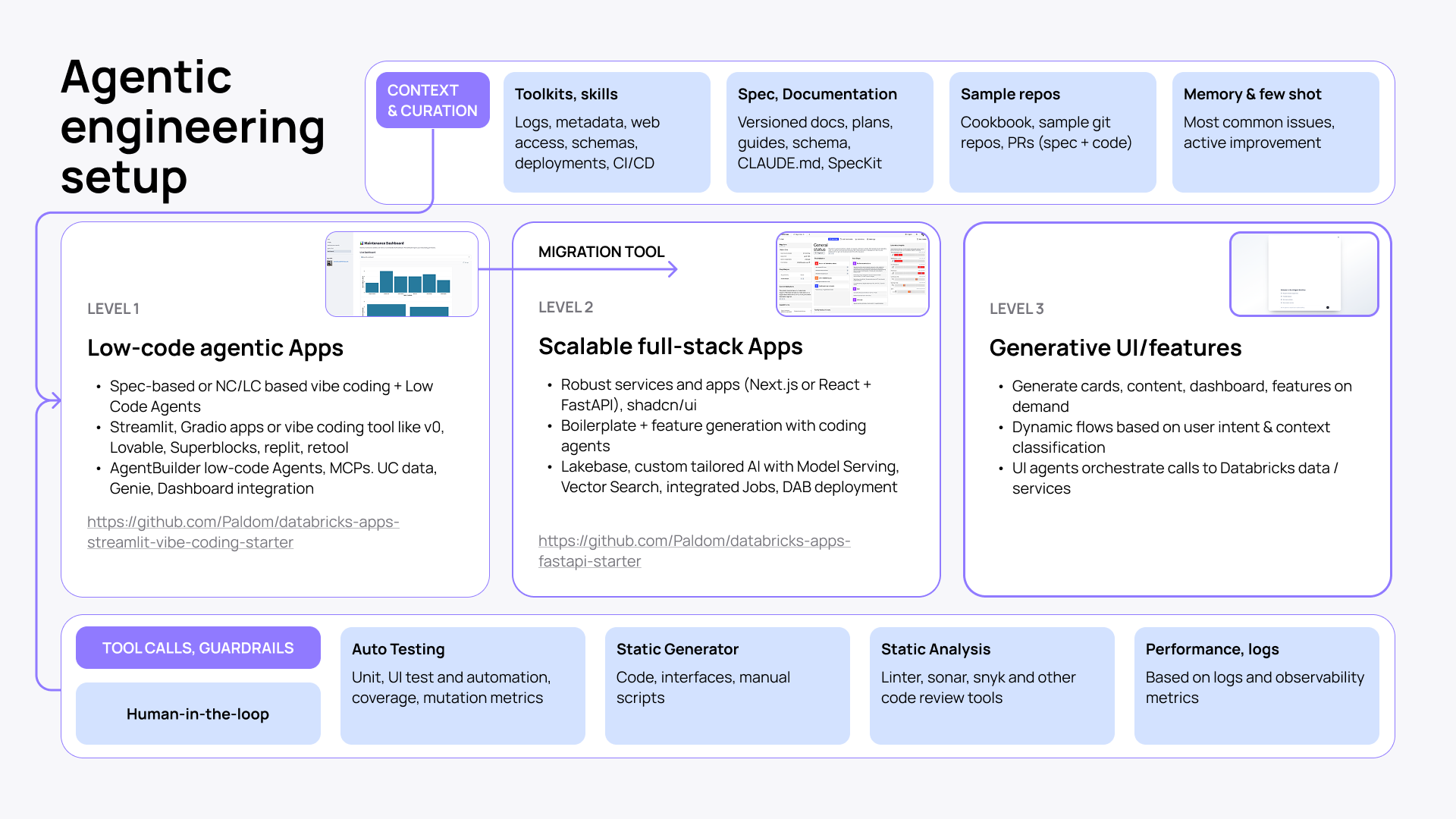
Tool calls and guardrails
Your coding agent is smarter and more capable with toolkits. But it still needs the necessary guardrails and feedback loop not to break things.
- Keep human-in-the-loop as the primary control.
- Layer in auto testing (unit, UI, coverage, mutation metrics).
- Add static analysis (linter, Sonar, Snyk, and other code review tools).
- Run performance monitoring based on logs and observability metrics.
Along with guardrails for agents, you should also stay in control of all the spend that comes with AI coding apps at scale. This requires full observability and attribution for Databricks Apps costs.
Databricks AI coding for every app scale
Agentic engineering on Databricks scales with your build. The same principles apply whether you put together a quick prototype or work on a production-ready full-stack app. The difference is the platforms and tools you will need. Here's how it breaks down.
Level 1: Low-code agentic apps
Perhaps the fastest way to get to a working prototype. Build with spec-based prompting, no-code or low-code tools, and Low Code Agents. Use Streamlit, Gradio, or popular vibe-coding tools like v0 or Lovable, Replit, or Retool. Plus, Agent Builder for MCP connections, Unity Catalog data, Genie, and dashboard integration.
Check this repo to get started.
Level 2: Scalable full-stack apps
This build demands production-readiness and scale. Start with a robust stack (React + FastAPI or Next.js) and expand by integrating a wider Databricks ecosystem: Lakebase, Model Serving, Vector Search, Jobs, etc. Build a full-stack app from proven boilerplates and generate new features and workflows with coding agents on top.
Check this repo to get started.
Level 3: Generative UI and features
This is not a higher complexity layer, but an entirely new way to look at agentic engineering. With Generative UI, you can build on top of your app and turn it into a dynamic, customizable experience. Generate cards, dashboards, and features in the app on demand based on context and user intent.
Best practices to enhance the reliability of AI coding agents
Speed is good and all, but it only matters if what you ship actually works. Here are a few hands-on practices to keep your agentic engineering workflow reliable, governed, and production-ready.
- Own the architecture. Define what you’re building and how you’re going to do it before you begin coding.
- Scope every task explicitly. Reference specific files, constraints, and existing patterns.
- Write a CLAUDE.md (or equivalent). Give your agent persistent project context: Bash commands, code style, test runners, repo conventions. Keep it short, but as long as needed.
- Permit only the specific tool calls and Bash commands you know are safe.
- Run the agent with the minimum required permissions. The agent inherits your credentials and access rights. So don't run it in environments where it could touch production data it shouldn't touch.
- Ask the agent to generate a revert guide after every run. Before moving on, have the agent document how to undo what it just did. This is your safety net when things break downstream.
- Commit frequently, squash later. Small, frequent commits give you clean rollback points throughout an agentic session.
- Don’t skip static analysis. Run linter, Sonar, and Snyk on every agent-generated change before it merges.
- Agents produce plausible-looking code that can carry real vulnerabilities. Review SQL and file operations before execution.
- Agents will ask to run queries and modify files. Read them. Unity Catalog enforces access control, but it won't stop you from deleting your own tables.
- Give the agent a way to verify its own work. Provide tests, expected outputs, or screenshots. Without success criteria, the agent can not correct itself reliably.
- Explore and plan before coding. Use plan mode (or equivalent) to separate research from implementation.
- Be the quality gate, the final guardian of the codebase. Treat any agent output as a proposal.
- Reset context between unrelated tasks. Long sessions with accumulated irrelevant history degrade agent performance.
- After two failed corrections, start fresh. Repeated corrections in one session pollute the context with failed approaches.
- Keep your CLI and SDK current. Agents rely on accurate tool interfaces. Stale CLI or SDK can cause unexpected behavior and failed calls.
- Treat the toolkit install as part of the project, not a one-time setup. Pin a version tag and include the setup script in the repo so every team member runs the same configuration.
Conclusion
Agentic engineering raised the bar for what a small team can build. But that doesn’t mean that growing speed and productivity gains with AI coding will gradually wipe out design thinking, engineering instincts, and good judgment.
On the contrary. To echo Gergely Orosz, this will benefit those who know how to build interfaces and apps that ‘feel good,’ can judge on an agent's output, and know how to up its quality and reliability.
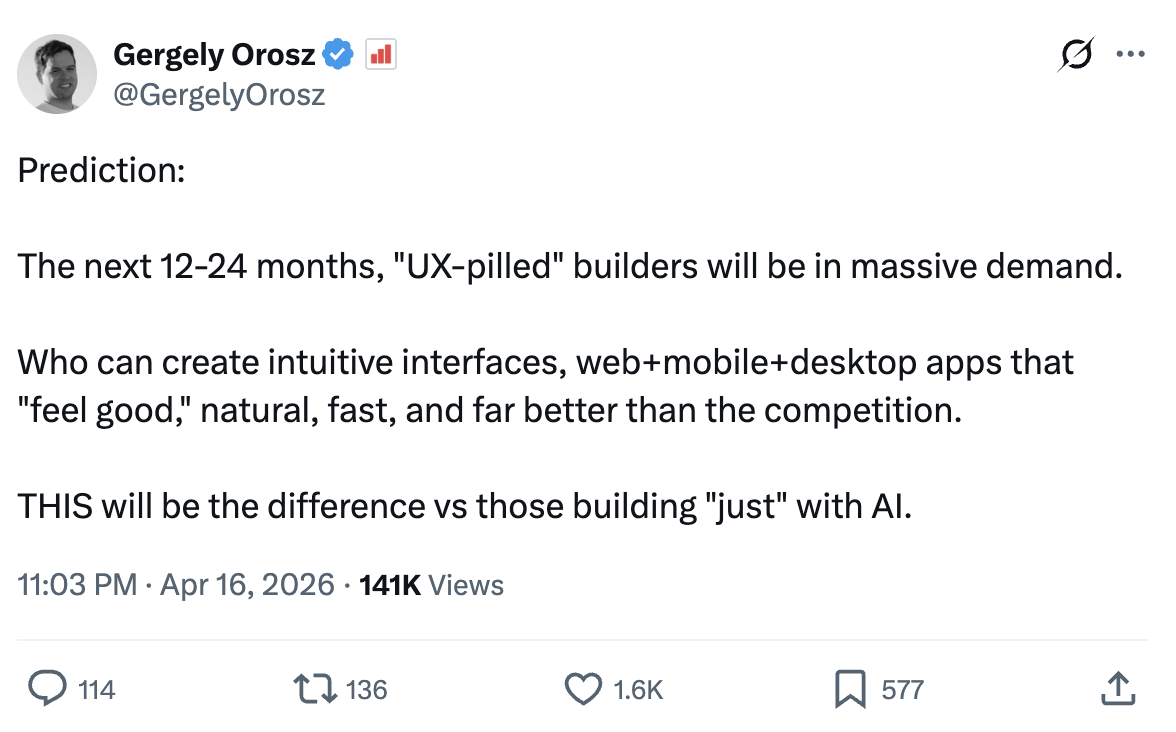
Quote credit: Gergely Orosz on X
Want to gain speed on your Databricks project? Check out our Databricks applications services to see how we can help you get to production faster than anyone in the market.