TL;DR
- Databricks AI Dev Kit is a newly released toolkit that gives coding assistants (Claude Code, Codex, Cursor, and others) Databricks-specific knowledge and execution tools to ship projects faster and hallucinate less.
- It combines skills, the MCP server, tools, and the Databricks Builder App, covering the full stack from pipelines to apps.
- Unity Catalog permissions are enforced, and you have DABs and Databricks-native options to rollback, so you get speed without adding risk.
- While Databricks AI/BI Genie and Agent Bricks allowed us to spin up out-of-the-box agentic capabilities in hours or even minutes, the workspace configuration and building the business logic to Apps still took significant time. With AI Dev Kit, creating a valuable, production-ready AI app on top of unstructured data takes 15 minutes.
Databricks has released AI Dev Kit. If you've been wishing to improve your DevEx and make your AI-coding agents more aware and grounded in the Databricks environment, this is it.
I spent some time testing the kit myself, and now want to share my first impression and a few practical steps and resources to get started.
What is Databricks AI Dev Kit?
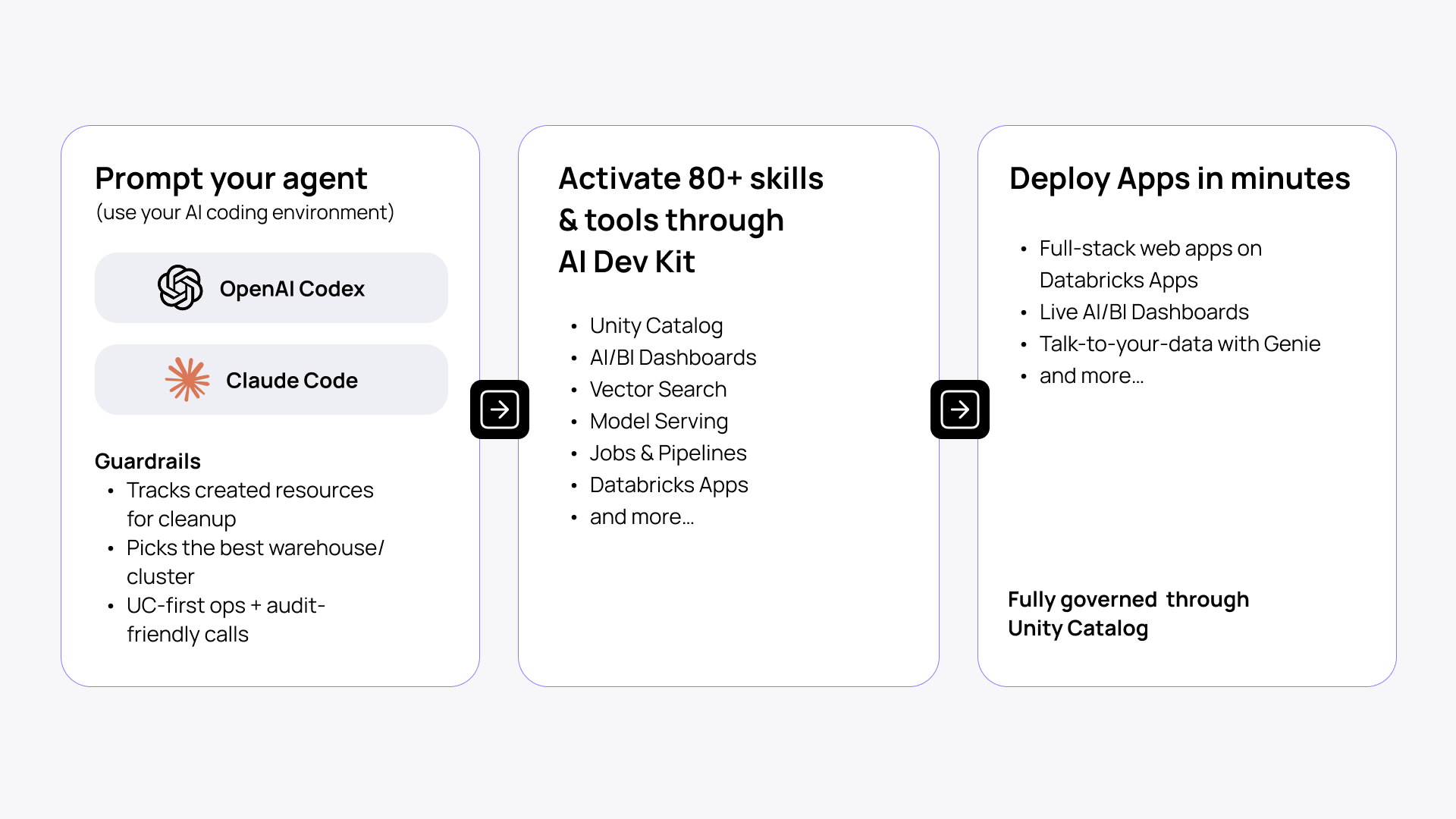
AI Dev Kit is a Databricks-focused open-source kit that gives your coding assistants (Claude Code, Cursor, Windsurf, Codex, or whatever you're already using) knowledge (skills) and execution (MCP tools) to plan, run, and iterate directly on your workspace.
It allows you to operate as a solo engineering team, managing a fleet of agents under your command. Assistants can inspect tables, create jobs/pipelines, and deploy resources. It’s governed throughout by Unity Catalog, makes audit-friendly calls, and tracks created resources for cleanup.
AI Dev Kit is designed for high-efficiency agentic engineering on Databricks. It gives your DevEx a serious boost to build scalable AI apps across the full stack: data → pipelines → agents → apps.
In short, your AI coding assistant finally has the Databricks-specific context and tools it was missing.
The era of a solo engineer operating a team of coding agents is here.
What is inside AI Dev Kit?
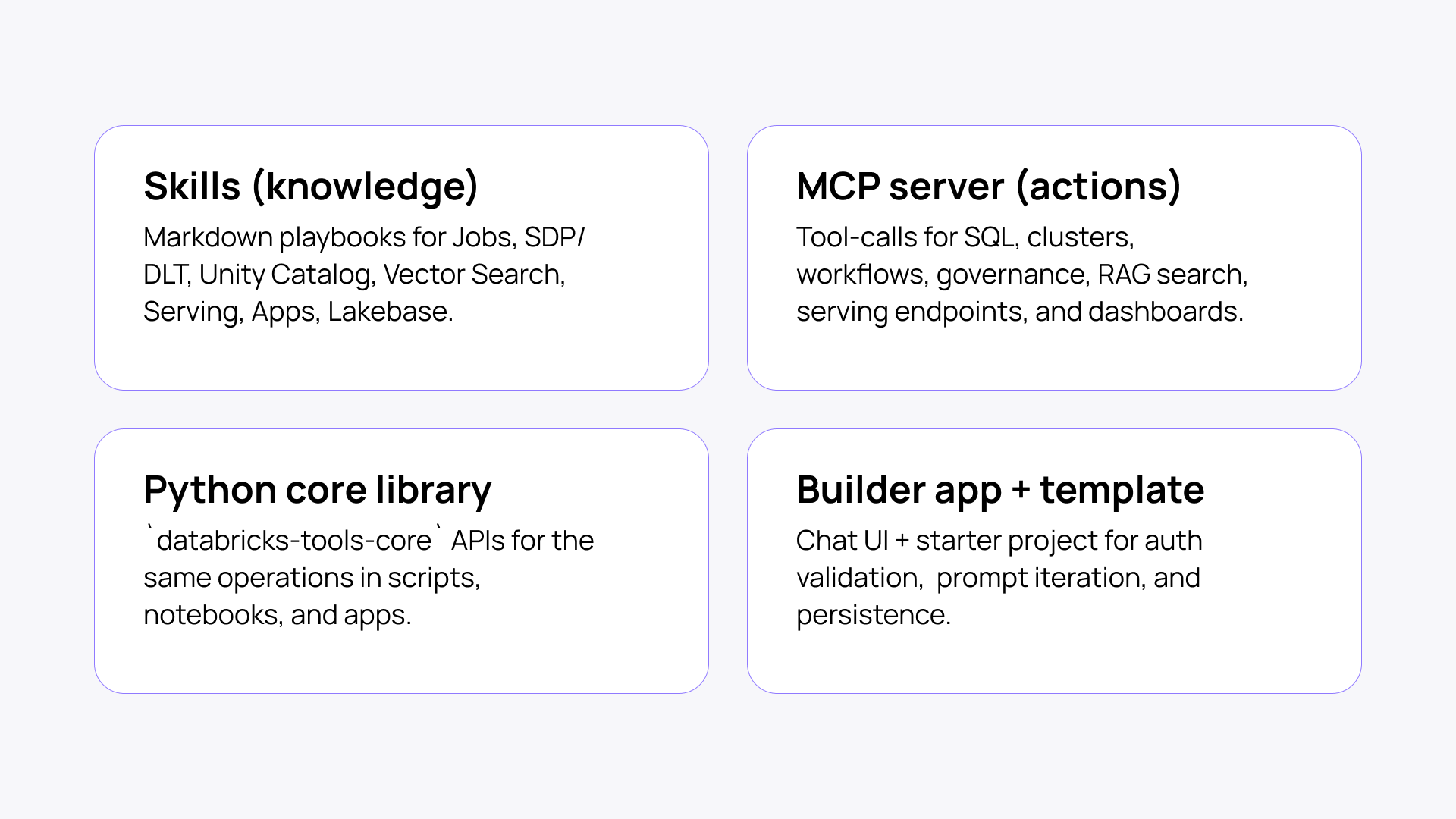
Skills (knowledge)
Skills include best practices and playbooks to work with Databricks native tools like Jobs, SDP/DLT, Unity Catalog, Vector Search, Model Serving, Databricks Apps, and Lakebase. These get loaded into your coding agent, so it stops guessing and starts building correctly instead of hallucinating APIs or weird patterns.
MCP server (actions)
This is the execution layer, allowing your agent to not only plan but also invoke and run Databricks tools effectively. It tool-calls for SQL, clusters, workflows, governance, RAG search, serving endpoints, and dashboards.
Python core library
databricks-tools-core exposes the same operations as reusable APIs you can call from scripts, notebooks, and apps directly.
Builder app + template
A chat UI and starter project for auth validation, prompt iteration, and persistence. If you don't want to run Claude Code or Cursor locally, deploy this inside your Databricks workspace and let your whole team use a shared agentic coding interface.
How AI Dev Kit closes the loop in agentic engineering
Software engineering is one of the most verifiable domains for AI-assisted work, which is why feedback loops matter more than raw generation quality.
Using flagship Codex or Opus models, the real limit is not necessarily the generated code quality baseline, but whether it can operate inside a tight loop of context, execution, and validation. When that loop is strong, you get a much more reliable engineering workflow, as the new programmable layer is your setup, not the code.
Playwright skill is a good frontend example of this shift. Once an agent can inspect the UI, read console logs, compare screenshots against a spec, and iterate automatically, it stops building blind and starts improving against real feedback.
The same principle matters even more in specialized platforms like Databricks, where generic agents know little about workspace context, platform conventions, logs, and other operational signals.
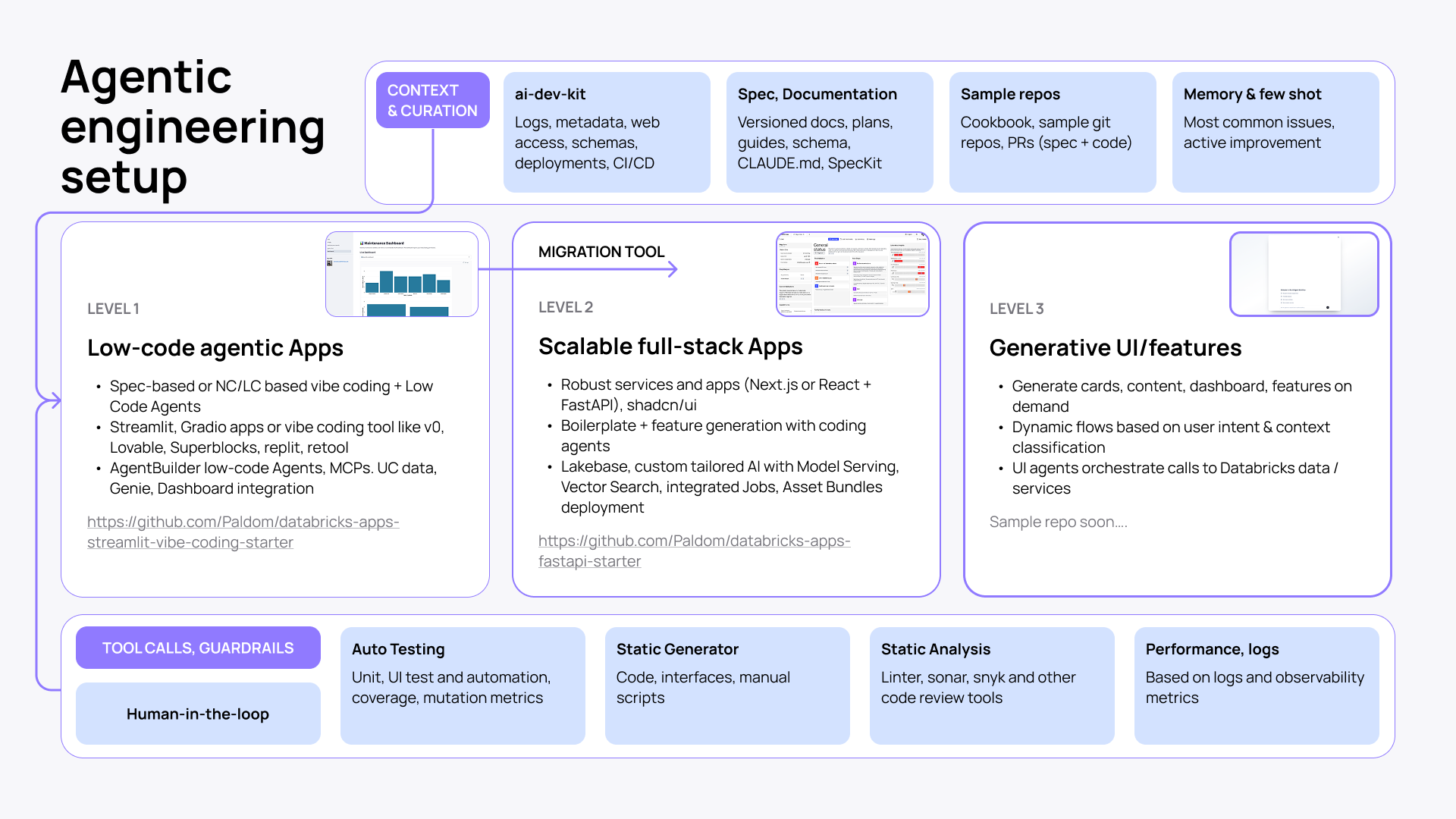
That is why AI Dev Kit feels like a missing puzzle piece. By giving the assistant Databricks-specific context — how to navigate workspace assets, schemas, metadata, logs, states + provide docs and skills — it shifts agentic development from generic code suggestions to grounded, iterative engineering against your actual environment.
A tighter loop of specification, execution, and verification makes AI-assisted development on Databricks more reliable and much closer to production work.
How does AI Dev Kit work?
Setup is straightforward. You install the kit, configure the MCP server to run locally (it authenticates through Databricks unified auth — OAuth, token, whatever your org already uses), and your coding agent gets the skills auto-detected as context.
Each developer on your team runs their own MCP server instance. Nothing is shared, so you don’t expose yourself or others to unnecessary risks.
With AI Dev Kit, your agent has access to what you have access to in the Databricks workspace. That's by design, and Unity Catalog enforces it. If you’re using it in environments where you have broad permissions, you have to watch what it's executing.
See it in action: creating an app in 15 minutes
For my first test, I created a customizable app with an integrated dashboard and talk-to-your-data in 15 minutes with Databricks Apps, AI/BI, Genie, and Claude Code. No coding effort, no manual setup and clicking. Just a few prompts to a finished product.
Prepare the dataset
The app template I use requires some form of structured data. You can always start with sample data. But if your data is currently unstructured (yet follows a similar pattern), Databricks provides built-in capabilities to handle that, too.
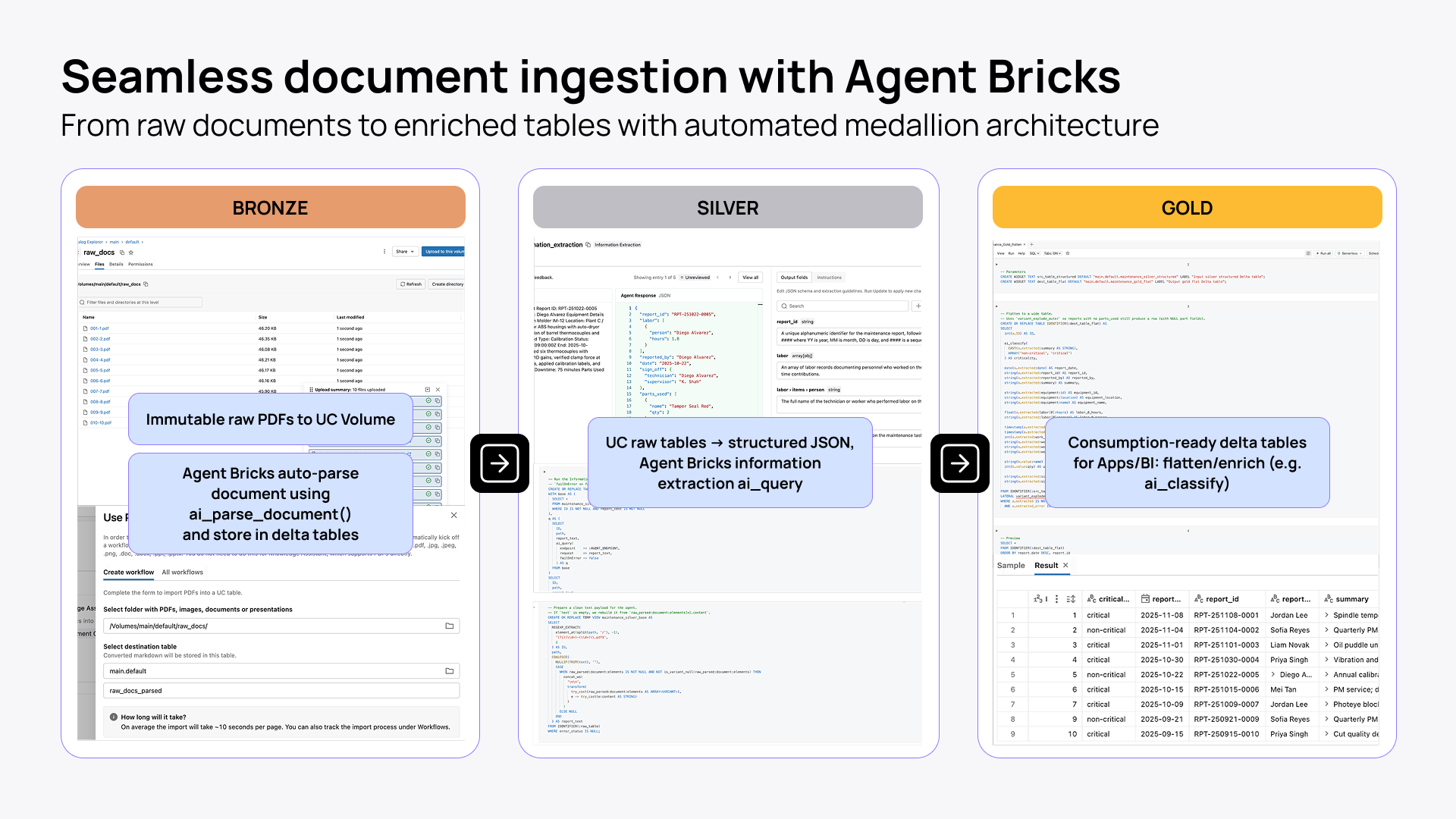
Agent Bricks gives you a much better path: it turns raw files into structured Delta tables through a Bronze → Silver → Gold flow. That means immutable raw documents first, then parsed and extracted JSON, and finally flattened, enriched, consumption-ready datasets for apps, Genie, and BI.
5 steps to build a sample app with AI Dev Kit
- Create an app in the Databricks workspace: streamlit-demo-app in my case.
- Upload sample data from a CSV to Unity Catalog and display it in a data grid: main.default.sample.
- Create an AI/BI dashboard and integrate it into the app on a new page.
- Add a Genie space directly integrated into the app on another page.
- Debug app logs (focusing on direct deployment rather than local development).
You can run these exact steps yourself using the sample setup. It's structured so you can follow along or adapt it to your own data.
Alternatively, whether you have an existing project you want to enhance with the ai-dev-kit, a new concept you're building from scratch, or you just want to install it globally, you can set up the whole kit with a single quick command.
And if you're looking for a complete full-stack setup, I'd suggest taking a look at this repo. It features:
- Full-stack app (FastAPI + React)
- Agents deployed on Model Serving within the app and in Genie as well
- Knowledge Assistant and Vector Search
- Lakeflow job-based data ingestion
- Complete end-to-end Databricks Apps architecture integrated with the ai-dev-kit
What you can build with AI Dev Kit
Unlike other toolkits for agentic engineering on Databricks, AI Dev Kit helps you build more than just Databricks AI apps. You can work with any Databricks project, from Jobs to Spark Declarative Pipelines to MLflow experiments.
Here are a few typical use cases and handy prompts to get started with some of them.
Databricks Apps: rapid scaffolding
Build Streamlit, Dash, Gradio, Flask, or FastAPI apps wired to SQL warehouses, Lakebase, model serving, and foundation model APIs.
Prompt: "Create a Streamlit Databricks App for support ops with warehouse-backed filters and a Genie chat tab based on data in main.default.sample."
Building applications on Databricks at scale? Check the Apps Factory playbook to build and run 100+ apps, saving up to 100 dev days/app.
Debugging app/workspace setup
Use it to diagnose local startup, DABs, app.yaml, and failed deployments with local debug mode and app logs.
Prompt: "Run local debug, inspect auth/resource config, and tell me exactly why this app deploy is failing."
Declarative Automation Bundles, aka DAB
It’s hard not to say Databricks Asset Bundles :) With AI Dev Kit, you can generate multi-environment deployment projects for apps, dashboards, jobs, and pipelines.
Prompt: "Create a dev/prod bundle for this app, dashboard, and job with permissions and target-specific catalogs."
Prompt-to-dashboard
Use a strong pattern—inspect schema, write SQL, test every query. Then create and publish an AI/BI dashboard.
Prompt: "Use main.default.sample to build and publish a KPI dashboard with a region filter and weekly trend."
Workspace automation
Use AI Dev Kit for SQL execution, file upload, job creation/runs, pipeline create/update/run, dashboard publishing, Genie spaces, and serving endpoint calls.
Prompt: "Upload this folder, create the job, run it now, wait for completion, and summarize any failures."
Genie Code vs AI Dev Kit
Genie Code was announced just weeks after AI Dev Kit. Although both are aimed at improving engineering experience on Databricks, each has its own space and use cases.
Genie Code is the workspace-integrated AI for doing data work in Databricks. AI Dev Kit is the external, mostly headless layer that turns your preferred coding agent into a Databricks-aware builder.
| Genie Code | AI Dev Kit | |
| Positioning | Workspace-integrated AI agent for doing data work inside Databricks. | External, mostly headless toolkit that makes your coding agent Databricks-aware outside the workspace. |
| User experience | UI-first: built into notebooks, SQL, Lakeflow, dashboards, and MLflow with chat and Agent mode. | Agent-first: lives in your repo/IDE/CLI and plugs into tools like Claude Code, Cursor, and Gemini. |
| Built to excel at | Exploring data, building pipelines, debugging, and operating workflows where the work already lives in Databricks. | Scaffolding and shipping Databricks pieces as part of a broader software project outside the workspace. |
| Why it feels strong | It automatically uses Unity Catalog context like tables, columns, lineage, and permissions. | It adds Databricks skills, 50+ MCP tools, and a core library to your external coding workflow. |
| How you tailor it | Workspace instructions, skills, and approved MCP servers. | Project configs, skills, MCP tooling, and optional custom integrations. |
| Best way to think about it | Databricks-native, UI-based, close to your data. | External, developer-led, Databricks-aware. |
Practical tips for using AI Dev Kit with coding agents
Here are a few best practices for using ai-dev-kit with Claude Code or a similar coding agent:
- Prefer project scope first. It’s worth keeping in mind that ai-dev-kit is not just a static install in the project folder. A setup script and version tag within the repo can help ensure everyone uses it consistently.
- Put durable repo rules in CLAUDE.md or AGENTS.md, and keep them short, specific, and practical.
- After a run, it’s always a good idea to ask the agent to generate a guide on how to revert the changes.
- Make sure to commit frequently. You can squash later.
- For anything non-trivial, make the agent explore, ask questions and plan first, then implement.
- For classic FastAPI, Node, React, or Streamlit skills, check out skills.sh or the repos mentioned above.
- Check for ai-dev-kit updates manually. Unlike skills.sh, there is no automation for that.
- Give the agent a way to verify itself: tests, lint/type checks, screenshots, or exact expected outputs.
- When building apps, the Playwright plugin is highly recommended.
- I love using “claude --dangerously-skip-permissions” within a dev container, but in this case, be careful with it.
- Keep the Databricks CLI and SDK current.
How Databricks Apps support AI Dev Kit
Databricks Apps is not the whole story behind AI Dev Kit, but it is a strong deployment target. It gives you a workspace-native place to run web apps, custom MCP servers, and browser-based agent interfaces. When your agent builds something, it deploys into an environment where auth, access control, and observability are already handled.
With Databricks Apps, you don’t have to build extra infrastructure or add a security layer. The app lives inside the workspace and plugs into your data directly, through synced tables and low-latency transactional state with Lakebase.
What this means for your team
- Data engineers can now autonomously vibe code and ship lightweight apps on top of their Databricks pipelines without pulling in a software developer or a Databricks consulting partner.
- AI engineers get a faster path to run experiments, iterate on projects, and roll out reliable AI products or agents hosted in Apps.
- Software engineers enjoy the productivity and speed of AI-driven Databricks application development without the usual risks and pains of vibe coding.
- Teams across the organization work more closely within one environment and gain enormous speed and flexibility.
The impact: from months to weeks to hours
Not long ago, moving from raw data to a working RAG + AI app often meant months of coordinated work across data engineering, analytics, and application teams.
With Genie and the broader Databricks platform, that cycle already started to compress into weeks by using out-of-the-box AI capabilities.
With AI Dev Kit, it can now shrink again to hours for a first working version, because the assistant has the skills, context, and validation loop to work directly inside the platform instead of generating disconnected code.
Production systems still demand governance, review, and hardening. But the deeper shift is not about speed alone. It is a change in leverage: one strong, opinionated engineer can materially alter the velocity of the entire data-to-app stack, and with it the pace at which the business moves.
The bottom line
In the larger picture, AI Dev Kit is another step in a direction Databricks has been moving toward for a while. The mission is to democratize data, break down silos, and empower everyone in the organization to build the tools they are missing to be more effective. Together with Databricks Apps, Genie, Agent Bricks, AI/BI, AI Dev Kit is the next move in that direction.
Try AI Dev Kit here.
Sample setup repo here.