The exciting part of Databricks is obviously the business applications and the AI models running on top of it. But that's only half the story. A lot of Databricks projects start the same way: a workspace, a storage account, a handful of permissions set up by hand. That works fine for a pilot. It falls apart the moment a team needs to scale, split environments, or move into more serious use cases.
Here's what you'll get out of this post: a reference architecture for an application landing zone on Azure, built for Databricks from day one, plus the infrastructure-as-code structure and the deployment model that keeps it all consistent. None of this is especially complicated. We'll walk through how to provision environments on top of Azure platform services you probably already have in place.
Target architecture of the application landing zone
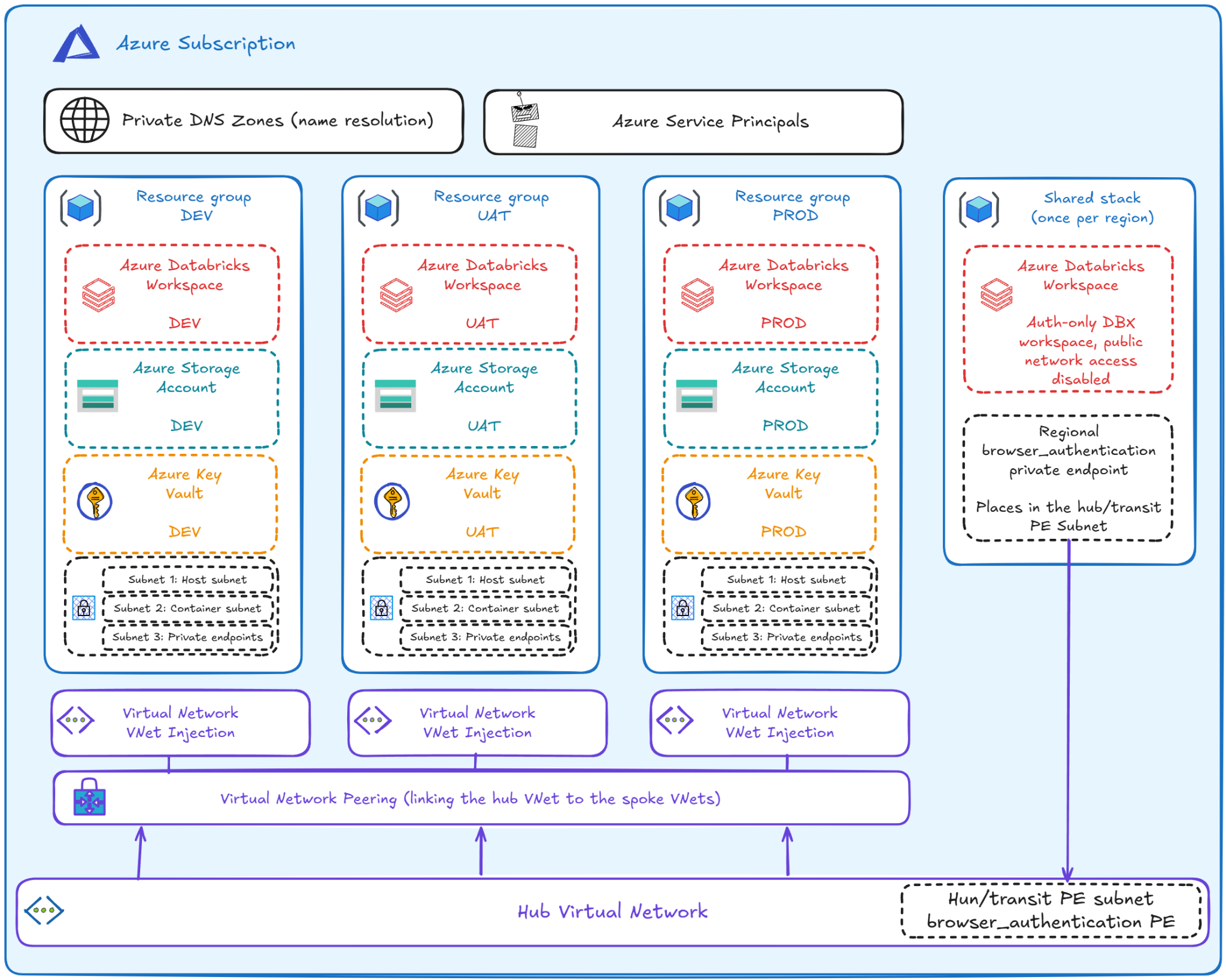
This is a simple application landing zone for Azure Databricks. It sits inside the broader context of an Azure Landing Zone1, 2, 3 where the shared cloud capabilities — identity, connectivity, hub networking, a private DNS — are already in place. The application landing zone consumes those. It doesn't recreate them.
Starting from the outside in: we're assuming an Azure subscription for the workload, a hub virtual network, and a private DNS zone already exist.
Spoke networks, one per environment
Moving inward, the first thing provisioned is the spoke virtual network (VNet) for each environment. Each spoke connects to the hub through network peering, so resources on either side can talk to each other directly and securely4. That's what lets Azure Databricks tap into shared platform services like DNS resolution or firewall inspection. And since every environment gets its own spoke VNet, you get physical separation on the network layer for free.
In this pattern5, each environment owns its own spoke-network resources:
- the environment VNet,
- three subnets:
- the host (public) subnet, serving the host-side network interfaces of Databricks nodes,
- the container (private) subnet, used for the container-side network interfaces — and sizing this one matters. Too small, and the workspace runs out of IP addresses as classic compute clusters scale up. (Serverless compute will ease this pressure over time, since it runs on Databricks's own compute plane, but that's not a reason to skip the math today.)
- and the private endpoints subnet.
In an actual implementation, these subnets also get Databricks delegation, security groups, and route table associations. All of this lives inside an environment resource group. From here, let's look at what else sits in that same environment.
What's actually inside each environment?
For a simpler setup, development, user acceptance testing (UAT), and production can live in the same Azure subscription. On bigger projects, that's usually not the case. Either way, each environment's resource group holds the following, on top of the subnets already mentioned:
- an Azure Databricks workspace, deployed as Premium, with VNet injection, no public IPs6, and private endpoints for frontend and authentication traffic7,
- browser-based authentication, handled by a separate, shared, regional auth-only Databricks workspace that hosts a single browser_authentication private endpoint8,
- an Azure Storage Account with ADLS Gen2 and hierarchical namespace enabled, HTTPS-only, shared key disabled, public network access disabled,
- an Azure Key Vault: even with managed identities and OIDC as the preferred path, some secrets still need to live somewhere (Confluent Kafka integration API keys, for instance),
- a Databricks Access Connector, so Databricks can reach Azure resources like ADLS Gen2 without relying on long-lived secrets, set up as Storage Blob Data Contributor,
- and private endpoints connecting the environment VNet to the Databricks workspace, ADLS Gen2, and Key Vault, over Azure Private Link.
One more piece sits outside the resource group: the private DNS zone, used for name resolution. It makes sure service URLs resolve to the private endpoint IPs, so clients like the Databricks workspace keep using normal service names while traffic stays on the private network.
Last, we provision Azure Service Principals for:
- CI/CD workloads, where GitHub Actions authenticates through OIDC, with the service principal set up for token federation instead of storing long-lived secrets,
- deployment workloads in Databricks, like Declarative Automation Bundles9, which shouldn't run under a personal user identity.
This landing zone also works as a foundation for serverless workloads, though the connection model looks a bit different there. Serverless compute runs on Databricks's own managed compute plane, so to let it reach private resources, you'll need a Databricks account-level network connectivity configuration (NCC)10, 11. That piece lives in the Databricks-specific infrastructure code, which I'll cover in my next post.
Infrastructure-as-Code
The real step forward is turning this architecture into infrastructure-as-code (IaC)12. IaC is the standard way to manage infrastructure through version-controlled configuration files, so you can build, change, and review infrastructure safely and repeatably instead of clicking through the portal.
There are several tools that can do this. We went with a Terraform-style structure:
Here's what each piece does:
├── bootstrap/          		# remote state and GitHub OIDC identities
├── envs/
│   ├── landing-zone/  			# single deployable DBX landing-zone definition
│   ├── config/         		# environment-specific configuration files
│   │   ├── dev.tfvars
│   │   ├── uat.tfvars
│   │   ├── prod.tfvars
│   │   └── shared.tfvars
│   └── shared/         		# shared regional Databricks authentication resources
└── modules/            		# reusable landing-zone building blocks
    ├── dbx-env/
    ├── resource-group/
    ├── spoke-network/
    ├── databricks-workspace/
    ├── storage-adls/
    ├── key-vault/
    ├── identity/
└── databricks-auth-workspace/- Bootstrap, which contains initial setup for remote state backend and the Microsoft Entra service principals used by GitHub Actions, before anything else gets provisioned. It's a one-time setup, separate from the repeated provisioning of dev, UAT, and prod.
- envs/landing-zone holds a single deployable Databricks definition, used by the environment configurations.
- envs/config holds the environment configurations: dev.tfvars and similar files that define what makes each environment what it is.
- envs/shared holds the Databricks resources that should exist only once per region, including the shared browser authentication private endpoint.
- modules holds the reusable building blocks behind the architecture above:
- resource-group creates the environment resource group,
- spoke-network creates the spoke VNet, its three subnets, routing, and the spoke-to-hub VNet peering,
- databricks-workspace creates the Databricks workspace, the Access Connector, the storage role assignment, and the private endpoints,
- storage-adls creates the ADLS Gen2 storage account, containers, and the blob private endpoints,
- key-vault creates the Key Vault with RBAC, purge protection, disabled public access, and a private endpoint,
- identity creates the Microsoft Entra applications and service principals,
- dbx-env wires all of these modules together into a single environment pattern.
Two things matter here. First, environment-specific configuration stays separate from the rest of the codebase. Second, the modules describe how the landing zone gets built and how its pieces are grouped. New environments stop being something you hand-build and start being something you standardize.
The provisioning model
So how do you actually deploy this, and how do you handle changes down the line? The infrastructure code lives in a repository (GitHub, in our case) as the single source of truth. Provisioning runs through GitHub Actions, so every infrastructure change gets a reviewable history.
Once a deployment finishes, the remote state gets written to an Azure Storage Account, created by the bootstrap stack. Each environment gets its own blob container or state key, and authentication runs through GitHub OIDC workload identity federation.
Here's roughly how the CI/CD pipeline works, starting from when a feature set merges into main and a deployment kicks off (we'll skip the gitflow and dev-validation steps for now):
- The pipeline authenticates into Azure.
- The remote backend state is initialized and read, as the provisioning tool connects to the Azure Storage backend holding the current state.
- The configuration gets validated, the pipeline checks whether the infrastructure code is valid and usable.
- A provisioning plan is created and reviewed, comparing the desired state in GitHub against the current state in Azure.
- The changes get applied, and the target environment updates.
- The remote state gets updated in Azure Storage, and the result gets recorded in GitHub Actions.
Wrapping up
This approach scales down just as well as it scales up. It works fine on the smallest of projects. The architecture follows Microsoft's hub-spoke best practices, nothing exotic, and the modularization holds up regardless of how complex the use case gets. You can add or remove environments as needed. Nothing stops you from starting with just one or two.
The next decision that matters for a high-quality, automated, maintainable infrastructure setup is which provisioning tool to use. In my next post, I'll pick this up and introduce OpenTofu, which tends to be the better fit for smaller teams and projects.
References
1 https://learn.microsoft.com/en-us/azure/cloud-adoption-framework/ready/landing-zone/?tabs=hubspoke
2 https://learn.microsoft.com/en-us/azure/cloud-adoption-framework/ready/landing-zone/design-areas
5 https://learn.microsoft.com/en-us/azure/databricks/security/network/classic/vnet-inject
7 https://learn.microsoft.com/en-us/azure/databricks/security/network/concepts/private-link
8 https://learn.microsoft.com/en-us/azure/databricks/security/network/concepts/private-link
9 https://hiflylabs.com/blog/2025/11/20/declarative-automation-bundles-isolated-networks
10 https://learn.microsoft.com/en-us/azure/databricks/security/network/serverless-network-security/
11 https://docs.databricks.com/api/azure/account/networkconnectivity
12 https://www.hashicorp.com/en/resources/what-is-infrastructure-as-code