This is part two of our series on using agentic AI in business intelligence. If you missed part one: “How We 10x Time to Insight by Baking Claude Into Data Workflows”, we covered how the Data Analyst profession is changing, and what adoption looks like within our own team.
Here, we get into three concrete areas where agentic business intelligence has hands-on impact:
- rapid prototyping
- ticket management
- gold layer development
Each one saves real time, and expands what's actually possible for a typical BI team.
The role of the context layer
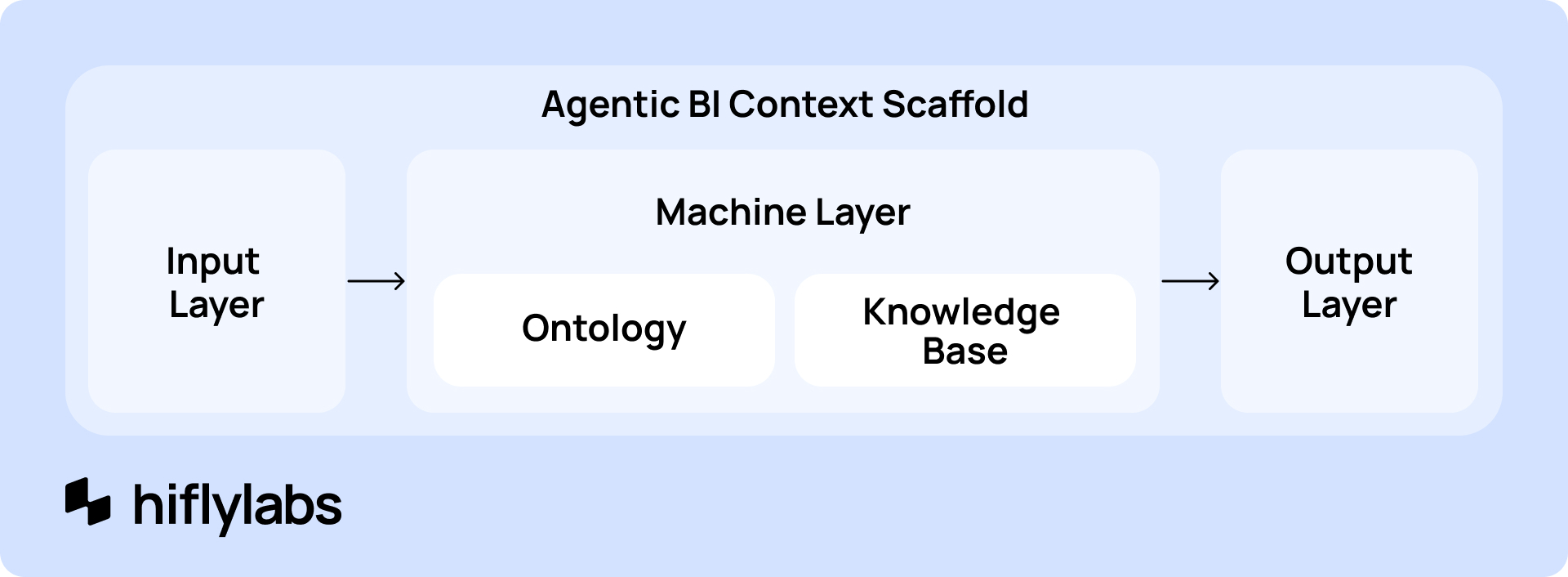
Before getting into use cases, it helps to understand the foundation. Everything in agentic business intelligence runs on a context layer. First, a structured knowledge base the agent can reference. It sits between raw inputs (meeting transcripts, KPI catalogues, Power BI files, client docs) and the outputs a data analyst, engineer, or scientist actually needs.
The most mature implementation of the context layer is an AI ontology, which LLM agents can query: data semantics, report context, business logic, governance decisions. Underneath that sits a knowledge graph or schema with entity classes, relationship types, and validation rules. This keeps everything consistent, and most importantly: machine-readable.
Let’s see the three clearest places for payoff, where the context layer holds the functional and visual logic, so now agents can turn briefs into something a stakeholder can react to almost immediately:
How to use AI agents for business intelligence
1. Rapid prototyping
Prototyping has always been one of the most valuable things you can do early in a BI project. Getting a visual in front of a stakeholder and iterating before anything is built saves a lot of rework. Before AI, we mainly used Figma: days spent on detailed dashboard mockups. Which was still faster than rebuilding a live report, so it was worth it.
With agents in the workflow, we now apply three approaches, depending on the situation:
Dynamic HTML mockups
This is our go-to right now. Once the context layer is solid, you can generate a clean, functional mockup without a long prompt. Summarize the functional brief if it's not already in context, point Claude Code at it, and ask for a dynamic HTML mockup. The output is good enough for a quick client iteration, and you can go from brief to mockup in a fraction of the time it used to take.
Further reading: How Anthropic enables self-service data analytics with Claude
Need something more polished, with the client's branding? Create a design.md that lays out colors, typography, and UI kit rules. Reference it in the prompt, and Claude Code will use it when building the HTML. We've been able to 10x our mockuping speed this way.
Figma MCP
Figma released an MCP server, which means you can now use Claude or Codex to generate design systems and mockups directly in Figma. The output looks polished, sometimes even production-like. But you trade speed for that polish.
In a well-run BI operation, iteration speed matters more than pixel-perfect fidelity most of the time. So we only reach for Figma MCP when the mockup needs to look finished from day one, which honestly isn't that often.
Claude Design
It's very capable when it comes to generating design systems: feed it a prompt and some reference dashboards, and it can set up in a few prompts what would have taken weeks before AI. Unlocking even faster visual mockuping is something we're still working out.
So all this prototyping solves the front end of a BI request, getting a stakeholder to agree on what they want. The harder problem is usually what happens next: turning that agreement into well-specified work. Scoping, tracking, building. This is where processes and teams can break apart.
2. Ticket tracking and project management
Larger BI teams usually run on a ticket tracker like Jira, Linear, ClickUp, or some other flavor of these. It's a clean system in theory. Request in, get scoped, get built, get shipped. In practice tho, two things go wrong almost every time:
First, ticket quality is all over the place. A ticket written by an experienced product manager looks nothing like one dashed off by a busy analyst. Most BI teams don't have someone dedicated to grooming the backlog, so quality varies wildly.
Second, granularity is all over the place too. A one-line change like renaming a column label sits right next to a multi-month program like rebuilding the company's entire financial reporting suite. Both arrive as a single ticket. That makes prioritization close to impossible.
The root cause is usually the same: turning a vague request into a well-formed, properly scoped ticket is real work, and nobody has time for it. Most business users won't fill out a long intake form, they just call you in the middle of lunchtime. So the structuring work falls on the BI team, and it rarely gets done consistently.
Agents as product managers
Even a transcribed phone call will return a fully formed ticket: clear scope, background and context, acceptance criteria, and a sensible breakdown of steps. Because the agent draws on the same knowledge base the team already maintains, tickets stay consistent in a way most BI teams never had the capacity to achieve manually.
It works on both sides of the ticketing relationship. On the requester side, someone who would never fill out a formal intake form can just describe what they need in plain language, and the agent shapes it into a proper ticket. The analyst isn't interrupted, and the requirement is captured at a usable level of detail. On the delivery side, a large initiative can be automatically expanded into a full roadmap of individual tickets, rather than landing as one oversized task that hides months of work.
Pipeline from knowledge base to backlog
Once a team runs an agentic setup with a solid knowledge base, syncing it into Jira (or such) through an MCP server is low-effort. The agent keeps the roadmap and ticket list in step with the knowledge base.
What's planned, what the current tickets are, and how they relate all stays aligned. The backlog becomes a live projection of the team's actual plan.
A concrete example
On one build, the process started by having the agent generate a large roadmap up front. From that roadmap, it produced a full set of tickets describing the development steps for each topic.
After that, driving development came down to pointing the agent at one ticket at a time. It picked up the ticket, implemented the scope, and, because each ticket already carried its own acceptance criteria, the agent also tested its own work against them. Then everything was wired into the Git workspace.
The human's role shrank to review, stepping in only when something came back wrong. An AI wrote the roadmap, populated the tickets, and worked through them one by one.
That's the pattern we scale up to enterprise business intelligence. The ticket system stops being overhead and becomes the interface through which work is specified, built, and verified.
Build your own, or use the platform's AI?
The ticketing vendors see this coming. Some of the more forward-thinking issue trackers are already arguing that traditional ticketing is on its way out, and they're building agentic features into their own products. That capability will almost certainly come at an extra cost.
For most enterprise BI teams, the question is whether to use the platform's built-in AI or build your own agentic layer on top. Our take: build your own, for two reasons.
- Control: you own the workflow end to end, rather than inheriting whatever the vendor decides to ship.
- Context: you can feed your own agent far more of your organization's knowledge, conventions, data models, and history than a generic product-embedded assistant will ever see.
That combination is what makes the generated tickets trustworthy enough to actually build on. And it's especially powerful in enterprise settings, where the gap between a casual request and a well-specified piece of work has always been expensive to close.
Further reading: Issue tracking is dead – by Linear
That same gap, between a loosely defined ask and a properly specified deliverable, shows up at a much larger scale in gold layer work, where getting the scope wrong can cost months of rebuilding.
3. Gold layer planning and development
What used to make gold layer projects so painful?
Refactoring and migration work — rebuilding the gold layer of a data warehouse — has traditionally been one of the heaviest things a BI team takes on. Long timelines, thin documentation, and a high cost for getting requirements wrong. In the old world, you'd spend a month writing a specification. If something in it turned out to be wrong, you were back to square one, a month behind.
Agentic development changes that. When a requirement shifts, the model regenerates the affected load end to end, at the same level of documentation quality as the first pass. Iteration stops being expensive. Getting something slightly wrong is no longer a disaster. On one enterprise migration, this turned an eighteen-month build into a matter of a few months.
The foundation: a context layer you can trust
Everything here depends on the context layer. Before any code is generated, the team puts in real effort defining what the model is allowed to work with: usage policies, business rules, naming conventions, domain ownership, numbering. Some of this the model can help generate, but most of it when you set everything up the first time should come from genuine human experts (the people who actually know your operations), and skipping this is the fastest way to get unreliable output later.
A few patterns make this layer dependable:
- Read-only source folder. The raw inputs the model learns from (old SQL, table exports, the as-is architecture, the existing KPI framework) live in a separate, read-only location the model can reference but never modify.
- Encoded team rules. Who may change what, and which changes require approval, is written down rather than assumed.
- Anti-hallucination guardrails. The model is instructed to use only what's documented and never to invent a field, table, or metric. This is what keeps naming consistent and stops the project from quietly drifting away from reality.
Further reading: AI security overview – by Hiflylabs
Blueprint for reviewable SQL workflows
With the context in place, the build follows a deliberately staged path:
- Feed existing sources into the context layer. These can be Excel files, PDF design documents, or live systems wired in through an MCP server: Power BI logic, Databricks tables, SAP BW, and so on. Almost anything can be referenced into the context layer.
- Build an as-is map of the sources, so there's a structured picture of what exists today before anything new is designed.
- Generate a gold layer blueprint, a functional outline of the tables to be developed. At this stage you can enrich the context with additional heuristics and rules, and hand the model a process plan for how tables should be generated.
- Review the blueprint. A general sense check before going further. You don't want to spend tokens building on the wrong foundation.
- Generate the SQL code that data engineers use to create business tables at the end of the data pipelines.
- Review the SQL code.
- Implement the generated code.
The single most important discipline across these steps: break the work into meaningful, reviewable chunks. A reasoning model will happily return enormous volumes of code. Reviewing the blueprint before any SQL is written is a cheap way to avoid burning effort on the wrong foundation.
Where humans stay in the loop
Every output gets reviewed, but the real human contribution happens earlier, deciding scope. What actually needs to come through from the layers below, and in what shape.
Ideally this gets worked out together with the data engineering team, close to field level. When that alignment gets rushed or skipped, gaps show up later: tables that were promised but never built, keys that quietly disappeared between versions, data that landed in the wrong place.
This is where the agent works as an amplifier, not a replacement. It can read through sprawling change logs and design files that a person would need days to get through, and produce a gap analysis or coverage matrix:
Does the proposed gold layer actually cover what's needed to rebuild the target reports? Which fields exist? Where are the holes?
The output isn't flawless, but it's immediately workable. It turns an unreadable pile of documentation into a decision a human can act on.
Verification closes the loop. A practical approach is to build a data model from the new gold layer and compare it against a model built from previously trusted queries — row counts first, then the data itself — and only migrate the reports, metrics, and calculations once the two line up. With large datasets, hallucinations can still slip through even with strict guardrails in place. The human-led validation step is not optional.
Hard parts: keeping context in sync, and more reviews than ever before
The honest constraint is keeping the context layer current. Periodically refreshing and reviewing context files. Isolating context changes on their own branch so they can be checked deliberately. Leaving explicit notes for changes that are coming but not yet final. Because the model re-reads these files on every session, an out-of-date context layer both slows things down and immediately produces wrong answers.
So another new bottleneck arose: Review, review, review. One of the early pitfalls we have defaulted into is that we planned standard review cycle times for agentic projects. From experience, we see now that the volume and speed agentic workflow required was a multiplier in testing / review times as well.
Is it worth it?
Even with those constraints, yes. Beyond the raw speed, the agentic approach documents as it goes — often capturing things you didn't explicitly ask for, which later turn out to be exactly what you needed.
And even when a generated artifact isn't perfect, it's usually still worth generating with the model rather than writing by hand. There's a traceable record, the result stays consistent with everything around it, and it's far easier to refresh next time than something stitched together manually.
The gold layer used to be one of the heaviest parts of a BI build. With agentic business intelligence, it's one of the most rewarding.