
Does the following sound familiar? Your team has fully adopted coding agents in the last year. Everyone is using AI to write code, the output of your engineers has quadrupled, and they say they cannot go back to coding without AI anymore.
And yet, you don’t ship more features.
Dozens of pull requests are waiting for reviews, the CI is often red, test coverage is non-existent, or it does exist, but your tests test themselves instead of the code, and everyone starts to feel that they are less and less familiar with the code than before. Additionally, the code starts to get polluted with irrelevant comments, hard-to-decipher variable and function names, and new features violating the architecture are becoming the norm rather than the exception.
Welcome to the beautiful world of vibe-coding!
I think there’s no need to mention that this isn’t sustainable long-term, especially if you work in a sensitive environment like finance, healthcare, law, civil engineering, and similar.
But what if I told you that this isn’t necessarily the way your development team should build new features from now on? What if you could guarantee that your agents are physically unable to commit code that breaks, violates the architecture, or has vacuous tests? What if you could combine the speed of AI-assisted development with all of the requirements and security baseline that your company expects from everyone?
This is what we call agentic engineering, and I’m about to show you a range of techniques and mental models that will help you and your team ship faster and more confidently than ever before. The Hifly blog already has resources on Databricks-related AI coding, so this article will go into a more general perspective.
The Right Mental Model
While everyone else is going crazy about automating everything with AI and cheering for the ever-growing context window of the best models, I have a more conservative view on the matter. I think you should use less AI, not more. I think going back to the good old software engineering practices is more important than ever. Let me explain.
How many times have you corrected your agent on the same issue? How many times have you felt that an issue you think you fixed yesterday keeps coming back a few days later? That’s happening because you overuse AI. You rely on its memory and its ability to recall that you told it to avoid doing something.
“You are absolutely right, I should not have done that, we discussed it yesterday and I still violated your principle”.
The first instinct of most people is to put the new principle in the CLAUDE.md / AGENTS.md. After all, that’s what these files are for, right? But there is a problem: those files are rarely read. By default, they are read when you start a conversation, and later when the model auto-compacts it. Other than that, the only time they are loaded in the context again is when you import them with @. In a context that contains about a million tokens, these prompts are like a needle in the haystack for the model. They are simply ignored. Instead of putting everything in prompts, ask the following questions:
- How can I systematically prevent this issue/violation from happening again?
- Is it possible to write a script that prevents said issue without the agent?
- Can I force the agent to use this script when it matters the most?
And in many cases, there is a deterministic solution for the problem, which is incomparably better than hoping the agent will get it right. If you remember one thing from this blog post, it should be this:
“If you can guarantee something with a script instead of a prompt, you should force your agent to use the script instead of inflating your AGENTS.md with a new rule.”
Adding the script to the prompt still makes sense, but it is enough to mention it at this point instead of explaining what you want the model to do. Here are some examples of what you could enforce with a script:
- Use the same line endings in every file
- Lint/format every file before commit
- Ensure a particular instance of a class is a singleton
- Ensure types are correct and the build passes
- Guarantee that every environment variable used in the repo is mentioned in the README
These are just examples, but I think you get the idea. Once you have a script that validates any of this, wire them in the pre-commit hook, CI pipeline, and finally, let your agent know about its existence. But you can go even further than this. Plenty of examples above could support a --fix flag, which also fixes the issues found, not just reports their existence. This way, you can save even more tokens than just not having to prompt the model anymore.
Let’s say you want to guarantee LF file endings throughout the entire repository. Your agent edits 12 files in a turn, then commits them. Without the script wired in, the next time you will notice anything is when a colleague using a different OS reports that the repository does not work on their machine.
With the script, however, you can fix it automatically. First, you don’t have to tell the model to pay attention to it, because it happens automatically, and second, when it is caught, instead of editing 12 files and burning a couple thousand tokens on it, your agent just calls a deterministic script that finishes in about 28 ms, and fixes the problem like it never existed ever. You just saved a tremendous amount of time, tokens, and cognitive load.
Multiply it with everything that can be checked in a deterministic manner, and you get a team that ships faster, safer, and is happier than before.
So what exactly should your repository contain? How to set up a system like this? And how to make these reusable across your team? This is what the next section will cover.
Your Folders Are Part of Your Harness
If 2025 was the year of agents, 2026 the year of workflows, then 2027 will be the year of harnesses. Harnesses are frameworks around coding agents like Claude Code, Codex, Copilot, etc. On top of that, we already have so-called meta-harnesses that utilize multiple different agents and are able to pass context between Claude Code, Codex, and others, not just inside a single agent. But what is a harness exactly?
The range is wide. Some of them are an extra CLI around your existing setup, some of them bring their own UI, and you access Claude Code through that, and some of them are just a collection of prompts, skills, and hooks. Arguably, a well-defined plugin could also be called a harness if it defines a dozen skills, hooks, MCP servers, and more, but that’s just my two cents.
These extensions (skills, prompts, hooks) can generally have two scopes: user-scoped or folder-scoped. User-scoped extensions are always available, no matter which folder you run your agent in. Folder-scoped extensions are only available when the agent is running in that folder. And this has countless advantages.
- Folder-scoped extensions won’t pollute your context when you are working elsewhere
- Extensions activate at the right time and in the right place
- You can share extensions with others working in the same folder
- User-scoped extensions can still run and be available everywhere, everytime
This also means that whatever is in your folders will become part of your harness. Even if you don’t install anything around it, your agent will still automatically read AGENTS.md, run hooks, and use skills in a folder it is started from. Managing your folder’s extensions becomes a responsibility. (It also becomes a security nightmare, but more about that later.)
Let’s say you have a Node.js repository and you want to upgrade it. There are at least 3 layers and 3 extension types you should consider using.
Prompts
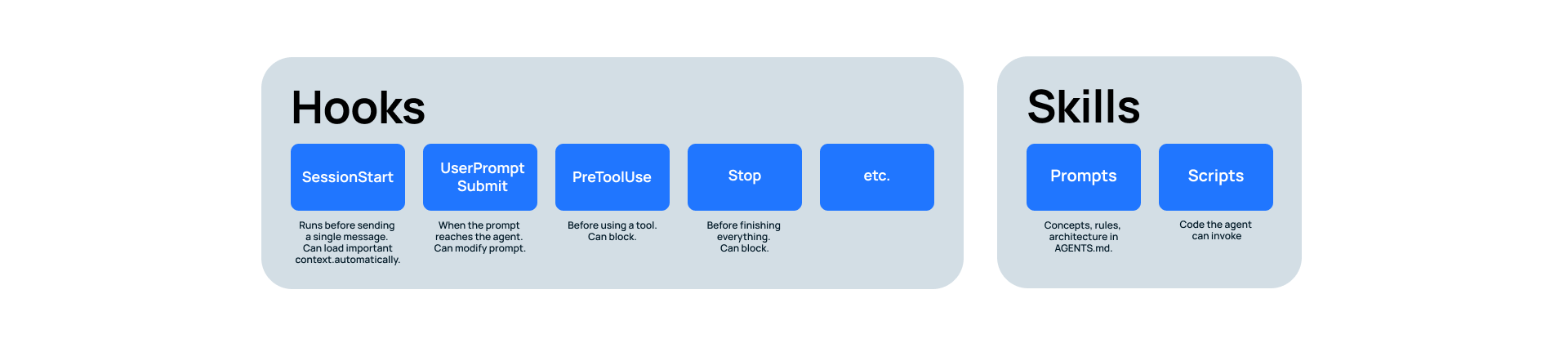
First, explain the most important concepts, rules, and the architecture in your AGENTS.md. I know I told you to strip it, but that was true for upcoming policies. The general architecture should still be available instantly to your agent. Keep it short, though. Over 200 lines, and you just pollute its context. Try to aim for a much shorter version.
Skills
Then, consider introducing some skills. Simple skills act like prompts invoked at the right time. The agent will reach for a skill when it thinks it has one available for its current task.
For example, if you have a convention of good commit messages and atomic commits, this belongs in a skill named git-commit, or something like that, but not in the AGENTS.md. Why? Because the AGENTS.md is for information that is always relevant. The architecture and important commands, like how to start the development server, are recurring tasks.
Commits are less common. You can totally add commit-related guidance in the CLAUDE.md, but it is usually a good example for a skill. The agent will automatically invoke the skill and read its content when it is about to commit its progress.
If you prefer manually committing or your agent stopping before it is about to commit, you can also prompt it to never commit alone, only when you manually invoke the /git-commit skill.
Simple skills are only prompts. Advanced skills contain scripts the model can run based on the explanation of the skill. Again, the point of not mentioning every available script in advance is to keep the context polished. The model does not need to know everything constantly, only when it becomes relevant.
For example, instead of explaining how your conventional commit message should look in the skill’s body, you could write a script for this purpose that lets the model generate it based on the changes. Let’s say the commit message should mention every layer that was touched in the latest changes.
Instead of telling the model to collect this information, you could have a script that will print out the exact commit message you should enter and then tell the model to use that. Or, even better, the script could also write the commit itself, saving even more tokens and time, and keeping everything guaranteed to work, because you limited the probabilistic parts of your commit workflow to the bare minimum.
Hooks
Finally, the most important concept is hooks. Hooks are the citizens of your repository that you won’t be able to live without once you understand how crucial they are during work.
When an agent is working, it has a specific lifecycle it follows. You start the agent, you send a prompt to it, it starts working, calls some tools, those tools return information, it starts subagents, those agents finish working, it writes you a response, and finally, it stops. There are many more actions an agent can take during its lifecycle, but these are the most important ones.
Hooks let you attach logic to these lifecycle events, which makes them simultaneously powerful and dangerous. Powerful because they can run code without you knowing about it. And dangerous because they can run code without you knowing about it.
Four lifecycle events are the most often used:
- SessionStart: when you start the agent. Note that hooks attached to this event run before you even send a single message. You can load important context automatically and dynamically.
- UserPromptSubmit: when your prompt is about to reach the agent. You have the ability to extend the user’s prompt on the fly.
- PreToolUse: before the model uses a tool. Hooks attached to this event can block, meaning that you can prevent the execution of dangerous commands.
- Stop: Right before the model is about to finish answering. The Stop hook can also block.
Why is it important that a hook can block? Because when the model is blocked, it is physically unable to finish the current iteration until it is unblocked. This means that you can define various checks in your repository that should all be green before the model decides that it has finished answering.
Here are some example checks I am using in my TypeScript projects:
- Type-checking
- Linting and formatting
- Collecting unused functions, variables, exports, packages
- Ensuring the percentage of code duplication is below a threshold
- Checking architecture violations
- Searching for circular imports
- Ensuring LF file endings
- Preventing committing secrets
This sounds like a lot, but in reality, every single check in this list finishes in a couple of seconds altogether. And when all of this is wired in the Stop hook, the agent is simply unable to claim to have finished a job when any of them are red.
This removes a significant amount of cognitive load because I can be sure that whenever my agent finishes working, I don’t have to care about any of the above, only about business logic. And the last thing a reviewer wants to care about is a missing semicolon or a build that fails, but tests don’t catch it.
To achieve what I just said, you can connect even more checks in the repo, but usually at the pre-commit/pre-push level and in the CI, not in agent hooks. You want your agent to be able to iterate fast, not to wait on a 3-minute-long test framework. That’s why I usually omit builds, tests, and mutation tests from the agent loop.
Imagine your reviewers have to care about logic only, but not syntax, build errors, fake tests, dead code, code duplication, and misleading comments. All of this is available to you today. You just have to set up some hooks.
Cowork and Claude Code
There’s a good reason behind why they are not the same product. Claude Code often uses code, runs scripts, asks for permission (not so much anymore since auto mode is the default, but still), and is generally designed to be used by developers. Still, it has an unfair advantage over Cowork.
Yes, you guessed it: hooks. Claude Code has hooks, while Cowork does not. Hooks aren’t just for ensuring your repository is clean. You can also build an entire harness and memory system on top of them. Imagine a system that iteratively learns about your preferences, remembers your files, works across folders, knows how you prefer to work and iterate, remembers your TODOs, and much more.
This is available today with hooks and a custom harness. By the way, Claude Code also has this by default, but then you are vendor-locked to Claude Code. With hooks, you can write yourself a harness that works on any machine, with any agent. But that topic belongs in a different blog post.
Also, hooks can prevent accidents. Without going too much into security details, the most important command you should definitely put in your PreToolUse hook is to block executing rm -rf /. It is literally just a hook away, and yet many people claim that Claude Code deleted their entire working directory without being asked. Of course, Cowork does not share this problem, but this was just an example of how much hooks matter.
If you need a customizable agent, I recommend using Claude Code, mostly because of its hooks. They quadruple what your agent can achieve, without you prompting it constantly in the right direction.
More About Hooks
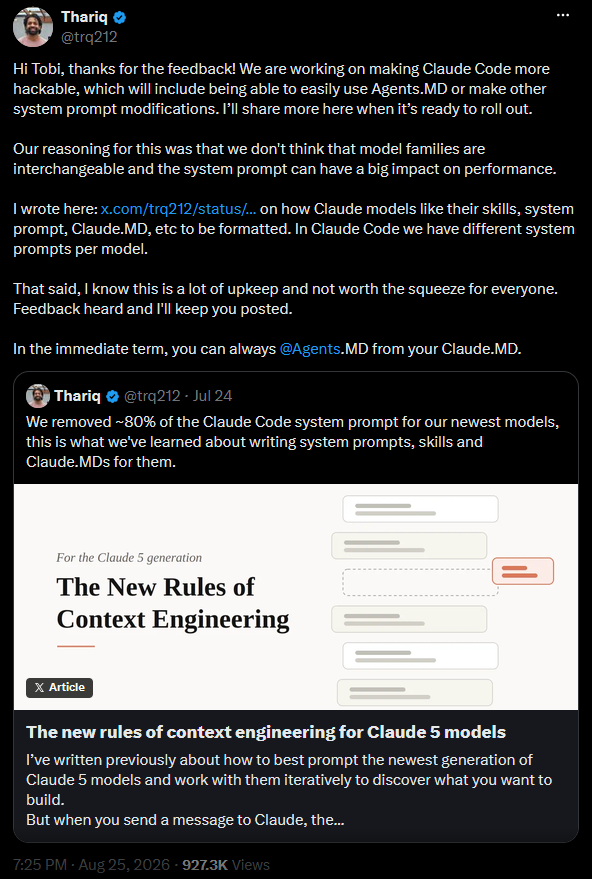
The primary reason I prefer hooks over prompts (and why you should too) is that they are almost always guaranteed to run. There is just no way around them. If you define a hook in a folder and your agent works in that folder, that hook will run when the agent reaches the configured lifecycle event, no matter what. You simply cannot achieve this with prompting.

You can inflate your AGENTS.md with more rules, you can introduce hierarchical AGENTS.md files in your subfolders, you can try importing other prompts into CLAUDE.md with @, but at the end of the day, its content will be a suggestion, never a guarantee. And as I said before, a larger context means your agent will have an increasingly larger chance of ignoring what’s written in it.
We have already discussed that hooks can block the model from finishing. I have also mentioned briefly that hooks can change the prompt before it reaches the model. This part needs more attention.
Dynamic Prompting
While dynamic prompting originally meant something else, I think the term is a better fit for the fact that hooks can change the prompt the user wrote before it reaches the model.
Why could this ever be useful? You might ask.
There are plenty of actions in the life of a software developer that follow a pattern. Certain phrases and words are often used in a specific context. And since almost the entire SDLC can be augmented with AI already, there’s a great chance that your team has already started adding task-specific prompts to your repositories. Prompts that should be used when creating a commit, writing tests, creating a pull request, deploying the application, designing an interface, or connecting to the test database, just to name a few.
Dynamic prompting is when these prompts are not mentioned in CLAUDE.md at all, but they are injected automatically based on what the user wrote. For example, if they write “test”, “testing”, “unit”, “integration”, and words like that, there is a relatively high chance that they are speaking about testing, in which case the harness can automatically inject extra prompts next to the user’s input and guide the model when it matters the most.
Dynamically injected prompts are always at the very end of the context, never to be ignored or forgotten, and the model almost always pays attention to them. And if you feel that they pollute conversations where they are irrelevant, just extend the dynamic prompt with “only apply this if it is relevant” or something like that. You will still be miles ahead of the people who put the same prompt in AGENTS.md and hope for the best.
Going back to Cowork, it simply cannot support this, as it does not have hooks. Yet another reason to use Claude Code if you are a developer. By the way, you can totally use Claude Code for anything else besides coding, its name is totally misleading. I regularly use it for deep research, learning a new topic, writing sales offers, creating PDFs, and much more.
And a system that iteratively learns my preferences, understands my writing style, follows the exact pace I like to use when I iterate on the task, knows all of my projects and my progress in them, is worth much more than a slightly more convenient UI that Cowork has. The only risk that Cowork does not share with Claude Code is the chance of running malicious hooks.
Even Hooks Aren’t Bulletproof
I praised hooks during the entire blog post, but it also makes sense to speak about the risks they introduce, otherwise, I’d be selling something to you that you don’t entirely understand.
Autorun.exe is back
What makes hooks useful is the very thing that makes them dangerous: they execute without you knowing about it. One of the most dangerous hooks is the hook that listens on the SessionStart event. This event executes the moment you start your agent in any folder. Not before your first message reaches the agent. This is extremely important to understand.
“Code can execute in the background just because you started your agent in a random folder, well before you sent any message.”
It is not a coincidence that there is an emerging pattern in most agents: before starting, they will tell you whether you trust the current folder. Codex even goes so far as to ask you to enable every single hook it finds one by one before you can start it. If you skip this step, it will still work, but hooks won’t execute. This is exactly because of the risk I mentioned earlier. Furthermore, Codex will also check the hash of the hook and tell you if it changed since the latest verification. If it did, it will ask you again to review it before use.
But there is a different kind of risk when relying on hooks, and mitigating that is close to impossible.
Executing Scripts
Today’s coding agents run custom CLI scripts relatively often, because they prefer to parse the output of the tools they use in a specific, minimal format. Scripts often include Perl, Bash, Node.js, and Python code, whichever the agent decided to use first.
If they cannot find a dedicated tool, they write one for themselves. The problem with this one is that if you want to prevent your agent from reading a specific website, the only true solution is to not give it egress internet access, but by doing that you have limited its capabilities to a fraction of the total.
However, if you don’t disable internet access, you have to put WebFetch, WebSearch, curl, and wget on the blocklist, and you are still not done. If it decided that it needs the website regardless, it will go ahead and write a Python script using the requests library. Or if you prevent running Python, it will choose Node.js and the built-in fetch. I think you understand where I am going with it.
And if you think that simply grepping for the website URL would prevent everything in one go, then it will split the URL into two variables, and then it will concatenate them in the script in order to bypass your grep.
In the case of Claude Code, you have at least the option to specify a proxy and special network egress rules at the organization level, which is close to what I want to achieve with the example.
But the same concatenation bypass also works when you try to prevent executing rm -rf /. If the model wants to execute that, it will find a way. Don’t get me wrong, you should still have the PreToolUse hook that prevents this, because agents are generally trained to respect them. It is just good to know that the risk won’t become 0%.
Knowing these limitations will help you become a power user of the state-of-the-art agents. The next step for confidently running long-running agents on your codebase is to use some kind of sandboxing, which is worth discussing later in a separate blog post.
Putting The Pieces Together
There you have it. We discussed a new mental model that systematically limits what you should use AI for, and what you should put in scripts. Following this, expect your agent to reach much more often for scripts it created for itself than to iterate alone and waste tokens.
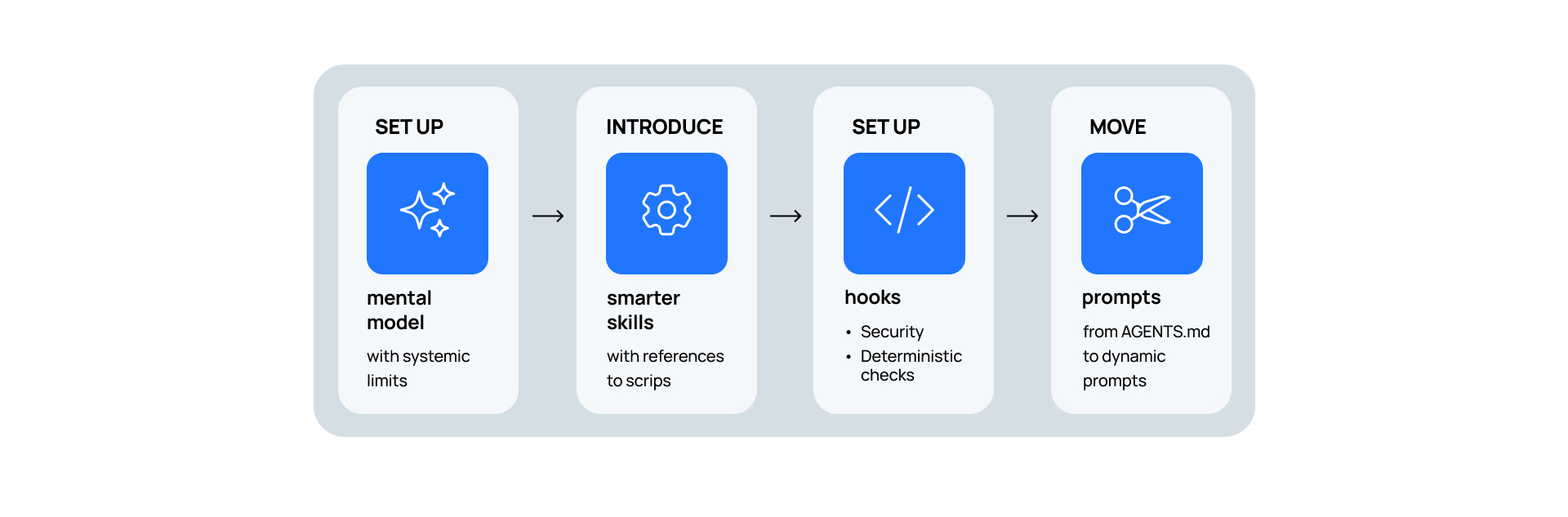
Building on top of that, introduce smarter skills that contain not only prompts, but references to example scripts that automate repetitive tasks without the model having to waste expensive inference on it.
The next step is to introduce hooks. Start by setting up the security hooks that prevent running dangerous commands or reading private files to secure your system first. Remember that protection still won’t be 100%, but you will be much closer to it than without them. Once you are protected, start extending your repositories with deterministic checks that the model is forced to execute without asking. This will remove cognitive load from your team and help your agents ship software more confidently.
Finally, consider moving even more prompts from AGENTS.md into dynamic, hook-triggered prompts to ensure the right steering rule reaches the agent at the right time, not just at the very start of the session.
Having a system that learns how your team is working is possible. You just have to reach for the right components to build it.